COnnecting
to a
TV
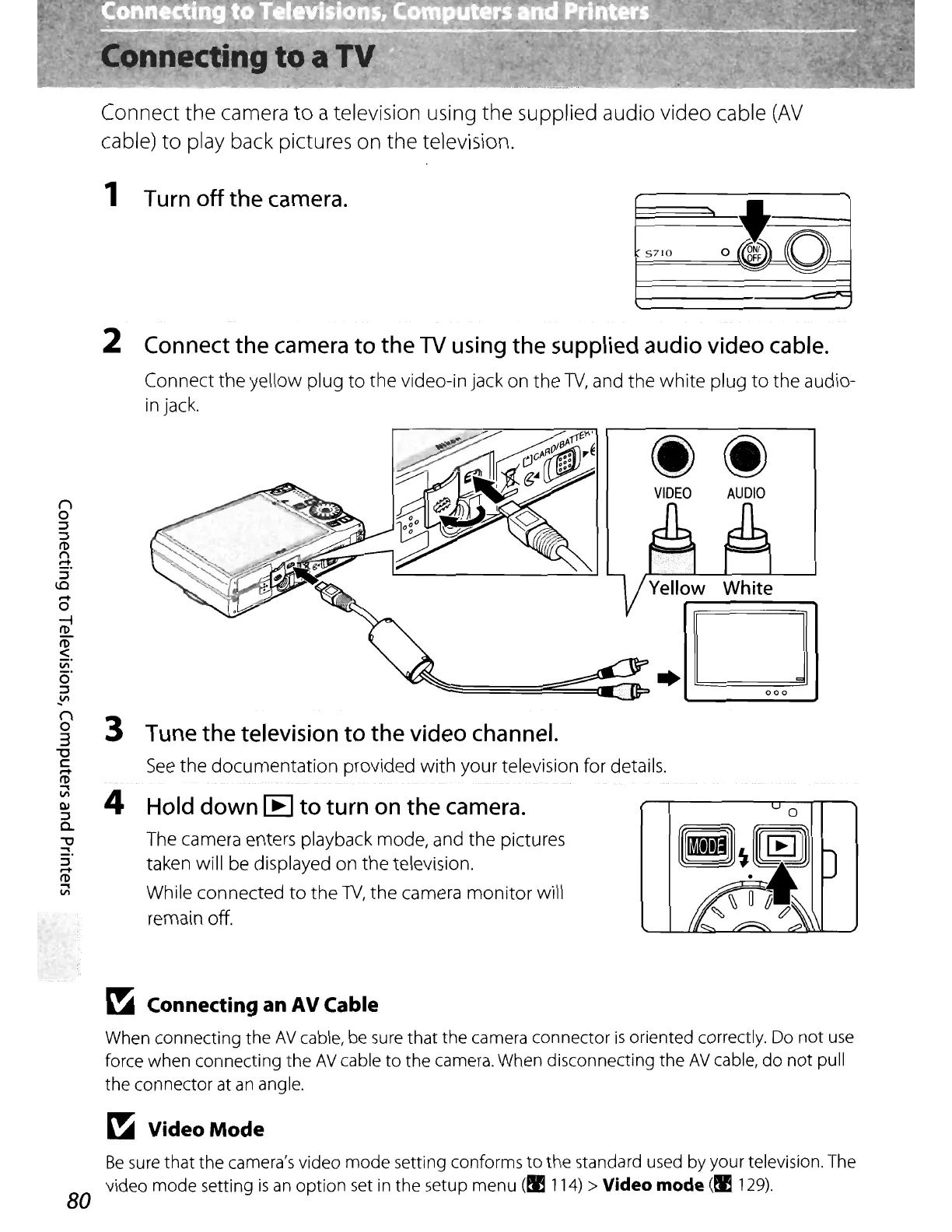
Connect the camera
to
a television using the supplied audio video cable
(AV
cable)
to
play back pictures on the television.
1
Turn
off the
camera.
to
5710
o(~lJD~
'='
'="
----
2
Connect
the
camera
to
the
TV
using
the
supplied
audio
video
cable.
Connect the yellow plug
to
the video-in jack on the W, and the white plug
to
the audio-
in
jack.
VIDEO
AUDIO
o
000
D
3
Tune
the
television
to the video
channel.
See
the documentation provided with your television for details.
4
Hold
down
[E
to turn
on
the
camera.
The camera enters playback mode, and the pictures
taken will be displayed on the television.
While connected
to
the W, the camera monitor will
remain off.
~
Connecting an AV Cable
When connecting the
AV
cable, be sure that the camera connector
is
oriented correctly. Do
not
use
force when connecting the
AV
cable
to
the camera. When disconnecting the
AV
cable,
do
not
pull
the connector
at
an
angle.
~
VideoMode
Be
sure
that
the camera's video
mode
setting conforms
to
the standard used by your television. The
video mode setting
is
an
option set in the setup menu (!I 114) > Video mode
(~
129).
80















 To Next Page