Using
the
Scene
Mode
Taking Pictures for a Panorama
The camera focuses on
the
subject in
the
center
of
the
frame.
Use
a tripod for best
results.
Turn
Vibration reduction
(~
123) off when using a tripod.
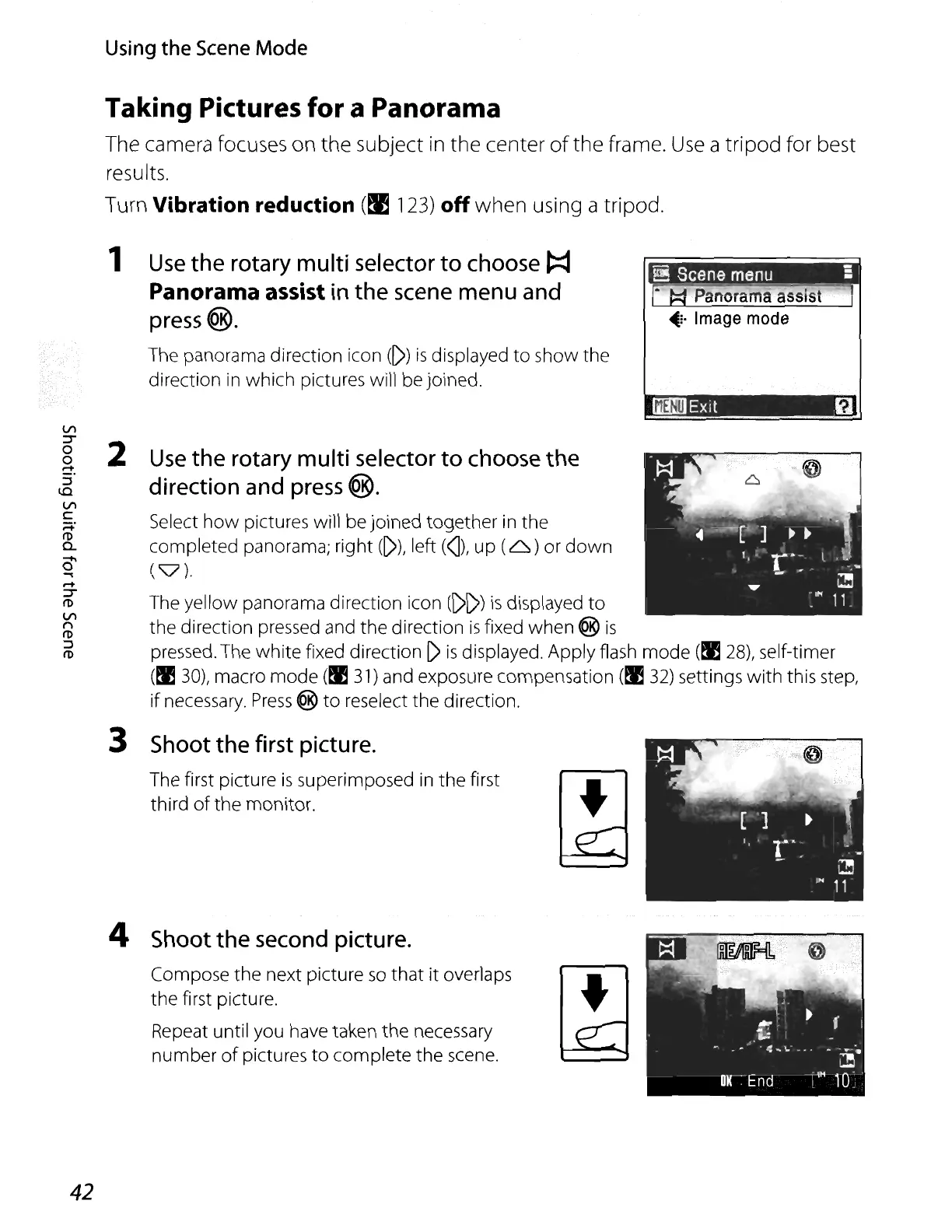
1
Use
the
rotary
multi
selector
to
choose
t:::I
Panorama assist
in
the
scene
menu
and
press
®.
The panorama direction icon
([»)
is
displayed
to
show the
direction in which pictures will be joined.
Panorama
assist
~:.
I
mage
mode
IOO!!.IExit
f1
Use
the
rotary
multi
selector
to
choose
the
direction
and
press
®.
Select
how
pictures will be joined together in the
completed panorama; right
([»), left
(]),
up
(6)
or
down
(v).
The yellow panorama direction icon ([)[»)
is
displayed
to
the direction pressed and the direction
is
fixed when ®
is
pressed. The
white
fixed direction
[)
is
displayed. Apply flash mode
(tI!
28),
self-timer
(tI!
30),
macro mode
(tI!
31)
and exposure compensation
(tI!
32)
settings
with
this step,
if necessary.
Press
@
to
reselect the direction.
3
Shoot
the
first
picture.
The first picture
is
superimposed
in
the first •
third
of
the monitor.
VI
:T
2
0
0
-
:::l
lO
VI
c:
~:
fI)
a..
-..
0
-.
-
:T
fI)
VI
n
fI)
:::l
fI)
4
Shoot
the
second
picture.
Compose the next picture
so
that
it
overlaps •
the first picture.
Repeat until you have taken the necessary
number
of
pictures
to
complete the scene.
42






 To Next Page