EasyManua.ls Logo

Nikon Coolpix S710 - The Movie Menu; Selecting Movie Options

Nikon Coolpix S710
198 pages
Print Icon
To Next Page IconTo Next Page
To Previous Page IconTo Previous Page
Loading...
Movie
options,
or
Autofocus
mode
settings can be changed from
the
movie
menu.
Press
MENU
in movie
mode
to
display
the
movie menu and
use
the
rotary
multi
selector
to
modify
and apply settings.
Selecting Movie Options
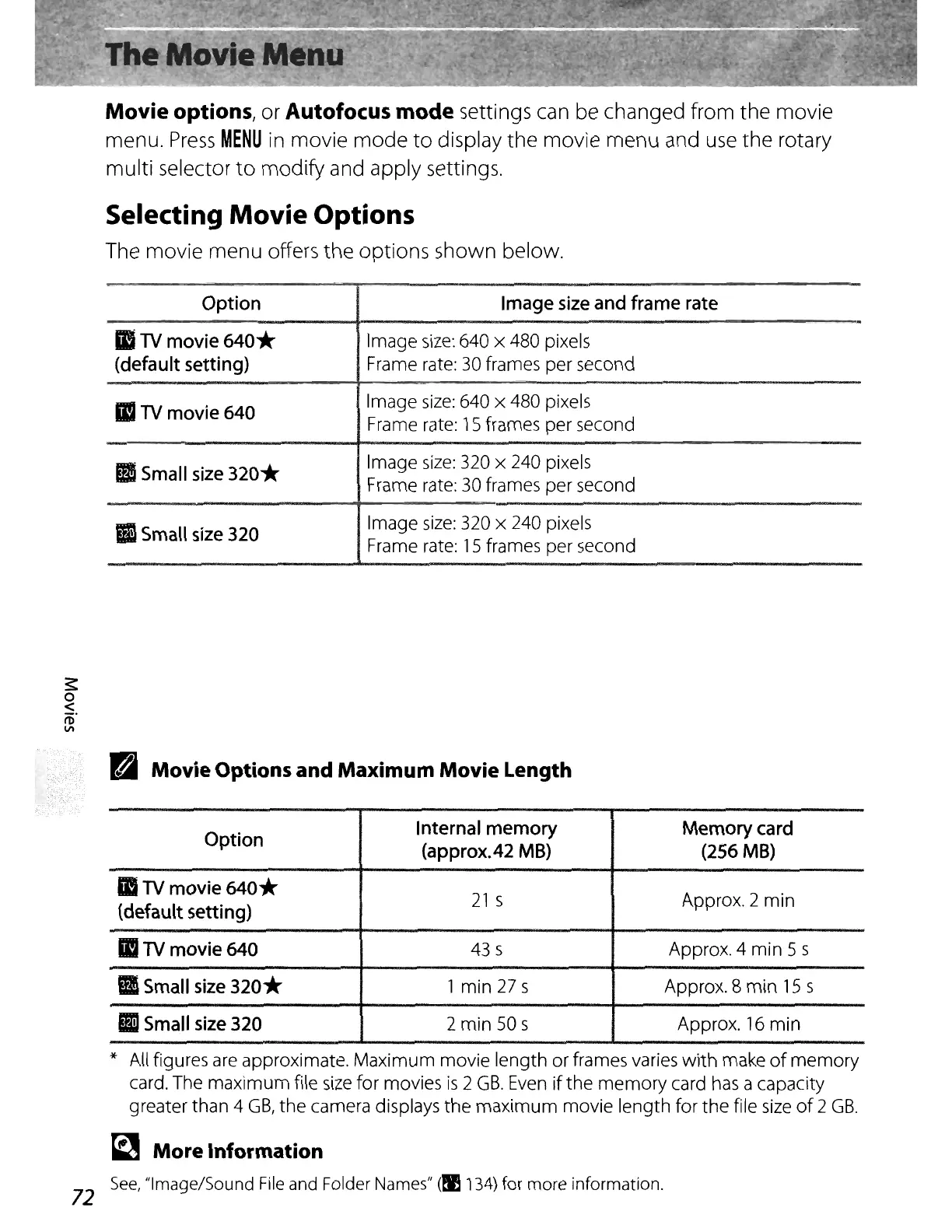
The movie menu offers the options shown below.
;::
o
<
fi)"
VI
Option
II
TV
movie
640*
(default
setting)
II
TV
movie
640
B
Small
size
320*
II
Small
size
320
Image
size
and
frame
rate
Image
size:
640 x 480 pixels
Frame rate:
30
frames per second
Image
size:
640 x 480 pixels
Frame rate:
15
frames per second
Image
size:
320 x 240 pixels
Frame rate:
30
frames per second
Image
size:
320 x 240 pixels
Frame rate:
15
frames per second
II
Movie Options and Maximum Movie Length
Option
Internal
memory
Memory
card
(approx.42
MB)
(256
MB)
II
TV
movie
640*
21
s Approx. 2
min
(default
setting)
II
TV
movie
640
43 s
Approx.4
min
5 s
B
Small
size
320*
1
min
27 s Approx. 8
min
15
s
II
Small
size
320
2
min
50s
Approx.
16
min
* All figures are approximate.
Maximum
movie
length
or
frames varies
with
make
of
memory
card. The
maximum
file
size
for movies
is
2
GB.
Even
if
the
memory
card has a capacity
greater than 4
GB,
the
camera displays
the
maximum
movie
length
for
the
file
size
of
2
GB.
~
More Information
See,
"Image/Sound File and Folder Names" (!I
134)
for
more
information.
72

Table of Contents

Other manuals for Nikon Coolpix S710

Related product manuals