EasyManua.ls Logo

Nikon Coolpix S710 - The Fiide3 (Mode) Button; The Rotary Multi Selector; The MENU Button

Nikon Coolpix S710
198 pages
Print Icon
To Next Page IconTo Next Page
To Previous Page IconTo Previous Page
Loading...
Basic
Operations
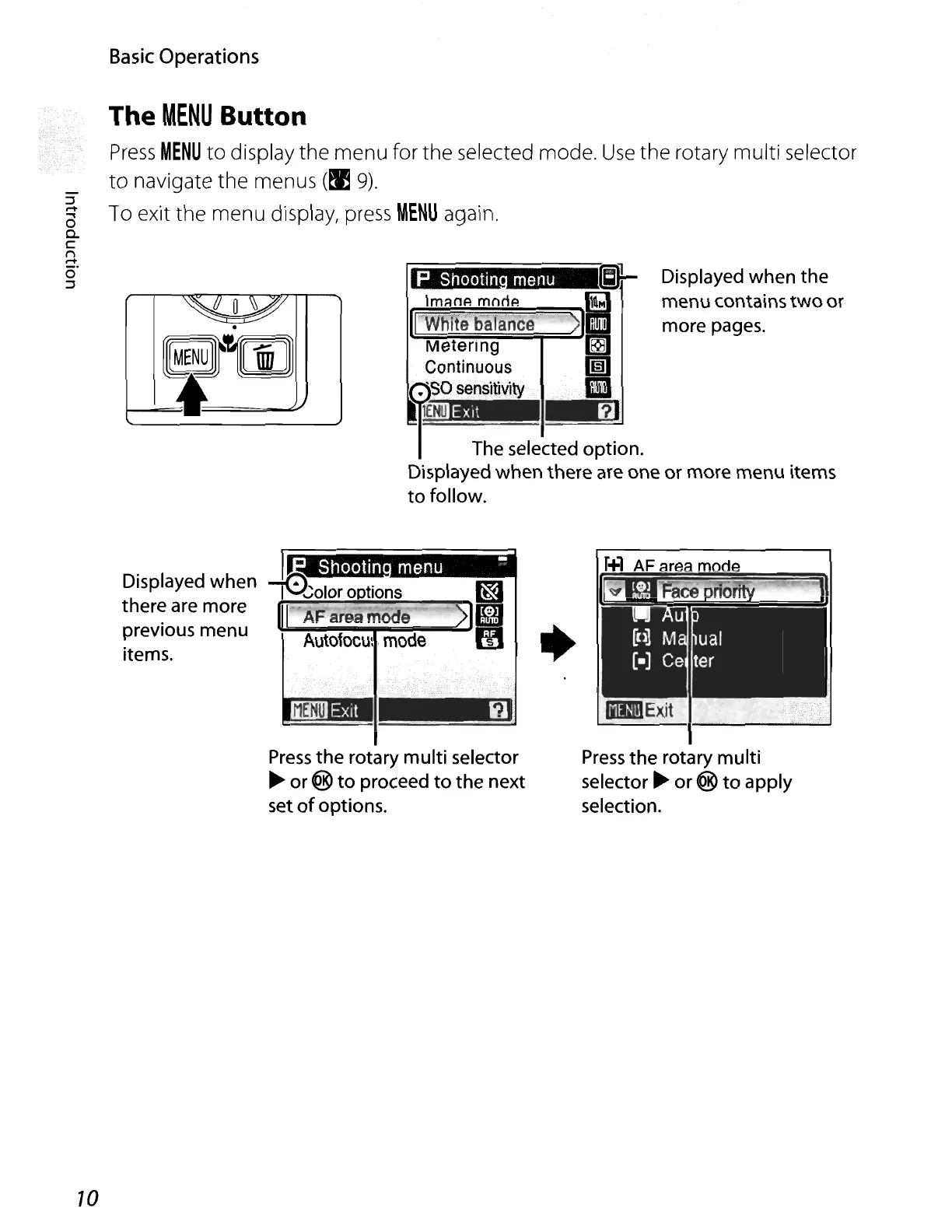
The
MENU
Button
Press
MENU
to
display
the
menu
for
the
selected mode.
Use
the
rotary
multi
selector
to
navigate
the
menus
(~
9).
To exit
the
menu
display, press
MENU
again.
Displayed when the
menu contains
two
or
more pages.
P
Shootin
menu
[;)}-
Im.::lnA
moriA
~
1~~r~~~aiiC.
>
Ii
~~~::Ie=!on.
Displayed when there are one or more menu items
to
follow.
.
Git'iOO
I----=I~
Press
the
rotary
multi
selector
~
or ®
to
apply
selection.
Shootin
menu
"'!!'
-t0i:-:1
~"_";_ol_or
.....
o_D
....
tio_n_s
__
~rm
AF area mode
KfB
~A~-:-i-"""~--~Eils
utofocu:
.
mode
UJ
Press
the
rotary
multi
selector
~
or @
to
proceed
to
the next
set
of
options.
Displayed when
there are more
previous menu
items.
10

Table of Contents

Other manuals for Nikon Coolpix S710

Related product manuals