Playing
Voice
Recordings
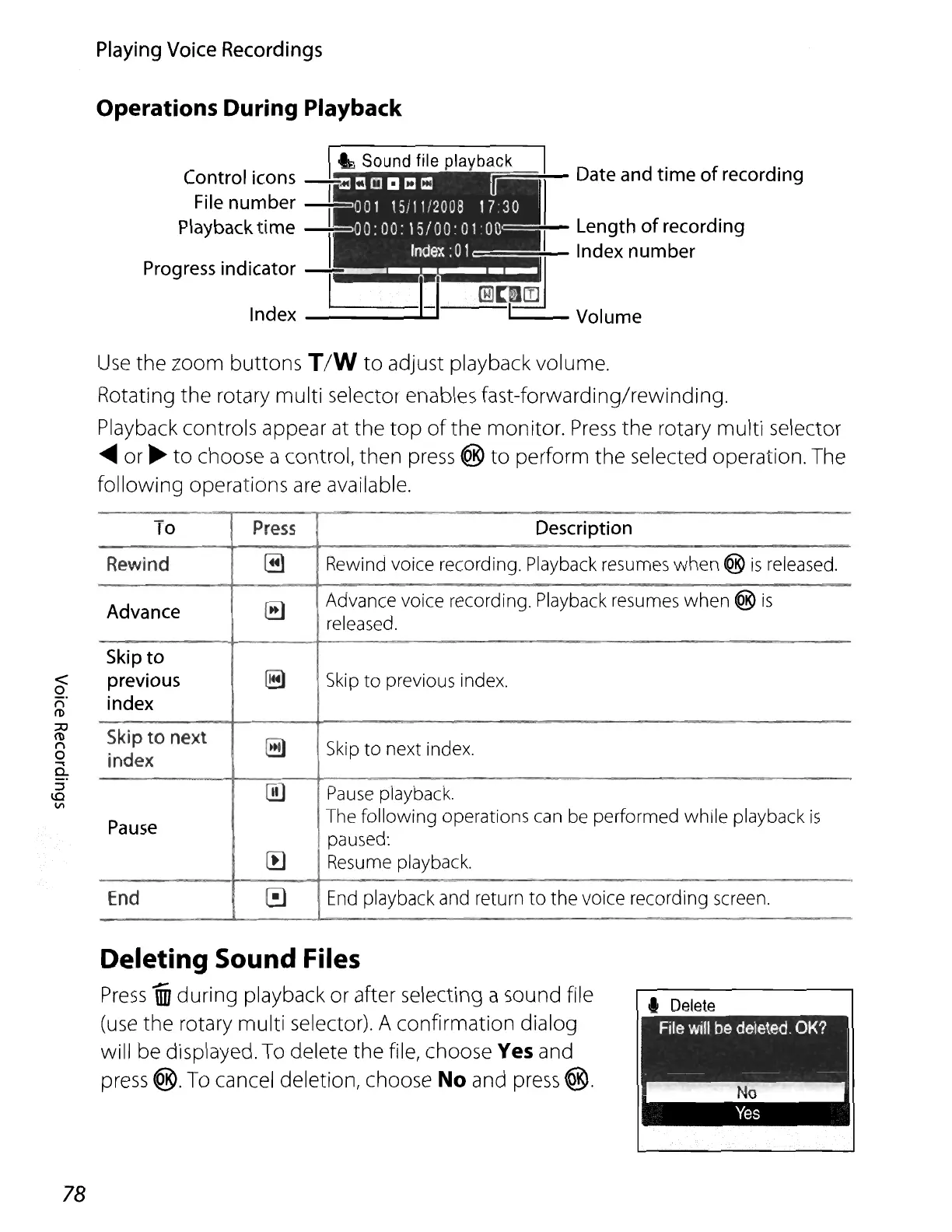
Operations During Playback
Index-----
~~
Date
and
time of
recording
Length
of
recording
Index
number
"""---Volume
<
o
("l
ro
;lj
ro
("l
o
....
a.
::l
1.0
VI
Use
the zoom
buttons
T/W
to
adjust playback volume.
Rotating
the
rotary multi selector enables fast-forwarding/rewinding.
Playback controls appear at
the
top
of
the
monitor.
Press
the
rotary multi selector
.....
or
~
to
choose a control,
then
press ®
to
perform
the
selected operation. The
following operations are available.
To
Press
Description
Rewind
@)
Rewind voice recording. Playback resumes
when
®
is
released.
Advance
~
Advance voice recording. Playback resumes
when
®
is
released.
Skip
to
previous
~
Skip
to
previous index.
index
Skip
to
next
~
Skip
to
next index.
index
[])
Pause
playback.
Pause
The
following
operations can be performed while playback
is
paused:
[I)
Resume playback.
End
•
End
playback and return
to
the
voice recording screen.
78
Deleting Sound Files
Press
1iiJ
during
playback or after selecting a sound file
(use
the
rotary
multi
selector). A confirmation dialog
will be displayed. To delete
the
file, choose Yes and
press
@. To cancel deletion, choose No and press
®.
.,
Delete
~"'-"-'~















 To Next Page