Basic
Camera
Setup:
The
Setup
Menu
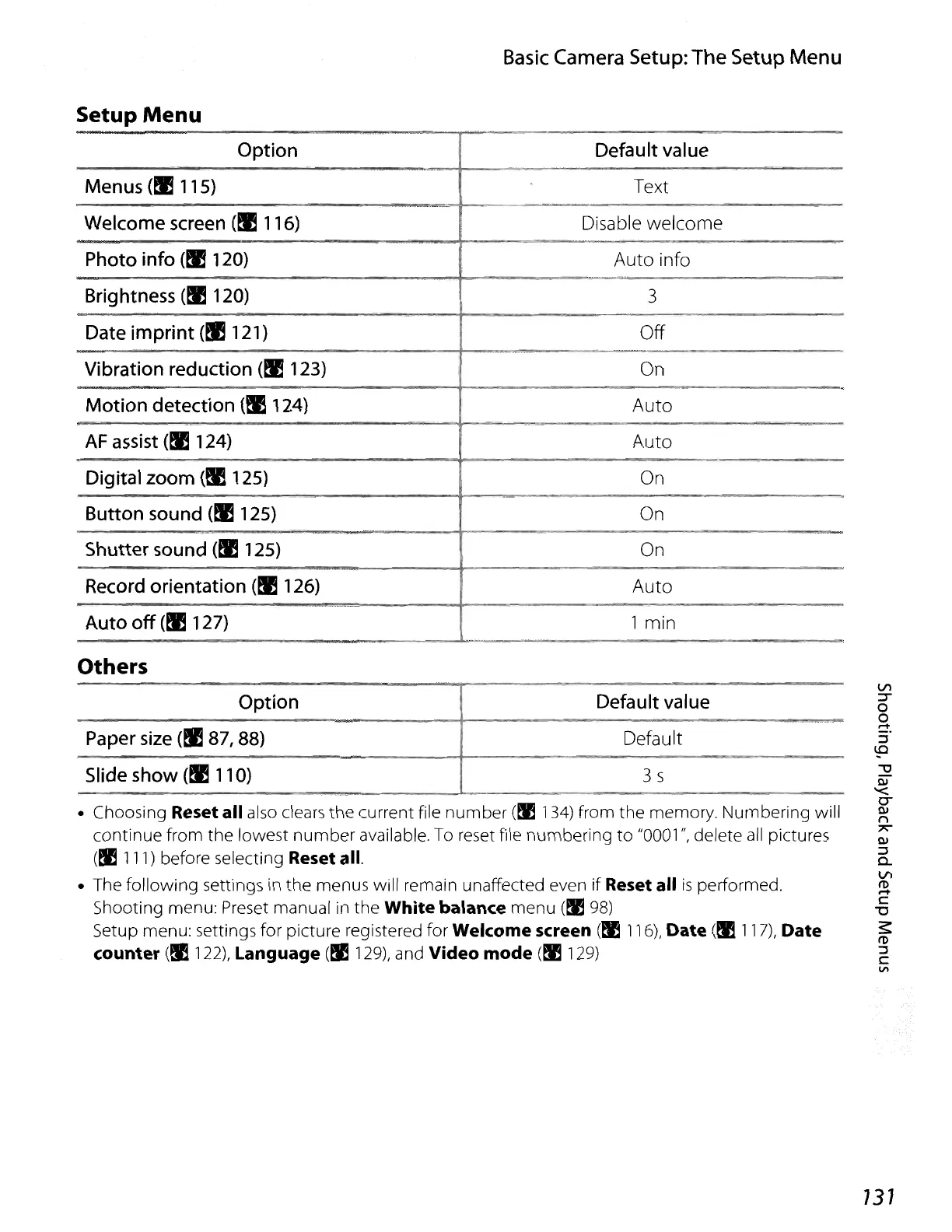
Setup
Menu
Option Default value
Menus
(!IllS)
Text
Welcome screen
(!I 116)
Disable
welcome
Photo info
(!E120)
Auto
info
Brightness
(!I 120)
3
Date imprint (!I
121
)
Off
Vibration reduction (!I 123)
On
Motion detection
(!I 124)
Auto
AF
assist
(tJ!
124)
Auto
Digital zoom (!I 125) On
Button sound
(!I 125) On
Shutter sound
(!I 125)
On
Record orientation
(!I 126)
Auto
Auto
off
(!I 127) 1 min
Others
• Choosing Reset all also clears the current file
number
(~
134)
from the memory. Numbering will
continue from the lowest
number
available. To reset file numbering
to
"0001
",
delete
all
pictures
(!llll)
before selecting Reset all.
• The following settings
in
the menus will remain unaffected even if Reset all
is
performed.
Shooting menu: Preset manual in the
White balance menu
(~
98)
Setup menu: settings for picture registered for Welcome screen
(!E
116),
Date
(!Ill?),
Date
counter
(!E
122),
Language
(!I
129),
and Video mode
(~
129)
Option
Paper
size
(!I 87, 88)
Slide show
(!Ill
0)
Default value
Default
3 s
131















 To Next Page