Step
1
Turn
the
Camera
On
and
Select
10
(Auto)
Mode
Indicators Displayed in 0 (Auto)
Mode
The indicators and
photo
info displayed during shooting and playback will turn
off
after
a few seconds
(t;E
120).
When the monitor
has
turned
off
in
standby
mode
to
save
power,
press
the
power switch or the shutter-release
button
to
reactivate it
(t;E
127).
~
Available Functions in
10
(Auto)
Mode
In
0 (auto) mode, macro
mode
(~
31)
and exposure compensation
(~
32)
can
be applied and
pictures
can
be taken using the flash
mode
(~
28)
and self-timer
(~
30).
Pressing the
MENU
button
in 0 (auto)
mode
allows you to set
up
the image
mode
(~
95).
~
The vibration reduction I motion detection icon
Vibration reduction corrects camera shaking that
commonly
occurs when shooting
with
zooming or
at slow shutter speeds.
Motion detection increases the shutter speed in shooting still pictures
to
reduce the vibrations
when camera shaking or subject blurring
is
detected.
(This
function
is
not
activated
in
the movie
mode.)
A description
of
each vibration reduction /
motion
detection icon
is
as
follows.
•
4J:
Vibration reduction
(~
123)
is
set
to
ON
and the
motion
detection
(~
124)
is
set
to
AUTO
(default setting) on the setup menu
(~
114)
.
•
~:
Vibration reduction
is
set
to
ON
and the
motion
detection
is
set
to
OFF.
• Ib0"i: Motion detection
is
set
to
AUTO
and vibration reduction
is
set to OFF.
•
No
icon: Both vibration reduction and the
motion
detection
are
set
to
OFF.
• Turn vibration reduction
off
when using a tripod.
•
In
the shooting
mode
(~
124)
where motion detection
is
not
activated,
4J
or Ib
O
"!)
is
not
displayed regardless
of
the setting
of
the motion detection.
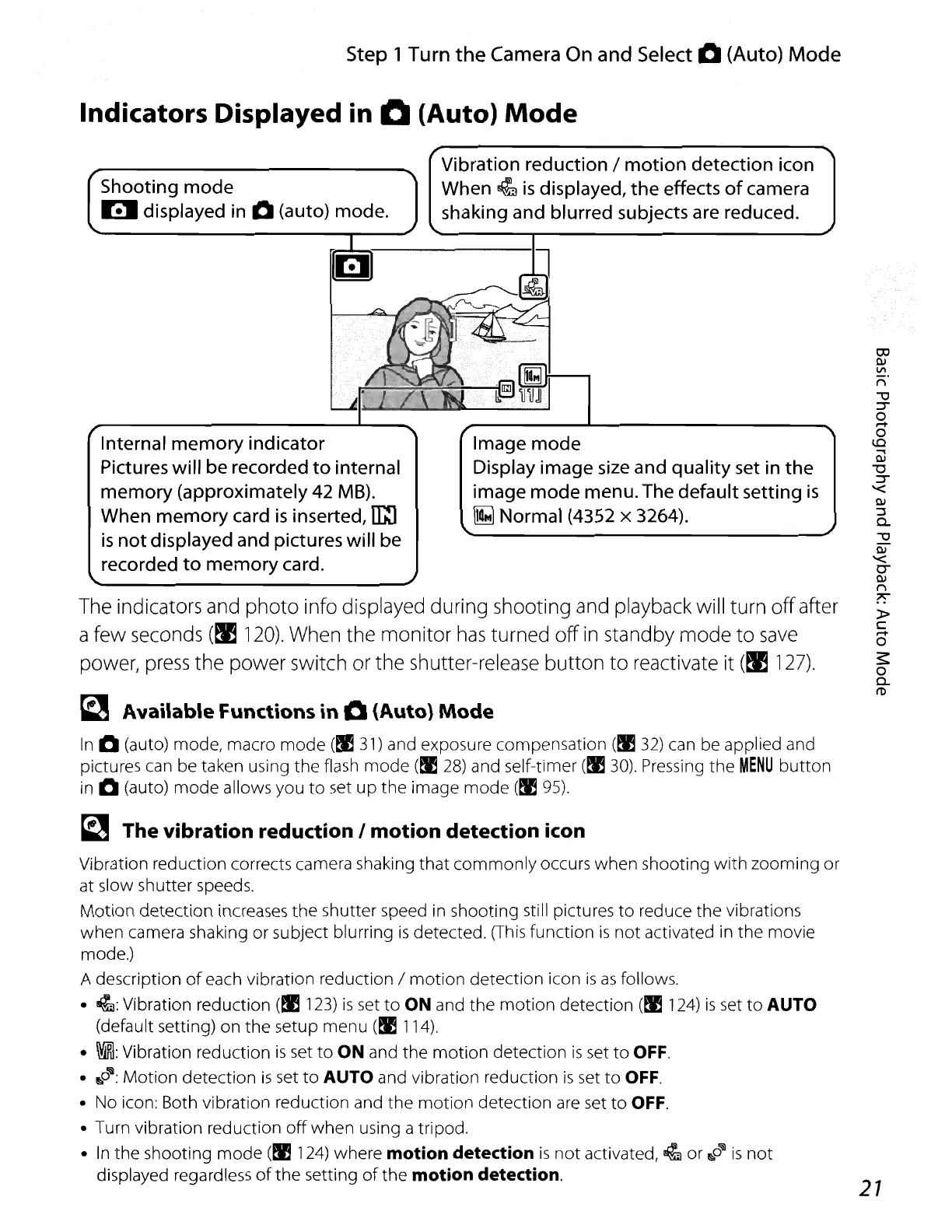
Shooting mode
I!I
displayed
in
0 (auto) mode.
Internal memory indicator
Pictures will be recorded to internal
memory (approximately 42 MB).
When memory card
is
inserted,
u::J
is
not displayed and pictures will be
recorded
to
memory card.
Vibration reduction / motion detection icon
When
~
is
displayed, the effects
of
camera
shaking and blurred subjects are reduced.
Image mode
Display image
size
and quality
set
in
the
image
mode
menu. The default setting
is
~
Normal (4352 x 3264).
27















 To Next Page