EasyManua.ls Logo

Nikon Coolpix S710 - Page 34

Nikon Coolpix S710
198 pages
Print Icon
To Next Page IconTo Next Page
To Previous Page IconTo Previous Page
Loading...
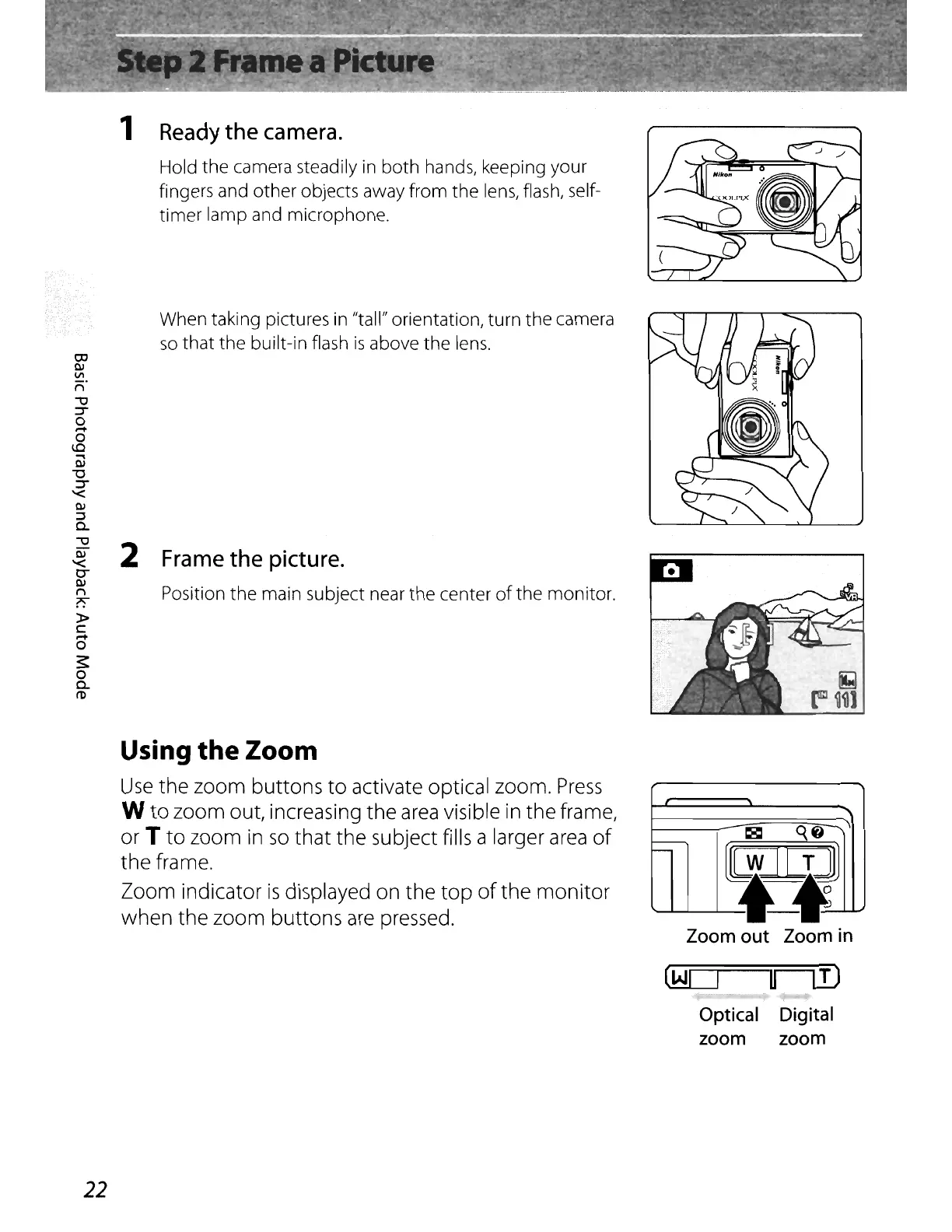
1 Ready
the
camera.
Hold the camera steadily in both hands, keeping your
fingers and other objects away from the
lens,
flash, self-
timer
lamp and microphone.
When taking pictures
in
"tall" orientation, turn the camera
so
that the built-in flash
is
above the
lens.
00
W
II>
n°
""U
~
o
,...
o
1.0
OJ
"0
::r
'<
w
::::l
0.
""U
~
2 Frame
the
picture.
0-
Ol
~
Position
the
main subject near the center
of
the monitor.
»
c:
,...
o
~
o
0.
ro
Zoom
out
Zoom in
II
i¥Jr1]
~
[W][T]
0
-
~
Using
the
Zoom
Use
the zoom buttons
to
activate optical zoom.
Press
W
to
zoom out, increasing the
area
visible
in
the frame,
or
T
to
zoom
in
so
that
the subject fills a larger
area
of
the frame.
Zoom indicator
is
displayed on the
top
of
the
monitor
when the zoom buttons
are
pressed.
Optical Digital
zoom zoom
22

Table of Contents