EasyManua.ls Logo

Oberheim Matrix-12 - Page 187

Oberheim Matrix-12
194 pages
Print Icon
To Next Page IconTo Next Page
To Previous Page IconTo Previous Page
Loading...
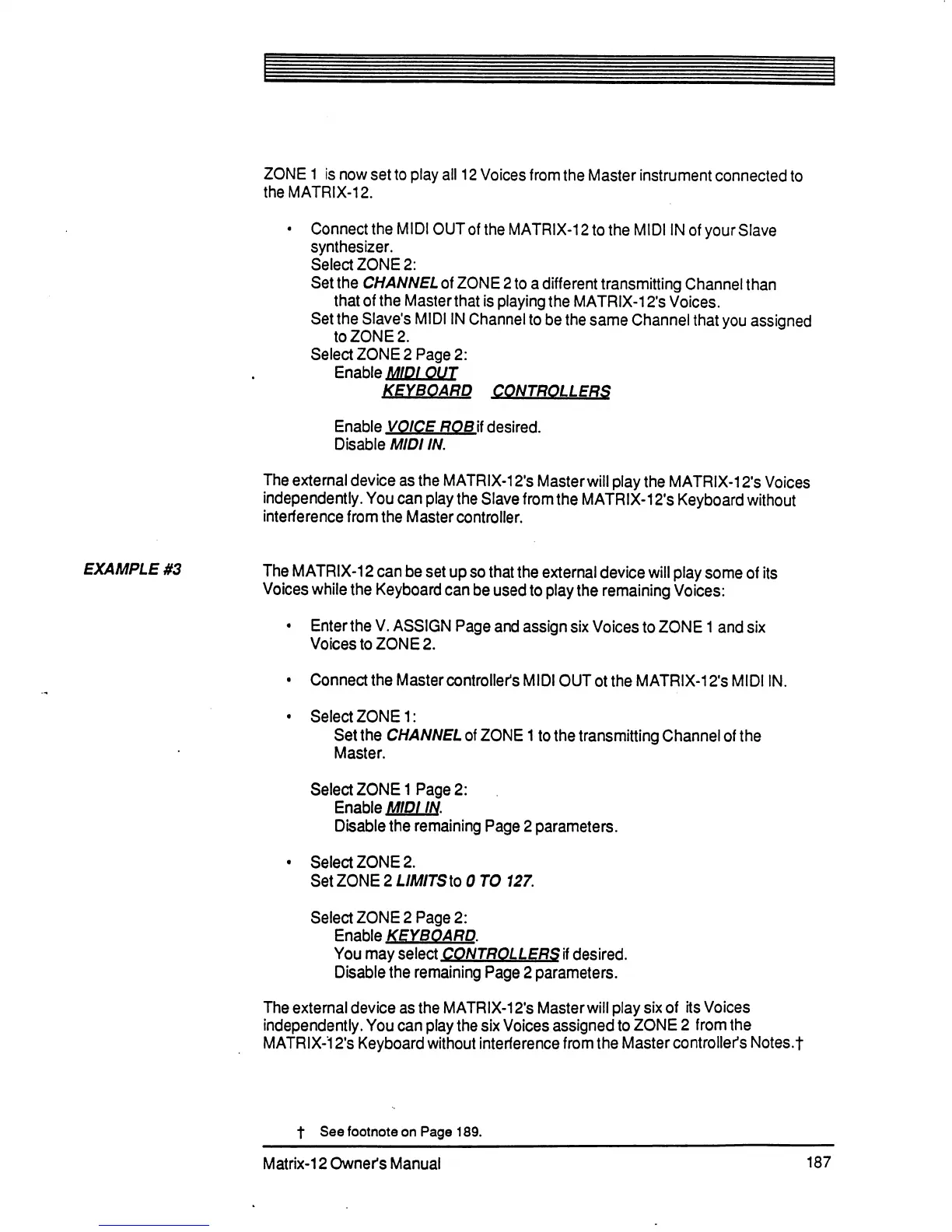
ZONE
1
is
now
set
to
play
all
12
Voices
from
the
Master
instrument
connected
to
the
MATRIX-12.
•
ConnecttheMIDIOUToftheMATRIX-12totheMIDIINofyourSIave
synthesizer.
Select
ZONE
2:
Set
the
CHANNEL
of
ZONE
2
to
a
different
transmitting
Channel
than
that
of
the
Master
that
is
playing
the
MATRIX-12's
Voices.
Set
the
Slave's
MIDI
IN
Channel
to
be
the
same
Channel
that
you
assigned
to
ZONE
2.
Select
ZONE
2
Page
2:
Enable
MIDI
OUT
KEYBOARD
CONTROLLERS
Enable
VOICE
ROB
if
desired.
Disable
MIDI
IN.
The
external
device
as
the
MATRIX-12's
Master
will
play the
MATRIX-12's
Voices
independently.
You
can
play
the
Slave
from
the
MATRIX-12's
Keyboard
without
interference
from
the
Master
controller.
EXAMPLE
#3
The
MATRIX-12
can
be
set
up
so
that
the
external
device
will
play
some
of
its
Voices
while
the
Keyboard
can
be
used
to
play
the
remaining
Voices:
•
Enter
the
V.
ASSIGN
Page
and
assign
six
Voices
to
ZONE
1
and
six
Voices
to
ZONE
2.
•
Connect
the
Master
controller's
MIDI
OUT
ot
the
MATRIX-12's
MIDI
IN.
•
Select
ZONE
1:
Set
the
CHANNEL
of
ZONE
1
to
the
transmitting
Channel
of
the
Master.
Select
ZONE
1
Page
2:
Enable
MIDI
IN
Disable
the
remaining
Page
2
parameters.
•
Select
ZONE
2.
Set
ZONE
2
LIMITSto
0
TO
127.
Select
ZONE
2
Page
2:
Enable
KEYBOARD.
You
may
select
CONTROLLERS
if
desired.
Disable
the
remaining
Page
2
parameters.
The
external
device
as
the
MATRIX-12's
Master
will
play
six
of
its
Voices
independently.
You
can
play
the
six
Voices
assigned
to
ZONE
2 from
the
MATRIX-12's
Keyboard
without
interference
from
the
Master
controller's
Notes.f
t
See
footnote
on
Page
189.
Matrix-12
Owner's
Manual
187

Table of Contents