EasyManua.ls Logo

Oberheim Matrix-12 - Master Section; Volume; Tune Page; Upper Display

Oberheim Matrix-12
194 pages
Print Icon
To Next Page IconTo Next Page
To Previous Page IconTo Previous Page
Loading...
MASTER
The
MASTER
Section
of
the
MATRIX-12
permits
the
selection
of
the
GLOBAL
functions
-
the
overall
functions
of
the
synthesizer
that
are
not
programmable
per
Patch-that
affect
the
entire
instrument
regardless
of
what
Page
is
selected
later.
VOLUME
This
knob
simply
controls
the
overall
audio
output
level
of
the
MATRIX-12.
When
it
is
fully
counter-clockwise,
the
mixed
AUDIO
OUT
jacks
-
LEFT,
MONO
and
RIGHT-
are
effectively
turned
off.
Full
volume
is
achieved
when
the
control
is
turned
fully
clockwise.
The
VOLUME
knob
simultaneously
controls
the output
of
the
synthesizer
through
the
LEFT,
MONO,
and
RIGHT
AUDIO
OUT
jacks
on
the
MATRIX-12's
back
panel.
It
also
controls
the
volume
output
of
the
MATRIX-12
in
CASSETTE
MODE
as
a
monitor
during
data
transfer.
If
you
have
your
MATRIX-12
retro-fitted
with
the
optional
Individual
Voice
Outputs,
the
Master
VOLUME
control
has no
effect
on
their
output
level.
TUNE
PAGE
The
TUNE
PAGE
key
selects
the
MATRIX-12's
functions
that
affect
its
overall
tuning.
Pressing
this
buton
displays
the
available
Tuning
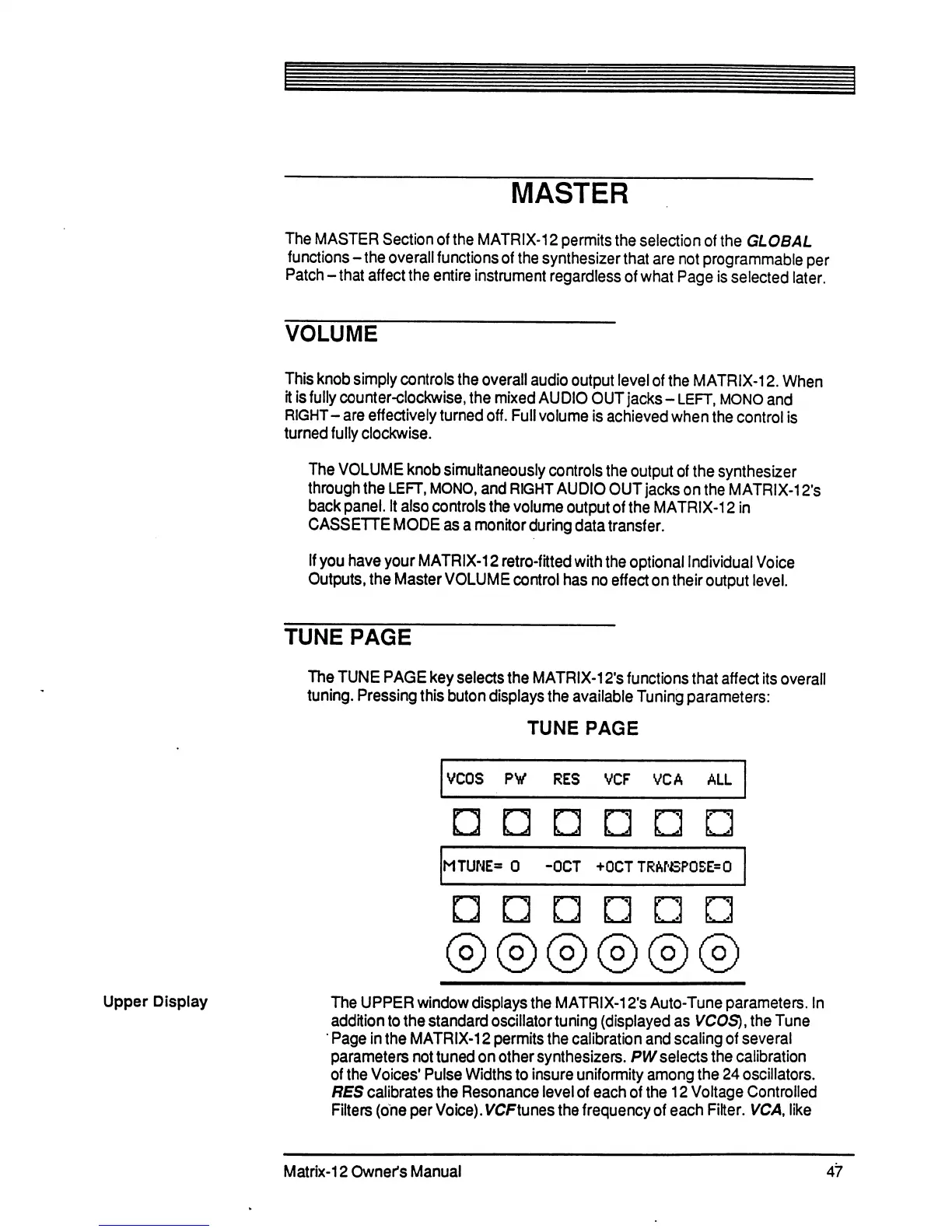
parameters:
TUNE
PAGE
Upper
Display
k.
.'I
k.
.«'
k-
.<#'
The
UPPER
window
displays
the
MATRIX-12fs
Auto-Tune
parameters.
In
addition
to
the
standard
oscillator
tuning
(displayed
as
VCOS),
the
Tune
Page
in
the
MATRIX-12
permits
the
calibration
and
scaling
of
several
parameters
not
tuned
on
other
synthesizers.
PW
selects
the
calibration
of
the
Voices'
Pulse
Widths
to
insure
uniformity
among
the
24
oscillators.
RES
calibrates
the
Resonance
level
of
each
of
the
12
Voltage
Controlled
Filters
(one
per
Voice).
VCFtunes
the
frequency
of
each
Filter.
VCA,
like
Matrix-12
Owner's
Manual
47

Table of Contents

Related product manuals