EasyManua.ls Logo

Oberheim Matrix-12 - Page 20

Oberheim Matrix-12
194 pages
Print Icon
To Next Page IconTo Next Page
To Previous Page IconTo Previous Page
Loading...
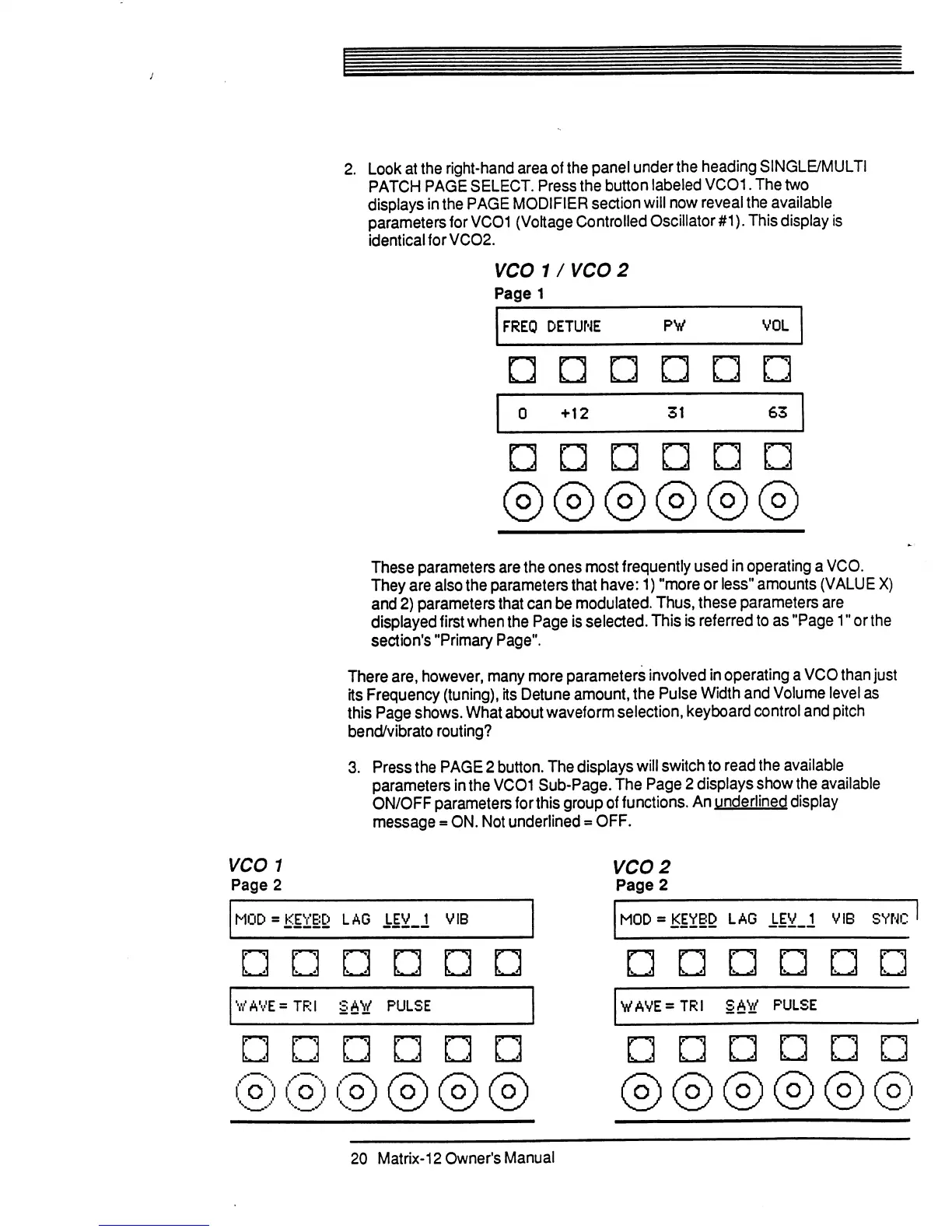
2.
Look
at
the
right-hand
area
of
the
panel
under
the
heading
SINGLE/MULTI
PATCH
PAGE
SELECT.
Press
the button
labeled
VCO1.
The
two
displays
in
the
PAGE
MODIFIER
section
will
now
reveal the
available
parameters
for
VC01
(Voltage
Controlled
Oscillator
#1).
This
display
is
identical for
VCO2.
VCO
1
/
VCO
2
Page
1
FREO
DETUNE
PW
VOL
I
k.
J
+12
31
63
These
parameters
are the
ones
most
frequently
used
in
operating
a
VCO.
They
are
also
the
parameters
that
have:
1)
"more
or
less"
amounts
(VALUE
X)
and
2)
parameters
that
can
be
modulated.
Thus,
these
parameters
are
displayed
first
when
the
Page
is
selected.
This
is
referred
to
as
"Page
1"
or
the
section's
"Primary
Page".
There
are,
however,
many
more
parameters
involved
in
operating
a
VCO
than
just
its
Frequency
(tuning),
its
Detune
amount,
the
Pulse
Width
and
Volume
level
as
this
Page
shows.
What
about
waveform
selection,
keyboard
control
and
pitch
bend/vibrato
routing?
3.
Press
the
PAGE
2
button.
The
displays
will
switch
to
read
the
available
parameters
in
the
VCO1
Sub-Page.
The
Page
2
displays
show
the
available
ON/OFF
parameters
for
this
group
of
functions.
An
underlined
display
message
=
ON.
Not
underlined
=
OFF.
WAVE=TRi
SAW
PULSE
VAVE=TRI
SAW
PULSE
20
Matrix-12
Owner's
Manual

Table of Contents

Related product manuals