EasyManua.ls Logo

Oberheim Matrix-12 - Page 88

Oberheim Matrix-12
194 pages
Print Icon
To Next Page IconTo Next Page
To Previous Page IconTo Previous Page
Loading...
Page
1
Press
the
button
directly
beneath
ZONE
on
the
display.
The
Upper
display
reads:
SELECT
ZONE
FROM
1
TO
6
Pressing
an
X
SELECT
button
from
1
to
6
will
select
that
Zone.
You
can
switch
among
the
six
Zones
with
the
X
SELECT
buttons.
For
this
example,
we
will
select
ZONE
1.
Press
the
"1"
button
in
the
X
SELECT
section.
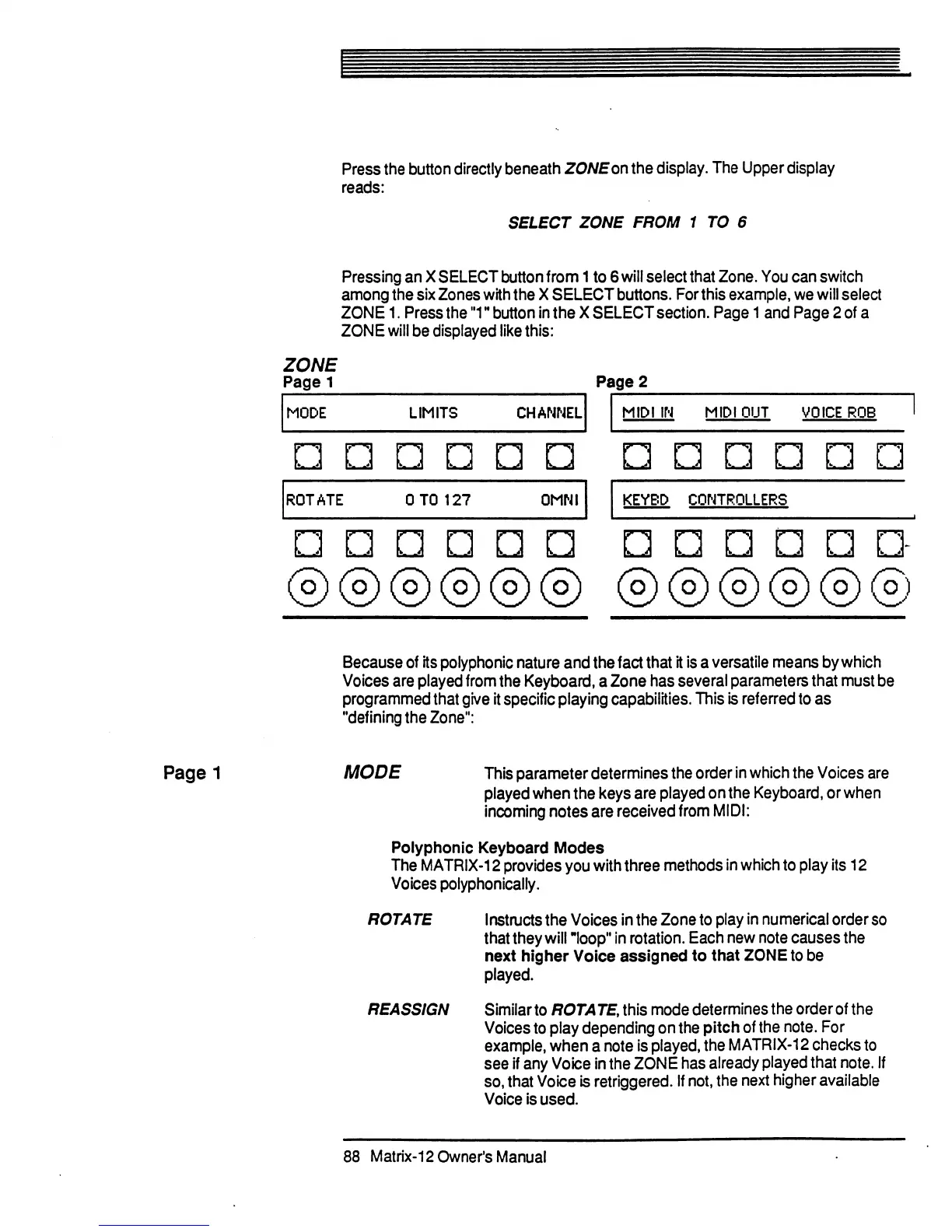
Page
1
and
Page
2
of
a
ZONE
will
be
displayed
like
this:
ZONE
Page
1
Page
2
MODE
LIMITS
CHANNEL
MIDI
IN
MIDI
OUT
VOICE
ROB
ROTATE
0T0
127
OMHI
KEYBD
CONTROLLERS
n
2>
®®®@®®
Because
of
its
polyphonic
nature
and
the
fact
that
it
is
a
versatile
means
by
which
Voices
are
played
from
the
Keyboard,
a
Zone
has
several
parameters
that
must
be
programmed
that
give
it
specific
playing
capabilities.
This
is
referred
to
as
"defining
the
Zone":
MODE
This
parameter
determines
the
order
in
which
the
Voices
are
played
when
the
keys
are
played
on
the
Keyboard,
or
when
incoming
notes
are
received
from
MIDI:
Polyphonic
Keyboard
Modes
The
MATRIX-12
provides
you
with
three
methods
in
which
to
play
its
12
Voices
polyphonically.
ROTATE
Instructs
the
Voices
in
the
Zone
to
play
in
numerical
order
so
that
they
will
"loop"
in
rotation.
Each
new
note
causes
the
next
higher
Voice
assigned
to
that
ZONE
to
be
played.
REASSIGN
Similar
to
ROTATEAhis
mode
determines
the
order
of
the
Voices
to
play
depending
on
the
pitch
of
the
note.
For
example,
when
a
note
is
played,
the
MATRIX-12
checks
to
see
if
any
Voice
in
the
ZONE
has
already
played
that
note.
If
so,
that
Voice
is
retriggered.
If
not,
the
next
higher
available
Voice
is
used.
88
Matrix-12
Owner's
Manual

Table of Contents

Related product manuals