24
EN
Preparation
1
Inserting and removing the card
Inserting the card
In this manual, all storage devices are referred to as “cards.”
The camera uses third-party SD, SDHC, or SDXC memory cards conforming to the SD
(Secure Digital) standard.
Cards must be formatted with this camera before rst use or after being used with
other cameras or computers. g “Formatting the card (Card Formatting)” (P. 241)
• The camera has two card slots.
1
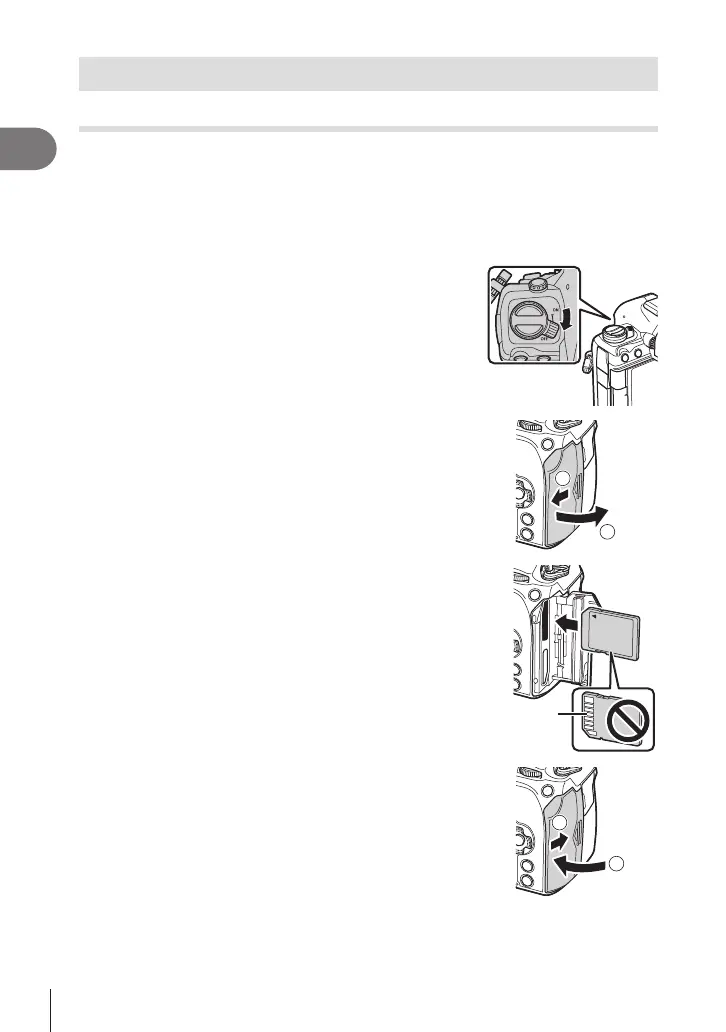
Conrm that the ON/OFF lever is in the OFF
position.
2
Open the card compartment cover.
2
1
3
Insert the card.
• Slide the card in until it locks into place.
# Do not forcibly insert a damaged or deformed card.
Doing so may damage the card slot.
Terminal area
4
Close the card compartment cover.
• Close it securely until you hear it click.
2
1






 To Next Page