EasyManua.ls Logo

Olympus OM System OM-1 - 2. Shooting; Information displays while shooting

Olympus OM System OM-1
342 pages
Print Icon
To Next Page IconTo Next Page
To Previous Page IconTo Previous Page
Loading...
34
EN
Shooting
2
2
Shooting
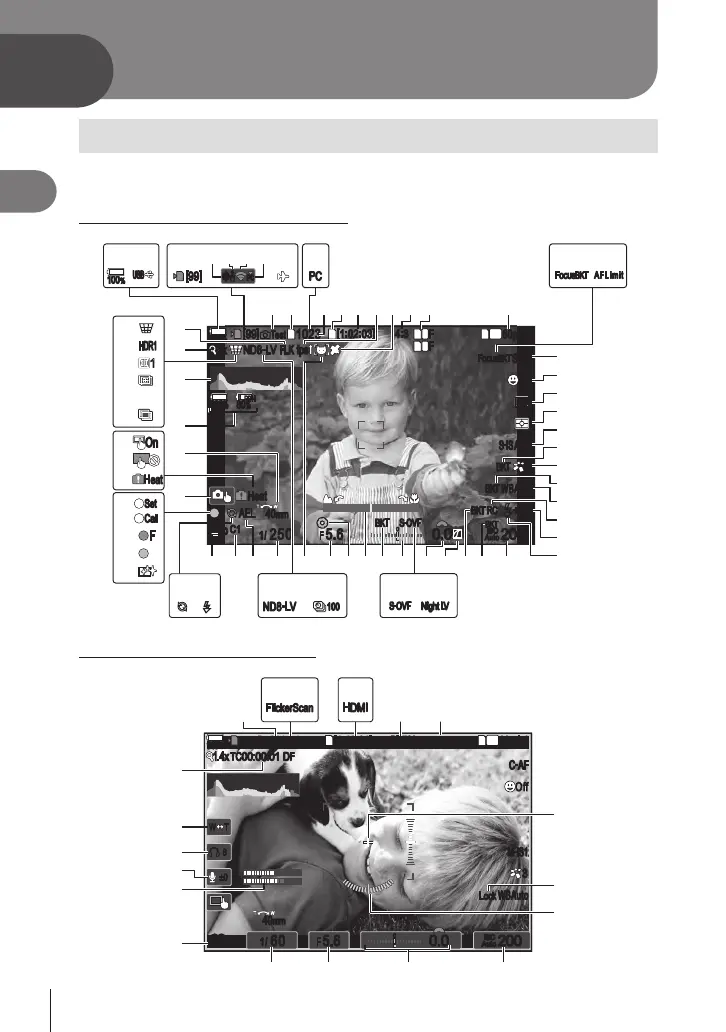
Information displays while shooting
%For information on the super control panel, which appears on the monitor by default, see
P. 71.
Monitor display during still photography
100
%
100
%
100
%
100
%
2x2x ND8
-
LV
FLK
fps
[
99
][
99
]
1
10231023
K
Test
P
C1
1
/
250
P
C1
1
/
F
250 5.65.6

1
1
[
1
:
02
:
03
][
1
:
02
:
03
]
4
:
34
:
3
FF
60p60p L
-
8L
-
8
S
-
AFS
-
AF
S
-
ISAutoS
-
IS
HeatHeat
33
200200
+0.3+0.3
Auto
AELAEL
40mm40mm

OffOff
2
FF
L
1
4K
L

80
%
80
%






 S
-
OVFS
-
OVF
RC
RC
ISO
Auto
fps
##
ISO
Auto
F
00
+
-
0.00.0
K
Test
100
%
100
%

A
F LimitAF Limit
S
-
OVFS
-
OVF
Night LVNight LV

[
99
][
99
]
s<s<
PCPC
PCPC
##
HDR1HDR1
11
ND8
-
LV
100
FF
SetSet
CallCall
OnOn
HeatHeat
h
s
m
t
u
v
n
o
p
q
r
x
w
ba d gfc hi je
C yGH FJNPOQ I AzBK
X
^
#
$
]
\
2 341
!
|
}
{
>
<
U
V
W
/
T
5678 09 k l
RS M L E D
Y
Z
[
Monitor display during movie mode
145
min
145
min
1.4x
REC
00:01
n
P
1
/
60
P
1
/
LL
R
F
60 5.65.6
1
[
1
:
42
:
21
][
1
:
42
:
21
]
60p60p L
-
8L
-
8
C
-
AFC
-
AF
M
-
IS1M
-
IS1
33
200200
40mm40mm
WBAutoWBAuto
OffOff
1
4K
ISO
Auto
ISO
Auto
F
00
+
-
0.00.0
(
REC
00:01
(
n
±0±0
8
8
W TW T
PP
R
1.4x
TC
00:00:01
TC
00:00:01
DFDF
BT.709BT.709
LockLock
FlickerScanFlickerScan
HDMIHDMI
(
;
-
:
+
) =
yJN F
*
/
,
% &
_
.

Table of Contents