43
EN
Shooting
2
Taking Pictures Using the Shooting Modes
Letting the camera choose aperture and shutter speed
(P: Program AE)
PASMB
n
The camera chooses the optimal aperture and shutter speed according to subject
brightness.
1
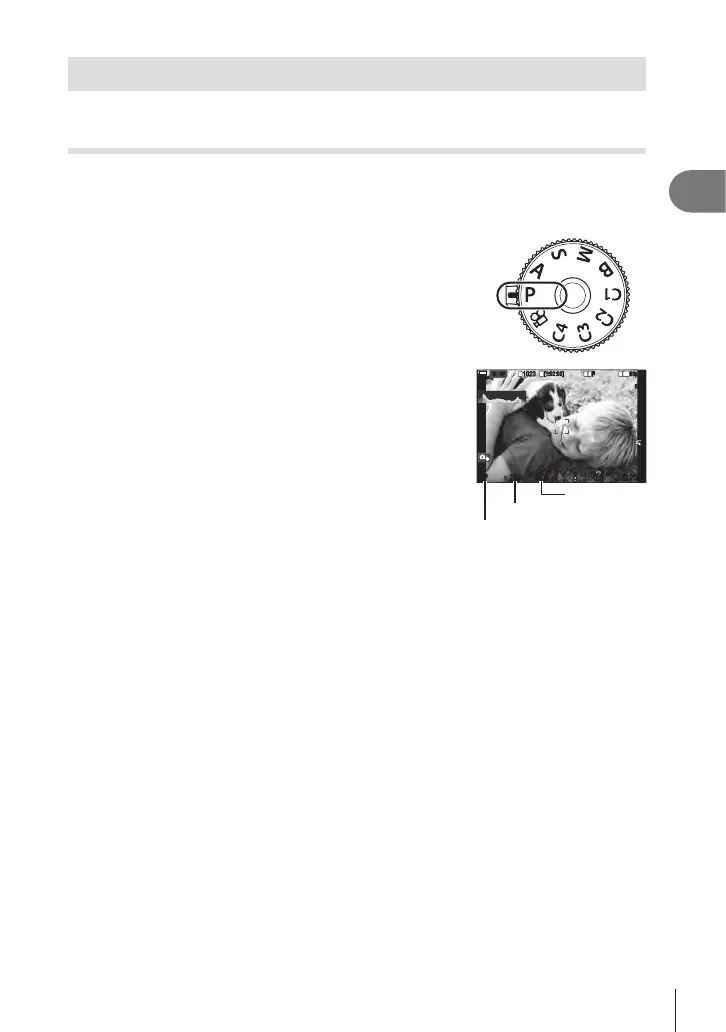
Rotate the mode dial to P.
2
Focus and check the display.
• Use the front and rear dials to adjust the following
settings.
Front dial: Exposure compensation (P. 106)
Rear dial: Program shift (P. 44)
• The shutter speed and aperture chosen by the camera
are displayed.
• Exposure compensation can also be adjusted using the
F button. Press the F button and then rotate the front
or rear dial.
3
Take pictures.
1
10231023
P
1
/
250
P
1
/
F
250 5.65.6
1
1
[
1
:
02
:
03
][
1
:
02
:
03
]
FF
60p60p L
-
8L
-
8
S
-
AFS
-
AF
33
L
1
4K
ISO
ISO
00
+
-
0
%
0
%
rr
OO
Shooting mode
Shutter speed
Aperture
%You can choose the functions performed by the front and rear dials. g “Assigning Roles
to the Front and Rear Dials (KDial Function / nDial Function)” (P. 216)
%You can use the Fn lever to reverse the roles of the front and rear dials. The lever
can also be assigned other roles. g “Customizing the Fn Lever (Fn Lever Settings)”
(P. 219)







 To Next Page