12 - 5
12 Troubleshooting
NX-series EtherNet/IP Coupler Unit User’s Manual (W536)
12-2 Checking for Errors and Troubleshooting with the Indicators
12
12-2-1 Checking for Errors and Troubleshooting with the Indicators on the EtherNet/IP Coupler Unit
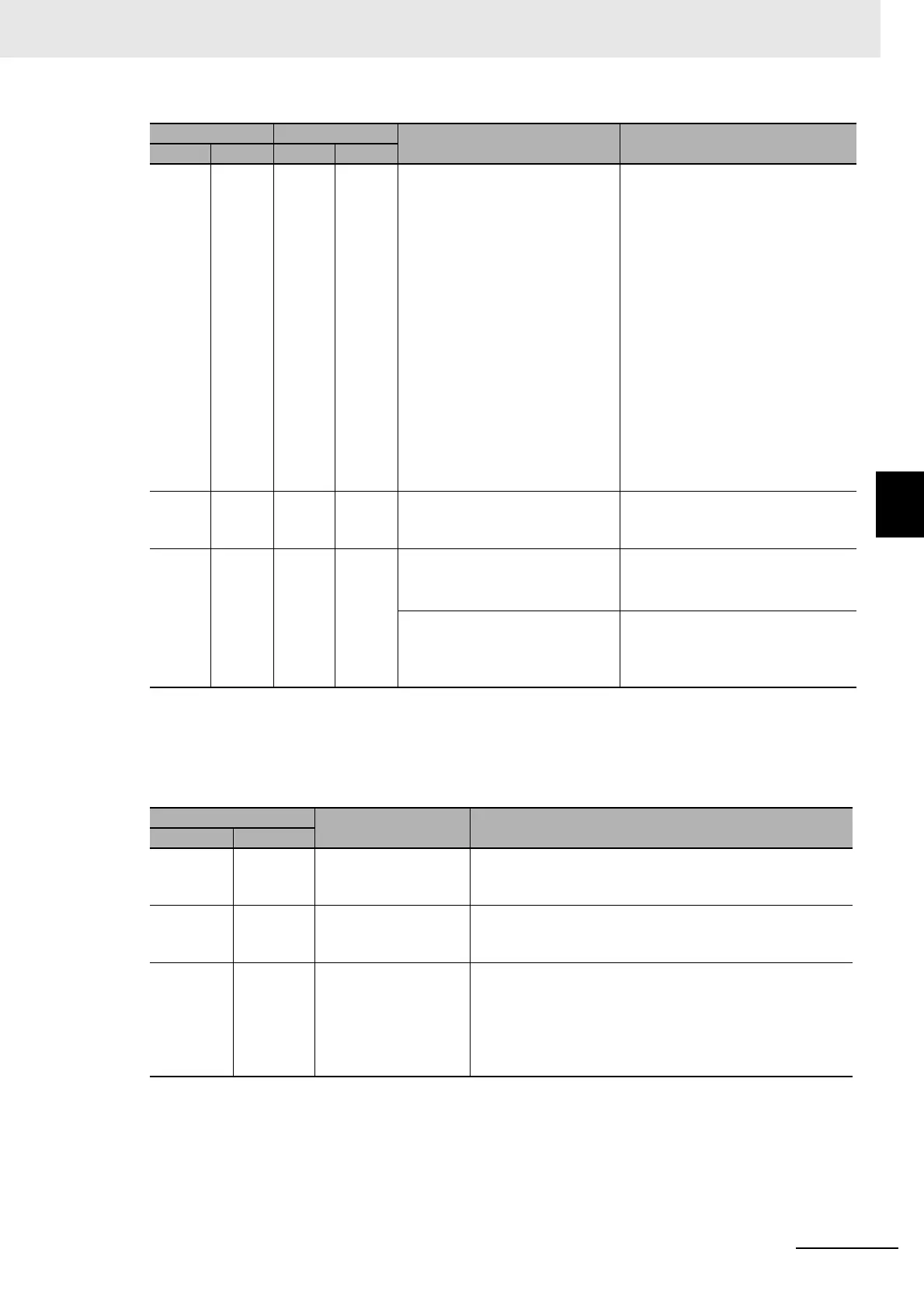
Troubleshooting the Primary Errors That Are Displayed with the TS Indicators
The TS indicator shows the status of the EtherNet/IP Coupler Unit and the communications status
between the EtherNet/IP Coupler Unit and the NX Units.
--- Flashes
at 0.5-s
inter-
vals.
--- --- • Unit Configuration Verification
Error
• Non-volatile Memory Control
Parameter Error
• Unit Configuration Error
• Unit Configuration Error, Too
Many Units
• Unit Configuration Error,
Unsupported Configuration
• TCP/IP Setting Error (Local IP
Address)
• NTP Client Setting Error
• NX Unit Communications Time-
out
• NX Unit Initialization Error
• NX Unit Startup Error
Refer to 12-3-5 Event Codes for
Errors and Troubleshooting Proce-
dures on page 12-22 for trouble-
shooting information.
Lit --- --- Lit Fatal communication error. The
Unit detects that it cannot commu-
nicate on the network.
Check the following items.
• IP address duplication
Lit --- --- Flashes
at 0.5-s
inter-
vals.
A timeout occurred in tag data link
communications.
Check the following items.
• Communication cable connec-
tions
BOOTP Server Connection Error Refer to 12-3-5 Event Codes for
Errors and Troubleshooting Proce-
dures on page 12-22 for trouble-
shooting information.
TS
Cause Corrective action
Green Red
Lit --- Communication estab-
lished with all con-
nected NX Units
--- (This is the normal status.)
Flashes at
2.0-s inter-
vals.
--- Initializing --- (This status is normal. Wait until processing is com-
pleted)
Flashes at
0.5-s inter-
vals.
--- Unit configuration
information is not set.
The EtherNet/IP Cou-
pler Unit is operating
according to the actual
Unit configuration.
Promptly check whether the configuration is the intended
configuration and then register the Unit configuration infor-
mation on the Support Software.
MS NS
Cause Corrective action
Green Red Green Red



 To Next Page