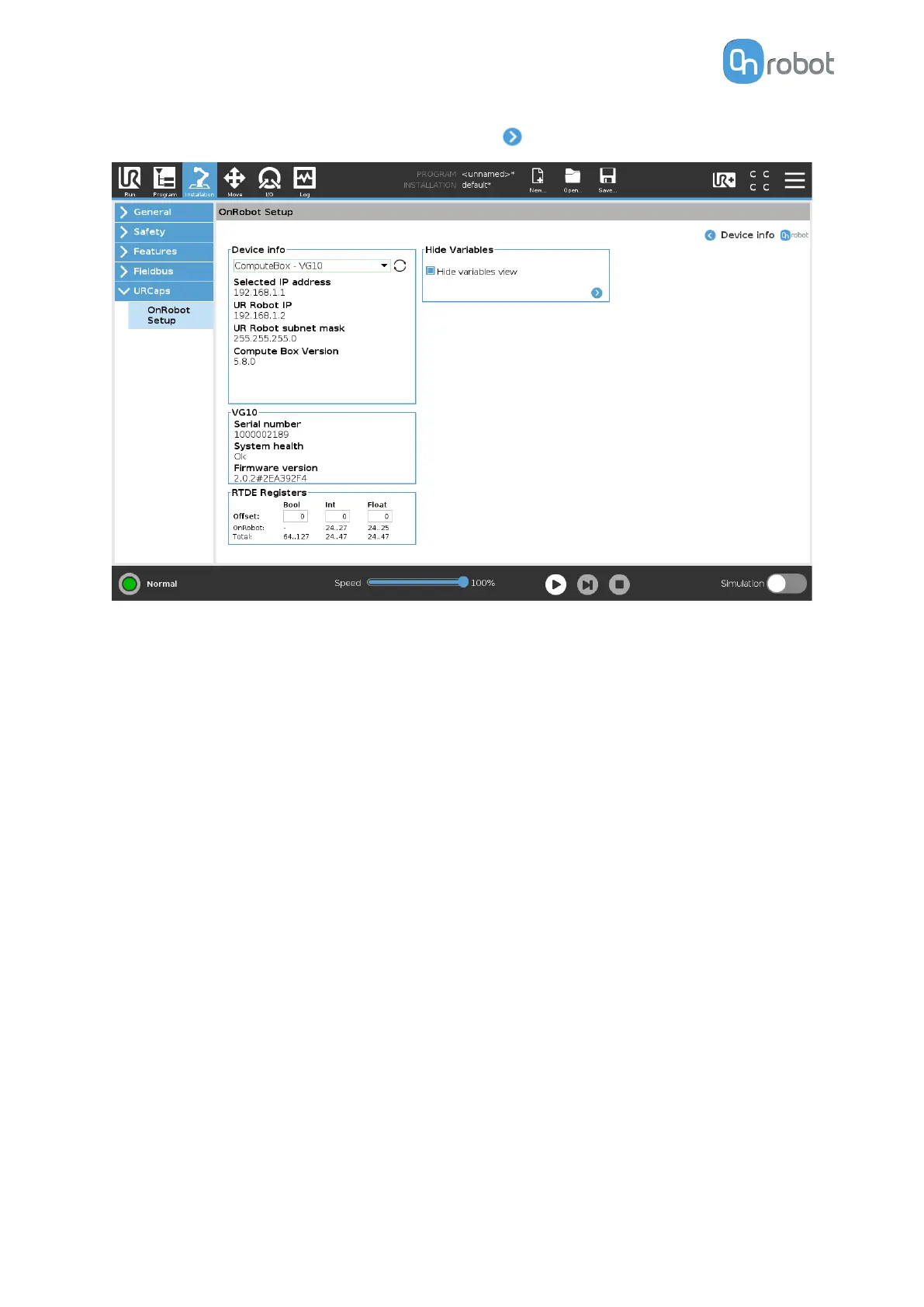
To get more information about the devices press on and the following screen will show:
Device info
The Selected IP address, Compute Box Version, UR Robot IP and UR Robot subnet mask
are shown.
Errors
This displays information about the errors if there is any.
Device name
The Serial number, System health and Firmware version are shown.
Update: this will update the
firmware if an update is available.
Depending on the selected devices, dierent panels will become available to configure the
devices.
RTDE Registers
OnRobot uses RTDE registers to communicate with UR. Real-Time Data Exchange (RTDE) is
an interface that can be used to send data for the robots through registers. For more
information about RTDE registers, see UR's Real-Time Data Exchange (RTDE) Guide.
You need this option if you use OnRobot devices with other vendors' devices and OnRobot
registers might overlap other vendors' registers.
OnRobot uses three
dierent types of registers: Bool, Int and Float.
Oset: Osets the registers by the amount that is written in the certain field.
OnRobot: Shows the number of registers that OnRobot uses of the certain type.
SW INSTALLATION
28



 To Next Page