Application Tools 3.2
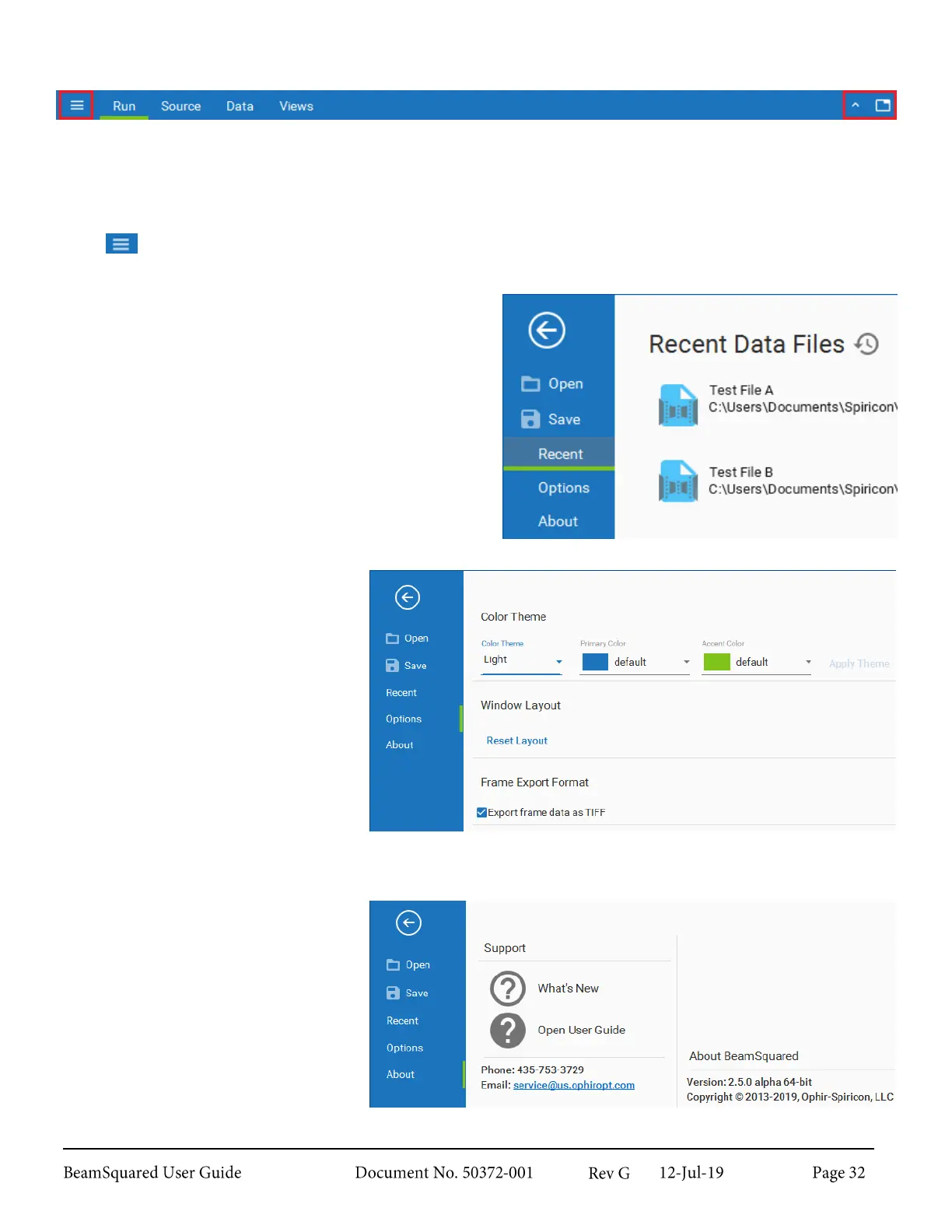
Application tools can be found in the same bar as the ribbon tabs and give access to the File Access window
and allow customization of the ribbons.
File Access Window 3.2.1
Select to access the File Access window.
Open
Opens Windows Explorer to navigate to a specific file
to open for file playback. Data files saved as *.m2-scor-
data from the legacy M
2
-200s-FW can also be loaded
into the BeamSquared software.
Save
Opens Windows Explorer to navigate to a location to
save the current data file. BeamSquared data files save
with a *.bsqData extension.
Recent
Stores quick links to recent data files.
Options
Allows customization of the color
scheme of the user interface. Choose a
combination of a light or dark theme, a
primary color, and secondary color.
Select apply theme to accept changes.
Reset Layout allows you to restore
the windows to the default
configuration.
Enable Export frame data as TIFF
to save images in a tiff format (see
section 3.2.1.1 for more information).
If unchecked the data remains as an
integer array.
About
Provides a link to this user guide,
contact information for the Ophir-
Spiricon Service department, and
displays the current software version
and copyright information. What’s
New opens the ReadMe which lists
new features and improvements found
in the current version.



 To Next Page