Exclude Data Points 4.4.3
If the Auto Outlier Removal feature is enabled in the Caustic Beam Display
window, the application will automatically remove data points that appear to be
anomalous. Points that have been automatically removed will show up in the plot
window as Purple X’s and Y’s. At the end of a run it is also possible to manually
exclude data points. To do so, double click these data points. Manually removed
points appear gray. Double click the point again to re-enable it. All points that
have been removed, whether manually or automatically, are excluded from the M
2
calculations.
Outlier data points appear for a number of reasons. One of the most common
occurs when a pulsed laser is triggered asynchronously to the video camera’s
scanning rate. Under this condition, distorted images may result. Sometimes
these images are good enough to make it into the data plot.
Interpreting Results 4.4.4
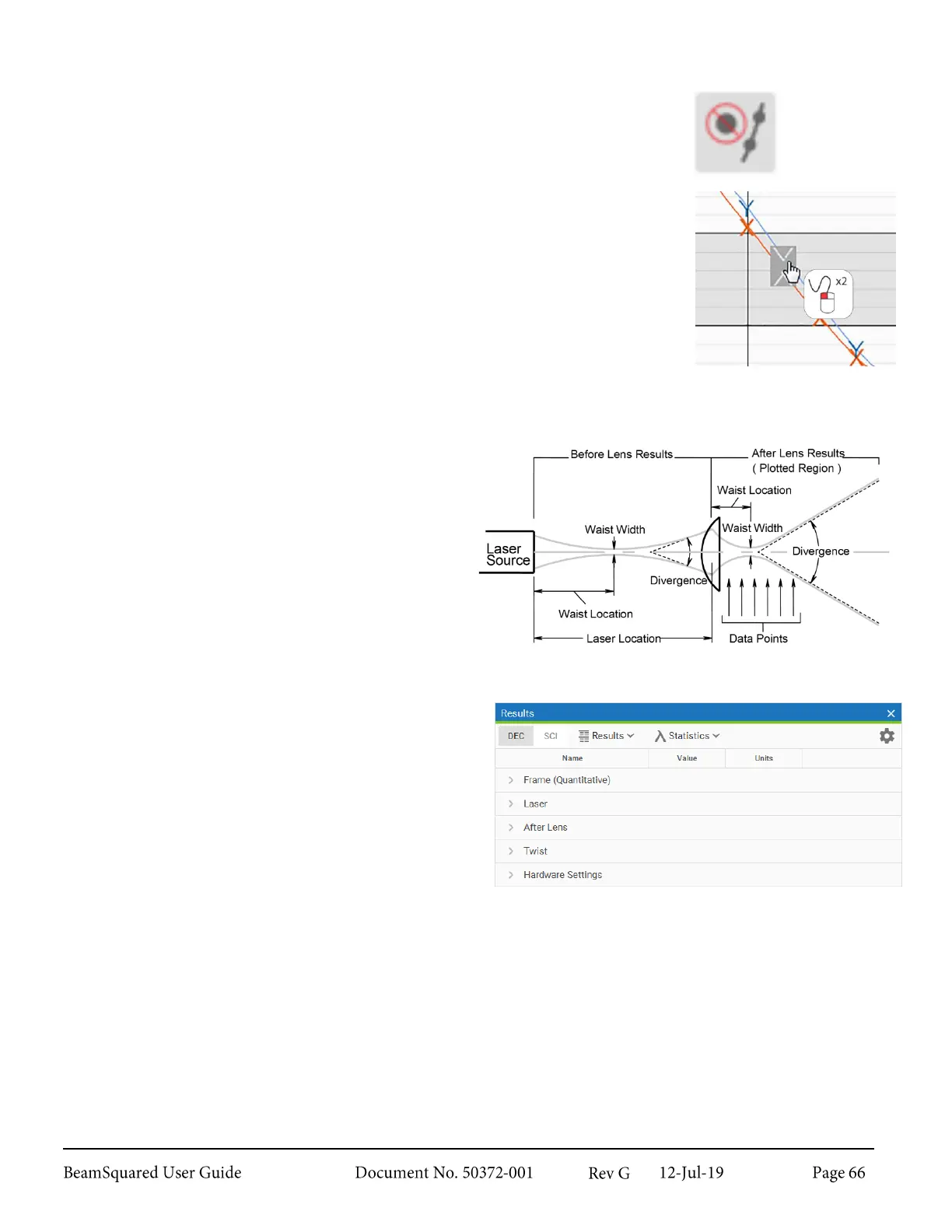
Three main windows in the BeamSquared software
provide feedback to the operator. The 2D Beam
Display window shows the energy distribution
profile of the beam. These are cross-sections of the
beam at various distances (Z locations) after the lens
(the “Data Points” in the image right). The X and Y
widths of the beam at each of these locations are
plotted in the Caustic Beam Display window, while
the results are displayed in the Results window.
The five main results groups in the Results window provide information about:
The current beam profile’s Quantitative results
o
The Frame (Quantitative) group
contains information about the currently
selected beam measurements.
The laser’s M
2
analysis results
o
The Laser group contains information
about the beam before the lens as
calculated from the After Lens results.
The laser’s After Lens results
o
The After Lens group contains
information about how the beam performs
after passing through the lens as directly
measured. This information is used to
determine the actual laser propagation
parameters including waist width, waist
location, and divergence angle.
Off Axis results
o
The Twist group contains information
about the beam’s Ellipticity and
orientation.



 To Next Page