C200 SOFTWARE
Instruction Manual C200 Part2 A1.doc
optek Danulat GmbH • D-45356 Essen • Germany
page 6
1 Overview Hardware
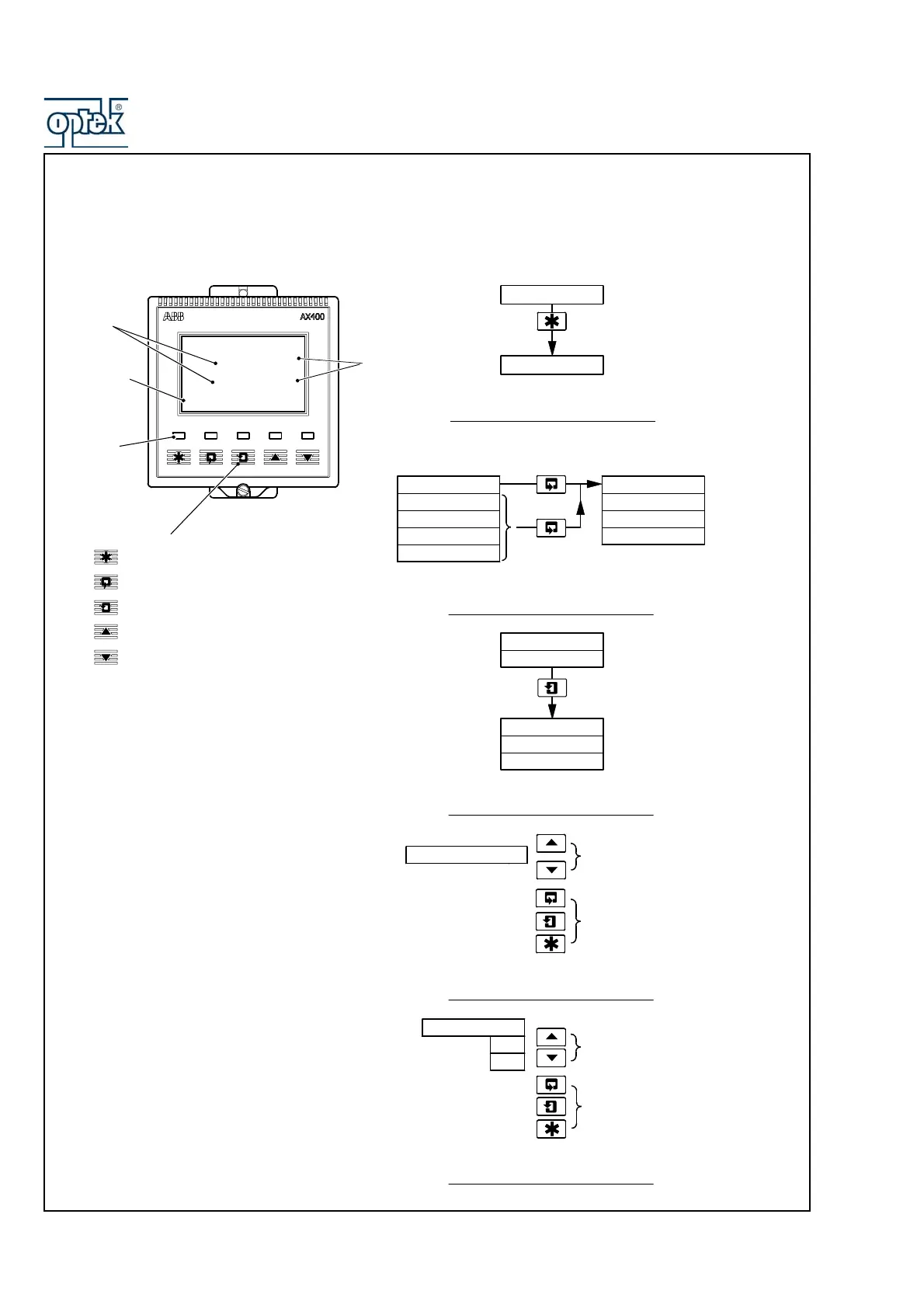
1.1 Front panel CONTROL 200
0.000
Dual Cond.
0.000
uS/cm
Alarm
LEDs
Display
Lines
Lower
Display Line
Membrane Keys
uS/cm
Units
Menu Key
Sidescroll Key
Downscroll Key
Up Key
Down Key
B – Advancing to Next Page
C – Moving Between Frames
D – Adjusting and Storing a Parameter Value
E – Selecting and Storing a Parameter Choice
A – Moving Between Menus
For majority
of Frames
Frame 1
Frame 2
Frame 3
Frame 4
Page 1
Frame 1
Frame 2
Frame 3
Page 2
Advance to
next page
or
Frame 1
Frame 2
Frame 3
Page X
Frame 4
Advance to
next Frame
New value is
stored automatically
Parameter Value
Adjust
Parameter X
Y
Z
Select
New value is
automatically stored
Menu 1
Menu 2
Advance to
next menu



 To Next Page