MECH-24
* Tape Type: 18um = DVCPRO
10um = DV
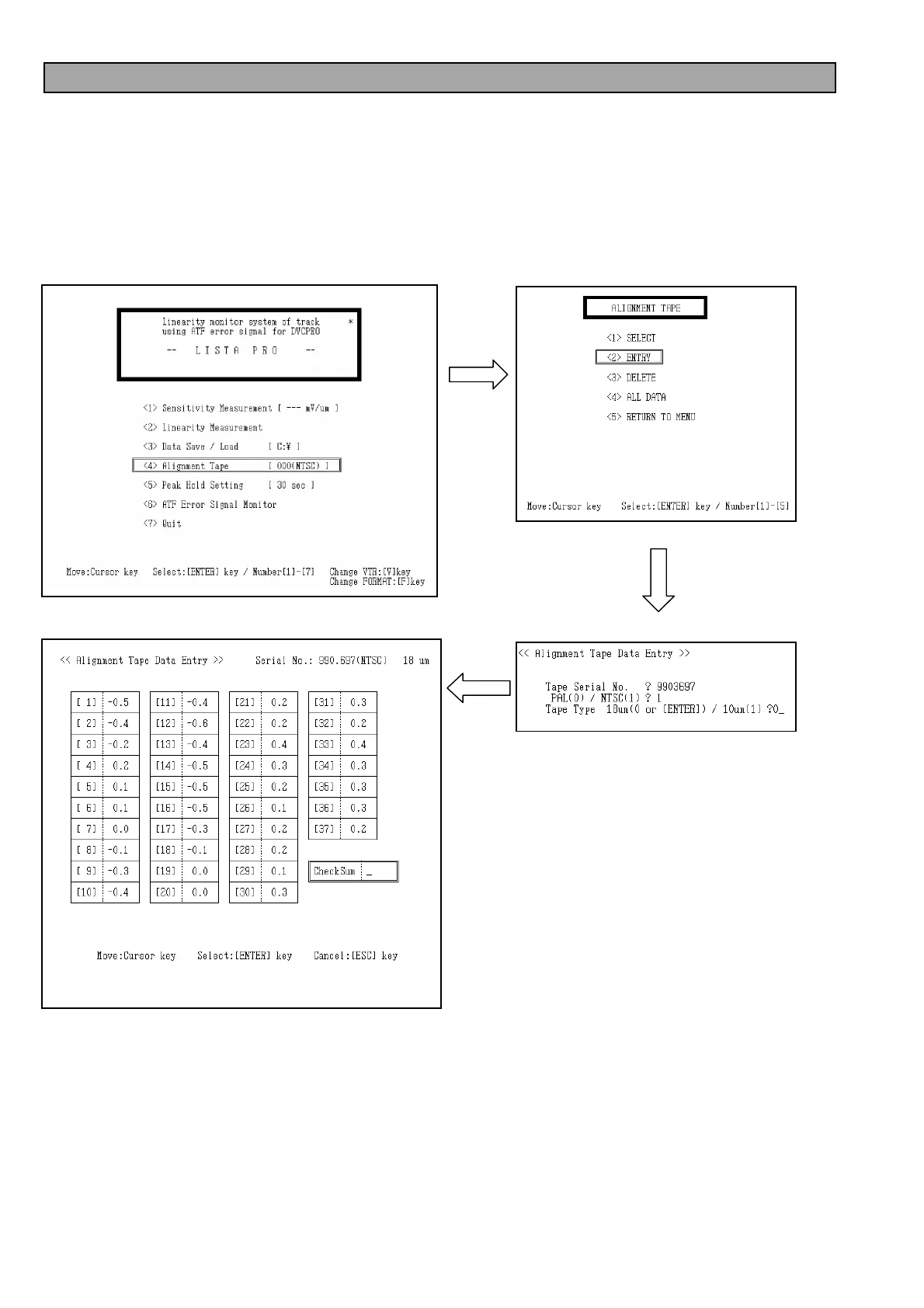
3-31. How to Enter the Attachment Data of Alignment Tape
1. Select the item “<4> Alignment Tape” on the LISTA main menu.
2. Select the item “<2> ENTRY” on the “alignment Tape” menu.
3. After the screen of <<Alignment Tape Data Entry>>is displayed, first input the Serial Number of Alignment tape
printed on the label. And input the number “0” or “1” to select the PAL/NTSC. Following the format select
(PAL/NTSC), Select tape type (18µm/10µm/9µm).
4. After selecting the tape type, the frame for entering the DATA and CHECK SUM appears on the screen. Input
the numerical value on the data sheet which are enclosed with alignment tape. If input the wrong number, the
error message appears on the screen after the Check Sum calculation, then confirm the data on the sheet.
5. After the data entry, the Screen returns to “Lista Main” menu. Confirm the serial number of Alignment tape.














 To Next Page