INF-15
9. DIAG MENU DISPLAY
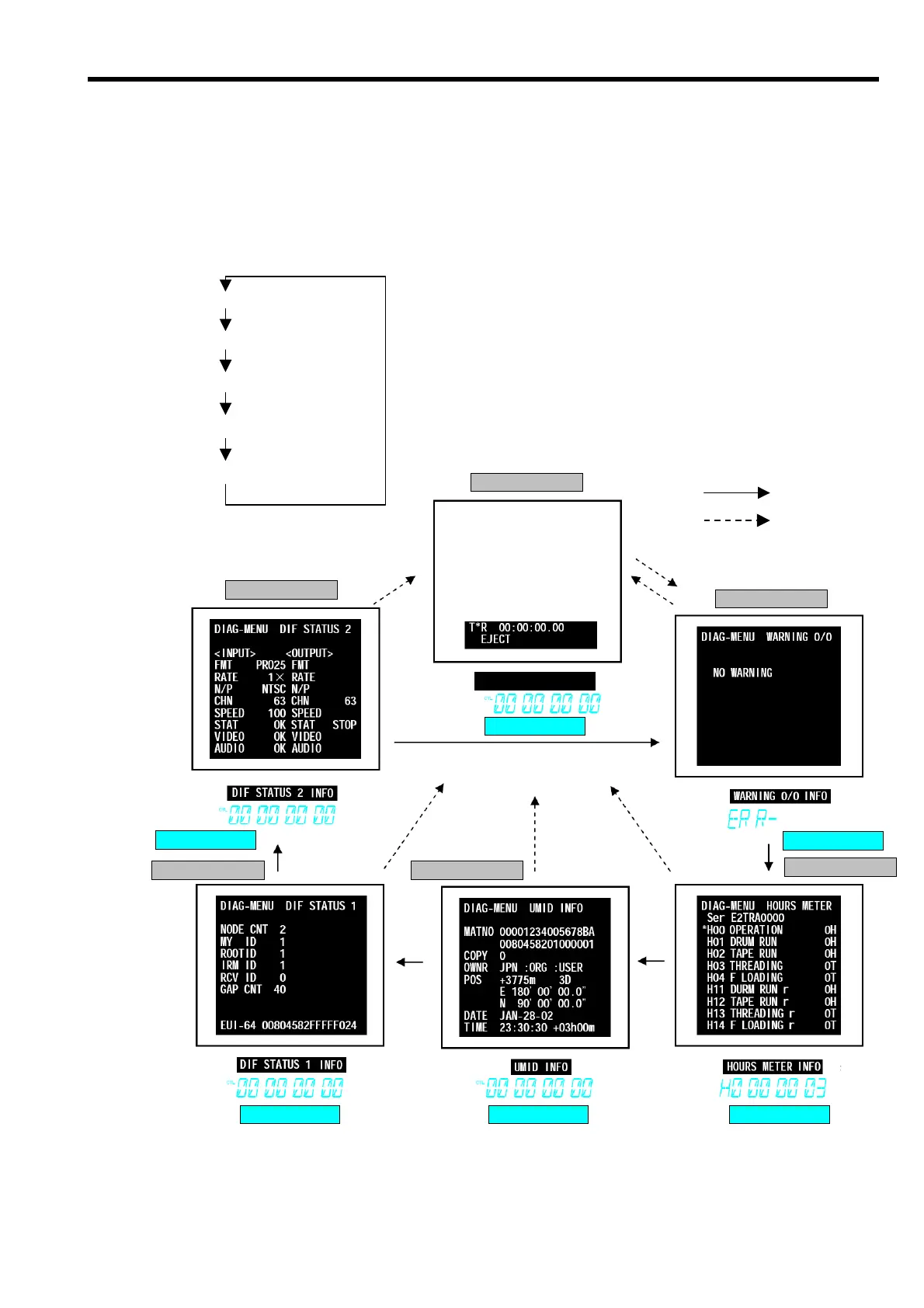
The DIAG-MENU is the menu for investigating the status of the VTR, and it has the indicated information.
• Warning display (WARNING information)
• Hour meter display (HOUR METER information)
• UMID display (UMID information)
• DIF status display (DIF STATUS 1 and 2 information)
1. Press the “DIAG” button so that the above information is displays on the monitor and Front Display.
2. Press the “SEARCH” button in order to change the display as shown below.
3. The Diag Menu is closed by pressiing the “DIAG” button again.
Monitor Screen
Monitor Screen
Monitor Screen
Monitor Screen Monitor Screen
Monitor Screen
Front Dis
la
Front Dis
la
Front Dis
la
Front Dis
la
Front Dis
la
Front Dis
la
NORMAL SCREEN
Note:
: SEARCH Button
: DIAG Button
HOUR METER SCREEN
WARNING O/O SCREEN
DIF STATUS 2 SCREEN
UMID INFO SCREEN
DIF STATUS 1 SCREEN














 To Next Page