HTTP server functions/web pages
86 FP Web-Server V2.810 EN
12.1.6 Editing HTML pages
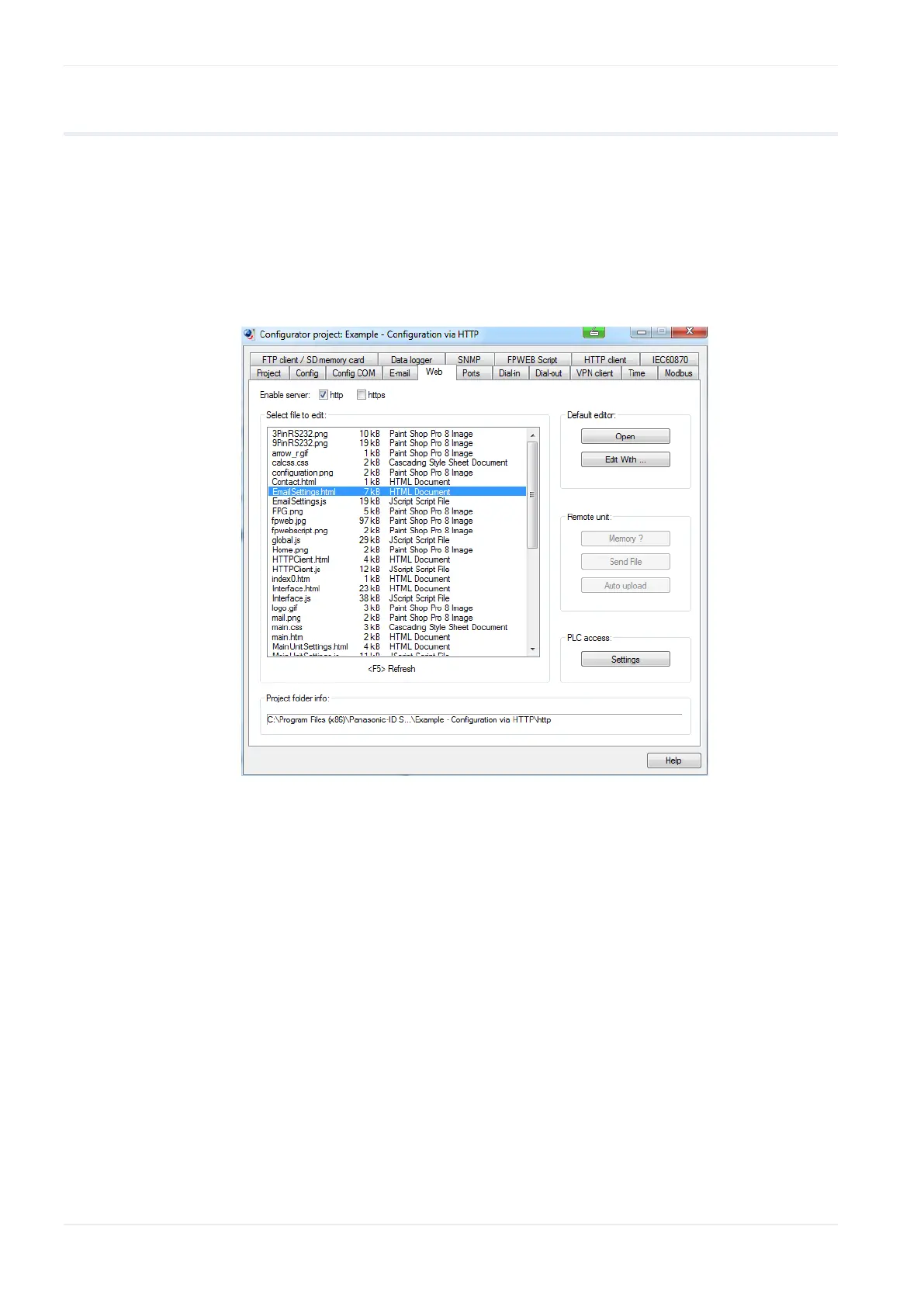
All web pages the FP Web-Server is supposed to display should be created
and/or edited on a computer. To do so, it would be best to mark the
respective file of the project in the Configurator in the "Web" screen and
start the preinstalled editor of the operating system by double-clicking (or
pressing <Enter> or [Open]). For detailed information, please refer to
Configurator HTTP administration and functions (see p. 116).
Alternatively, you can select an installed editor by pressing [Edit With]. The
editor can be an HTML editor or a standard ASCII text editor.
ASCII text editor:
With a standard text editor like the "NotePad" of the operating system, all
HTML features can be used in an ideal manner. Nevertheless, it takes time
to get used to the HTML format. For training purposes, the following links
are recommended:
http://archive.ncsa.uiuc.edu/General/Internet/WWW/
http://www.html.net/ http://www.html.net/
http://WDVL.com/Authoring/HTML/
http://whatis.techtarget.com/
http://de.selfhtml.org/ http://de.selfhtml.org/












 To Next Page