Chapter 5 Operations — Using the web control function
240 - ENGLISH
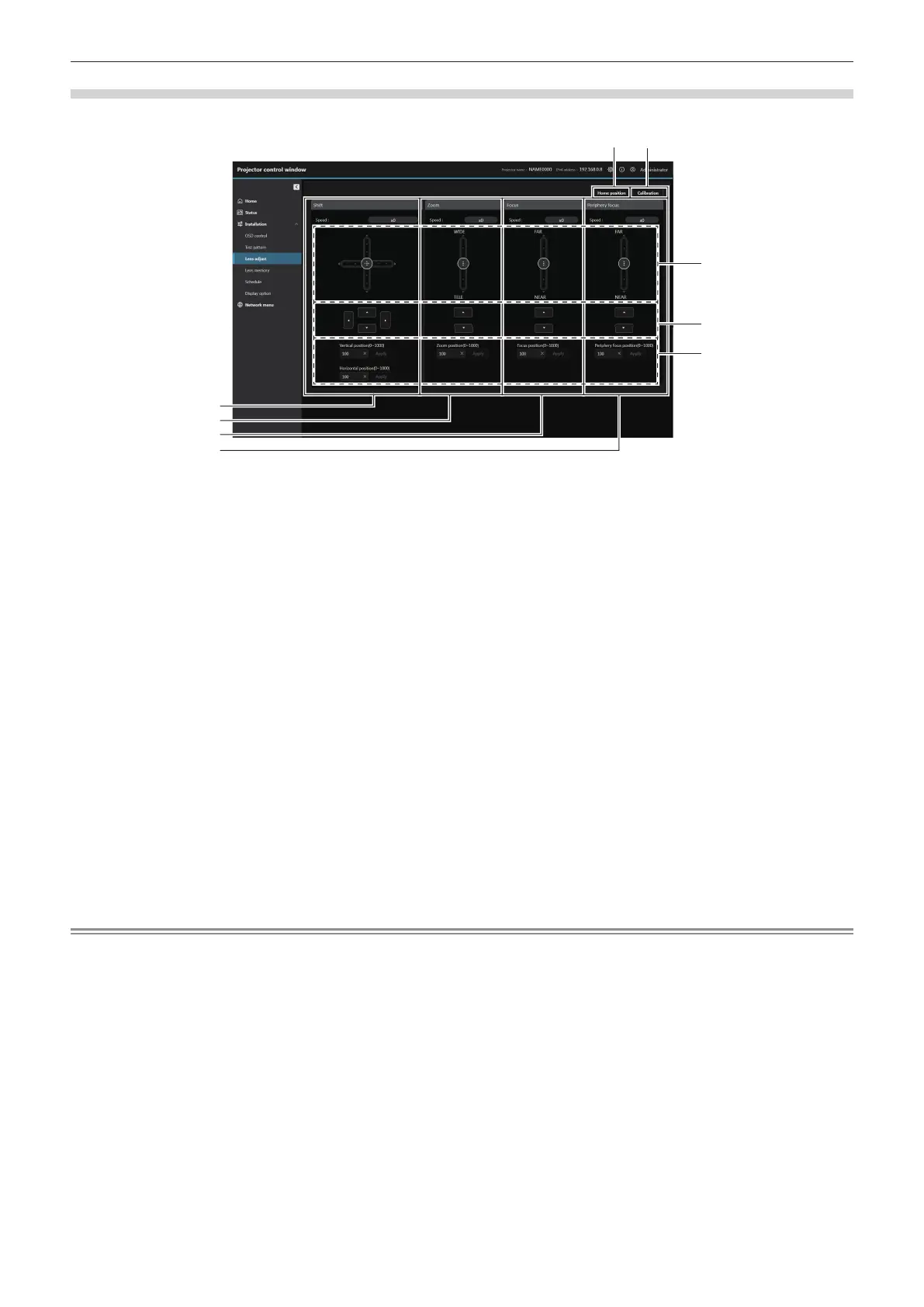
[Lens adjust]
Click [Installation] → [Lens adjust].
1 [Home position]
Moves the projection lens to the home position. (x page 241)
2 [Calibration]
Executes the lens calibration. (x page 241)
3 [Shift]
Use the slider bar, asqw or enter the data in lens position
data eld to adjust the lens shift (vertical position and horizontal
position).
The adjustment can be performed in three operating speeds by
the position which the slide button is dragged to.
Click asqw to make ne adjustments. The adjustment can
be performed faster by holding the button for three seconds or
longer.
4 [Zoom]
Use the slider bar, as or enter the data in lens position data
eld to adjust the zoom.
The adjustment can be performed in two operating speeds by
the position which the slide button is dragged to.
Click as to make ne adjustments. The adjustment can be
performed faster by holding down.
5 [Focus]
Use the slider bar, as or enter the data in lens position data
eld to adjust the focus.
The adjustment can be performed in two operating speeds by
the position which the slide button is dragged to.
Click as to make ne adjustments. The adjustment can be
performed faster by holding down.
6 [Periphery focus]
Use the slider bar, as or enter the data in lens position data
eld to adjust the periphery focus.
The adjustment can be performed in two operating speeds by
the position which the slide button is dragged to.
Click as to make ne adjustments. The adjustment can be
performed faster by holding down.
7 Slider bar
Adjusts the lens shift, zoom, focus and periphery focus by
dragging the slide button in the center over the slide rail. The
operation speed will become faster when the drag position is
further away from the center.
8 Adjustment buttons
Click asqw to adjust the lens shift, zoom, focus and
periphery focus.
9 Lens position value eld
Enter the lens position (Shift Vertical position, Shift Horizontal
position, Zoom position, Focus position, and Periphery focus
position) and click [Apply] to move to the lens position entered.
Note
f [Periphery focus] is displayed only when following projection lens is attached.
g Zoom Lens (Model No.: ET-C1U100, ET-C1W300, ET-C1W400, ET-C1W500)














 To Next Page