Chapter 5 Operations — Using the web control function
ENGLISH - 249
[Mail set up]
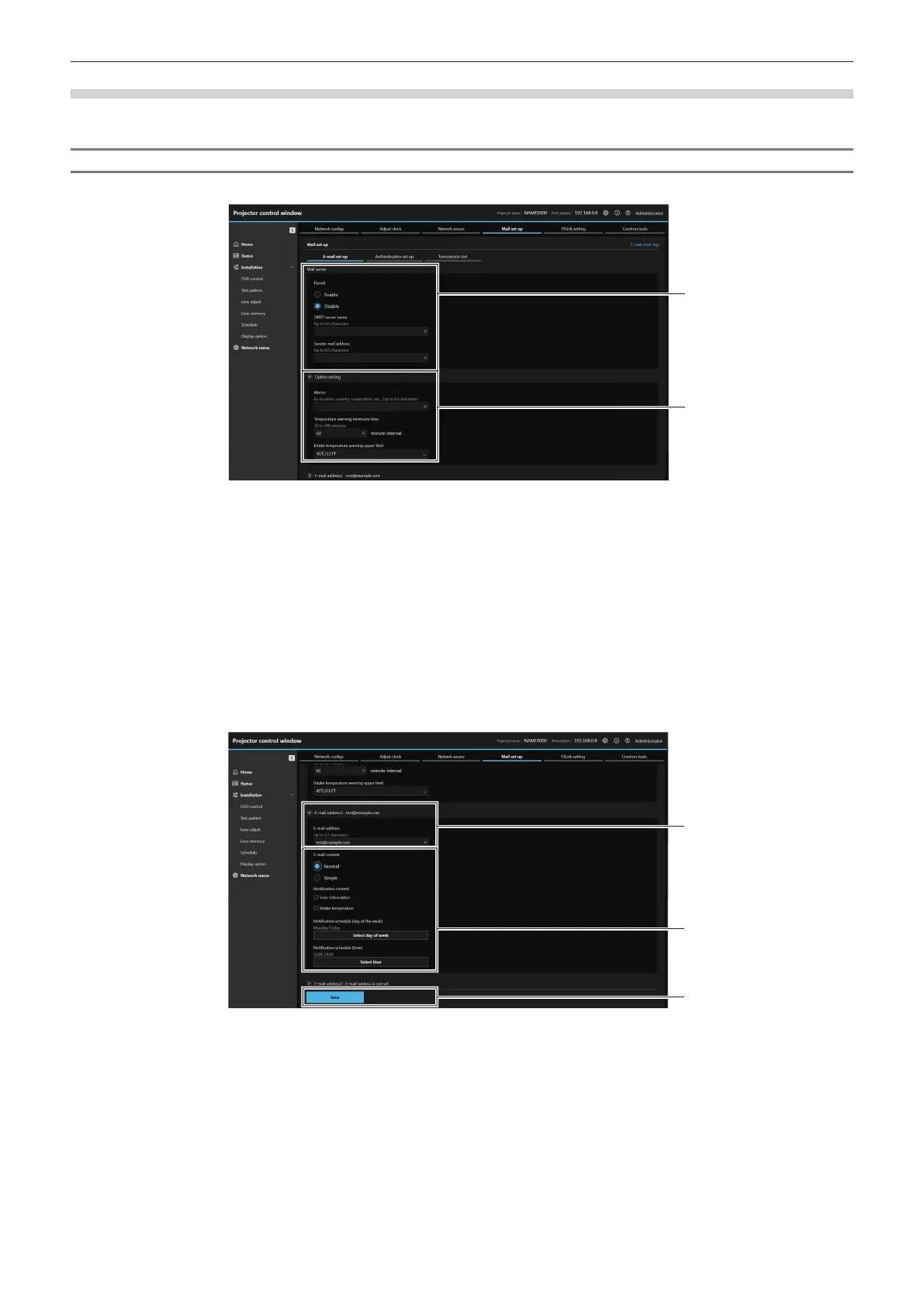
Click [Network menu] → [Mail set up].
[E-mail set up]
Send an E-mail to preset E-mail addresses (up to two addresses) when a problem has occurred.
1 [Mail server]
[Permit]
Select [Enable] to use the E-mail function.
[SMTP server name]
Enter the IP address or the server name of the E-mail server
(SMTP). To enter the server name, the DNS server needs to be
set up.
[Sender mail address]
Enter the E-mail address of the projector. (Up to 63 characters
in single byte)
2 [Option setting]
[Memo]
Enter information such as the location of the projector that
noties the sender of the E-mail. (Up to 63 characters in single
byte)
[Temperature warning minimum time]
Change the minimum interval for the temperature warning
E-mail. The default value is 60 minutes. In this case, another
E-mail will not be sent for 60 minutes after sending the
temperature warning E-mail even if it reaches the warning
temperature.
[Intake temperature warning upper limit]
Change the temperature upper limit for the temperature
warning mail. A temperature warning E-mail is sent when the
temperature exceeds this value.
3
4
3 [E-mail address1], [E-mail address 2]
Enter the E-mail address to be sent. Leave [E-mail address 2]
blank when two E-mail addresses are not to be used.
4 Settings of the conditions to send E-mail
Select the conditions to send E-mail.
[E-mail content]:
Select either [Normal] or [Simple].
f [Normal]: Select this item when sending detailed information
including the status of the projector.
f [Simple]: Select this item when sending minimal information
such as error information.
[Notication content]:
Send an E-mail when the following items are checked and
occur.
[Error information]:
Send an E-mail when an error occurred in the self-diagnosis.
[Intake temperature]:
Send an E-mail when the intake air temperature has reached
the value set at the above eld.
Periodic report:
Set [Notication schedule (day of the week)] and [Notication
schedule (time)] to send an E-mail periodically.
An E-mail will be sent on the day and time with the check mark.
5 [Save]
Update the settings and sends the details by E-mail.














 To Next Page