3
4
BRAKE CAM
LINING
ADJUSTING NUT
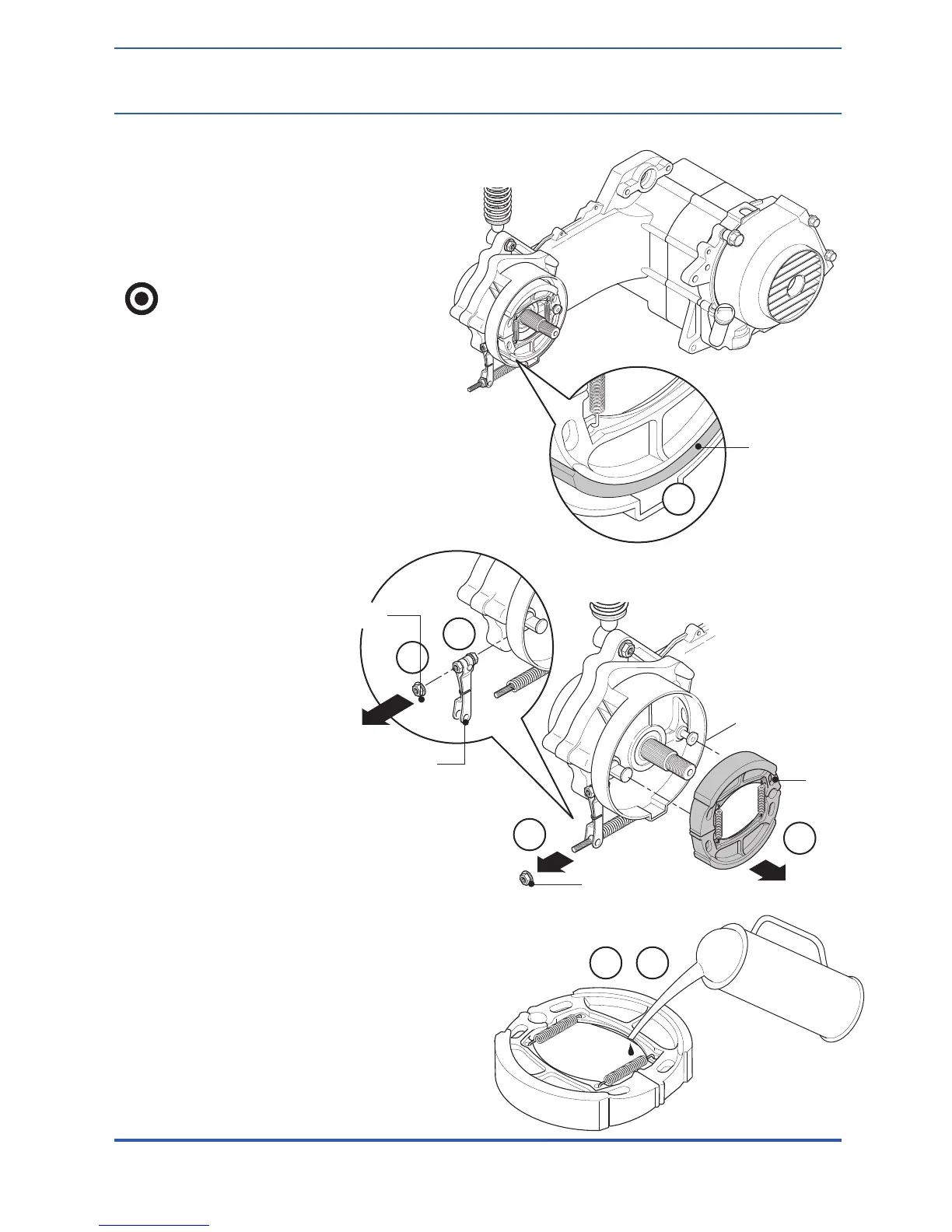
Checking the Brake Lining
1. Measure the thickness of the
brake lining. Replace when it is
below 2.0mm (.079 in.).
Attention:
Don’t have the oil adhere to
the lining surface.
Dismantling the Rear Brake
3. Remove the adjusting nut
of the rear brake.
4. Remove the brake lining.
5. Remove the fix bolt of
the brake arm.
6. Remove the brake arm.
7. Remove the brake cam.
Assembling the Rear Brake
8. Spread grease on the moving
parts of the lining and of the fix pin
(locating pin).
9. Spread grease on the moving
part of the brake cam shaft and
then assemble it.
10. Install the brake lining.
BRAKE CAM LINING
1
9 10
5
6
BRAKE ARM
FIX BOLT
13. The Rear Wheel, the Rear Brake & Rear Shock
13-4
143
NIKOTA USA: PANTERRA SCOOTER SERVICE MANUAL
CHAPTER 13: THE REAR WHEEL,
THE REAR BRAKE & REAR BUFFER



 To Next Page