Parker Hannifin
P Series User Guide 279
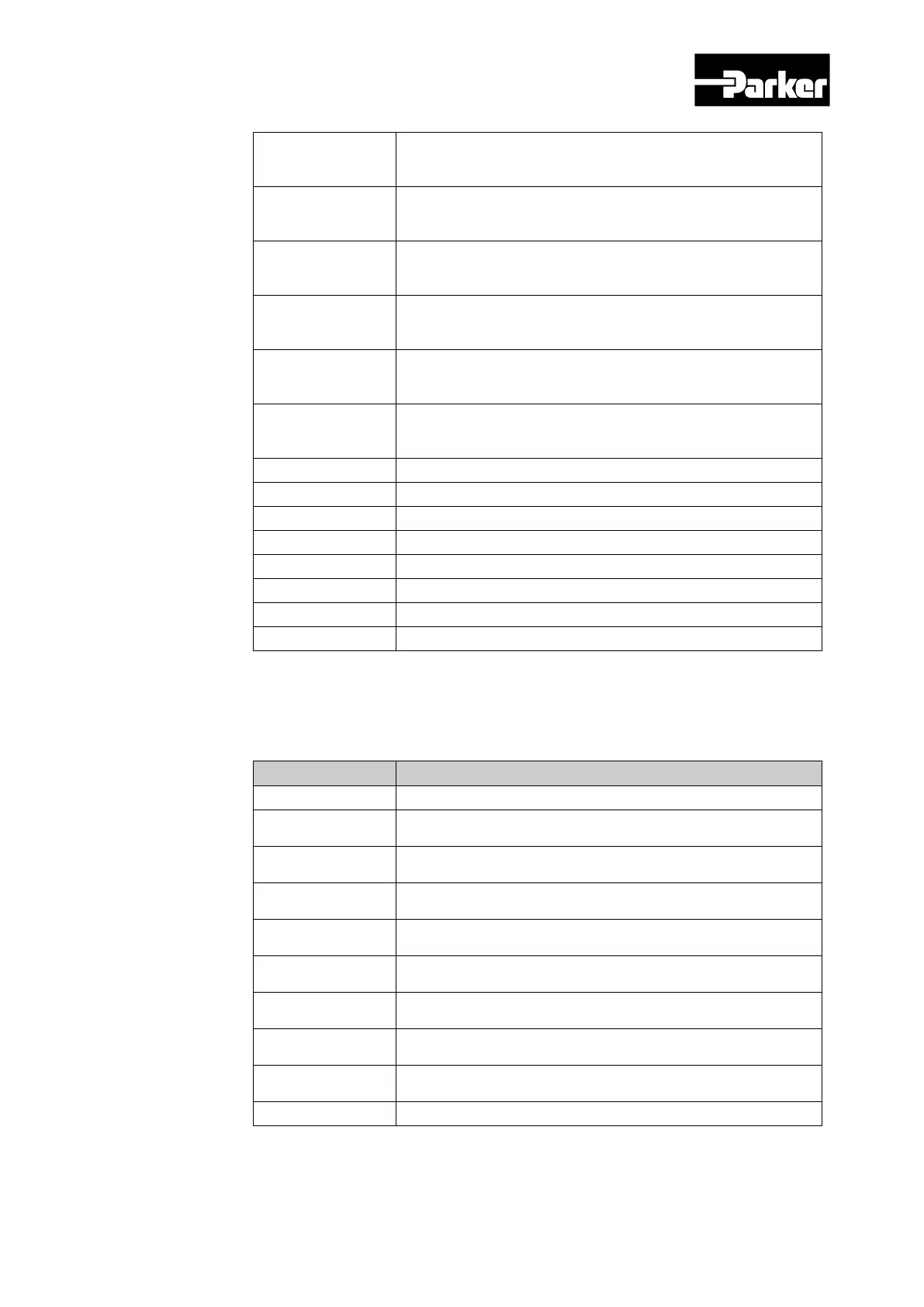
18
Forced output of DO#1(I/O pin 39, 40) (0:OFF, 1:ON)
Provided that the relevant bit mask (0x60FE:02.18) is set to
19
Forced output of DO#1(I/O pin 41, 42) (0:OFF, 1:ON)
Provided that the relevant bit mask (0x60FE:02.19) is set to
20
Forced output of DO#1(I/O pin 43, 44) (0:OFF, 1:ON)
Provided that the relevant bit mask (0x60FE:02.20) is set to
21
Forced output of DO#1(I/O pin 45, 46) (0:OFF, 1:ON)
Provided that the relevant bit mask (0x60FE:02.21) is set to
22
Forced output of DO#1(I/O pin 47, 48) (0:OFF, 1:ON)
Provided that the relevant bit mask (0x60FE:02.22) is set to
23
Forced output of DO#1(I/O pin 49, 50) (0:OFF, 1:ON)
Provided that the relevant bit mask (0x60FE:02.23) is set to
24 DO #1output status (0:OFF, 1:ON)
25 DO #2output status (0:OFF, 1:ON)
26 DO #3 output status (0:OFF, 1:ON)
DO #4output status (0:OFF, 1:ON)
28 DO #5output status (0:OFF, 1:ON)
DO #6output status (0:OFF, 1:ON)
30 DO #7output status (0:OFF, 1:ON)
DO #8output status (0:OFF, 1:ON)
Table 111. Physical Output Descriptions
Bit mask Descriptions
bit Descriptions
0 to 15 Reserved
16
DO#1(I/O pin 35, 36) output status setting (0:Disable,
1:Enable)
17
DO#2(I/O pin 37, 38) output status setting (0:Disable,
1:Enable)
18
DO #3(I/O pin 39, 40)output status setting (0:Disable,
1:Enable)
19
DO #4(I/O pin 41, 42)output status setting (0:Disable,
1:Enable)
20
DO#1(I/O pin 43, 44) output status setting (0:Disable,
1:Enable)
21
DO#2(I/O pin 45, 46) output status setting (0:Disable,
1:Enable)
22
DO #3(I/O pin 47, 48)output status setting (0:Disable,
1:Enable)
23
DO #4(I/O pin 49, 50)output status setting (0:Disable,
1:Enable)
Table 112. Bit Mask Descriptions


 To Next Page
 Loading...