11
108 Workshop Manual, TSD3450E, Issue 1
2800
Fuel filter header
To remove and to fit Operation 11-5
To remove
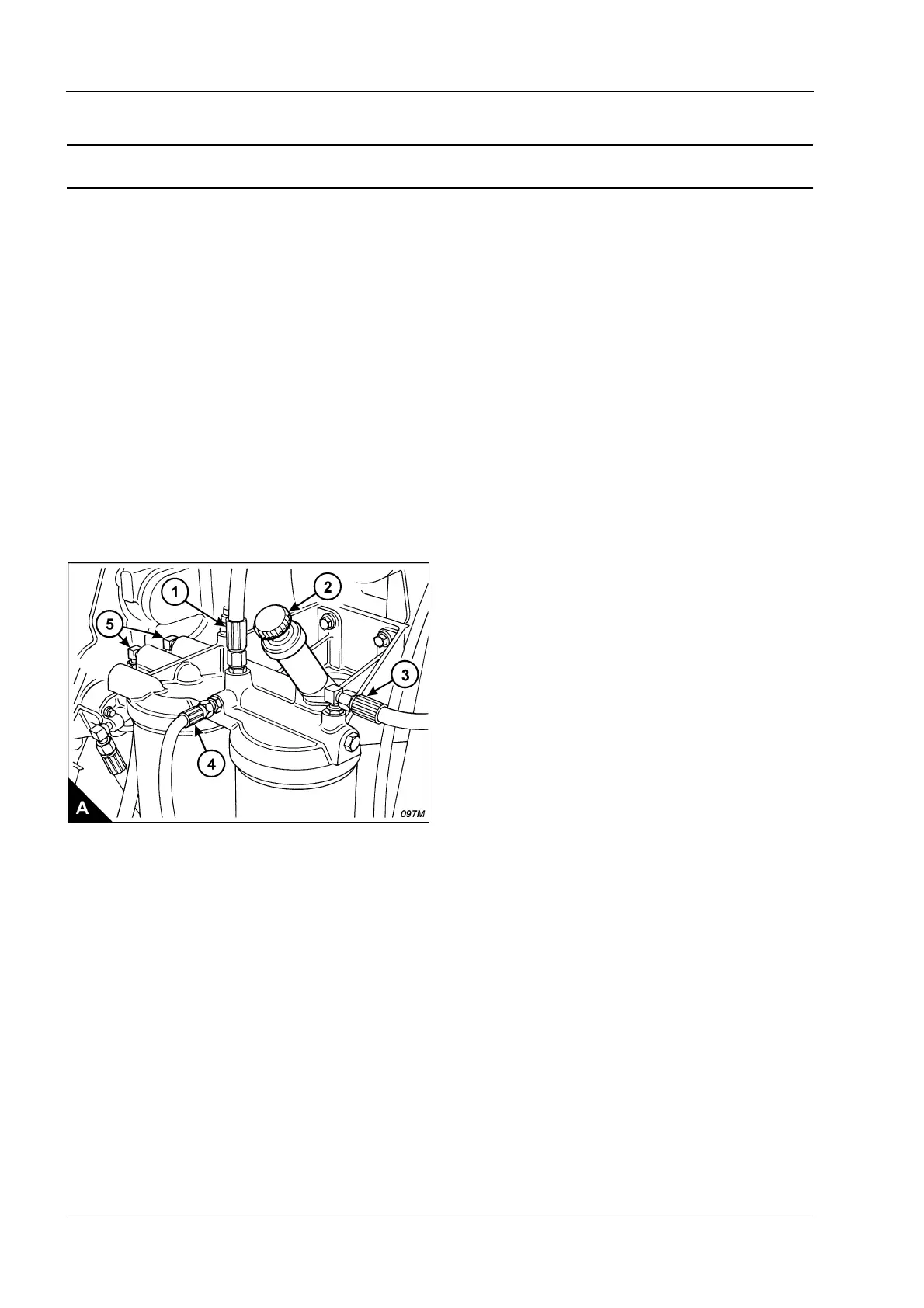
1 Remove the fuel priming pump (A2), Operation 11-1.
2 Disconnect the fuel pipes (A1, A3, A4 and A5). Fit plugs or caps to all openings to prevent contamination of
the fuel system.
3 Remove the filter housings and elements from the fuel filter header.
Warning! Discard the used filter elements and ‘O’ ring seals in a safe place and in accordance with local
regulations.
4 Remove the bolts which retain the filter header on the crankcase.
To fit
1 Fit the filter header to the crankcase.
2 Remove any plugs or caps and connect the fuel pipes (A1, A3, A4 and A5).
3 Renew the fuel filter elements in the primary and secondary fuel filter canisters. Use the procedures given
in the User’s Handbook, TSD3449E.
4 Fit the fuel priming pump, Operation 11-1.
5 Eliminate air from the fuel system, Operation 11-6.



 To Next Page