6
74 Workshop Manual, TSD3450E, Issue 1
2800
Gear case cover
To remove and to fit Operation 6-1
To remove
1 Remove the radiator, Operation 12-4.
2 Remove the fan, Operation 12-5.
3 Loosen the bolts which retain the gear case cover. Do not remove the bolts from the assembly, allow them
to be retained by the seal.
4 Remove the gear case cover.
To fit
Note: Ensure that all contact surfaces of the seal and the gear case are clean and free from oil, paint, burrs or
debris.
1 Examine the seal and renew if necessary, clean the contact surfaces of the seal and the gear case.
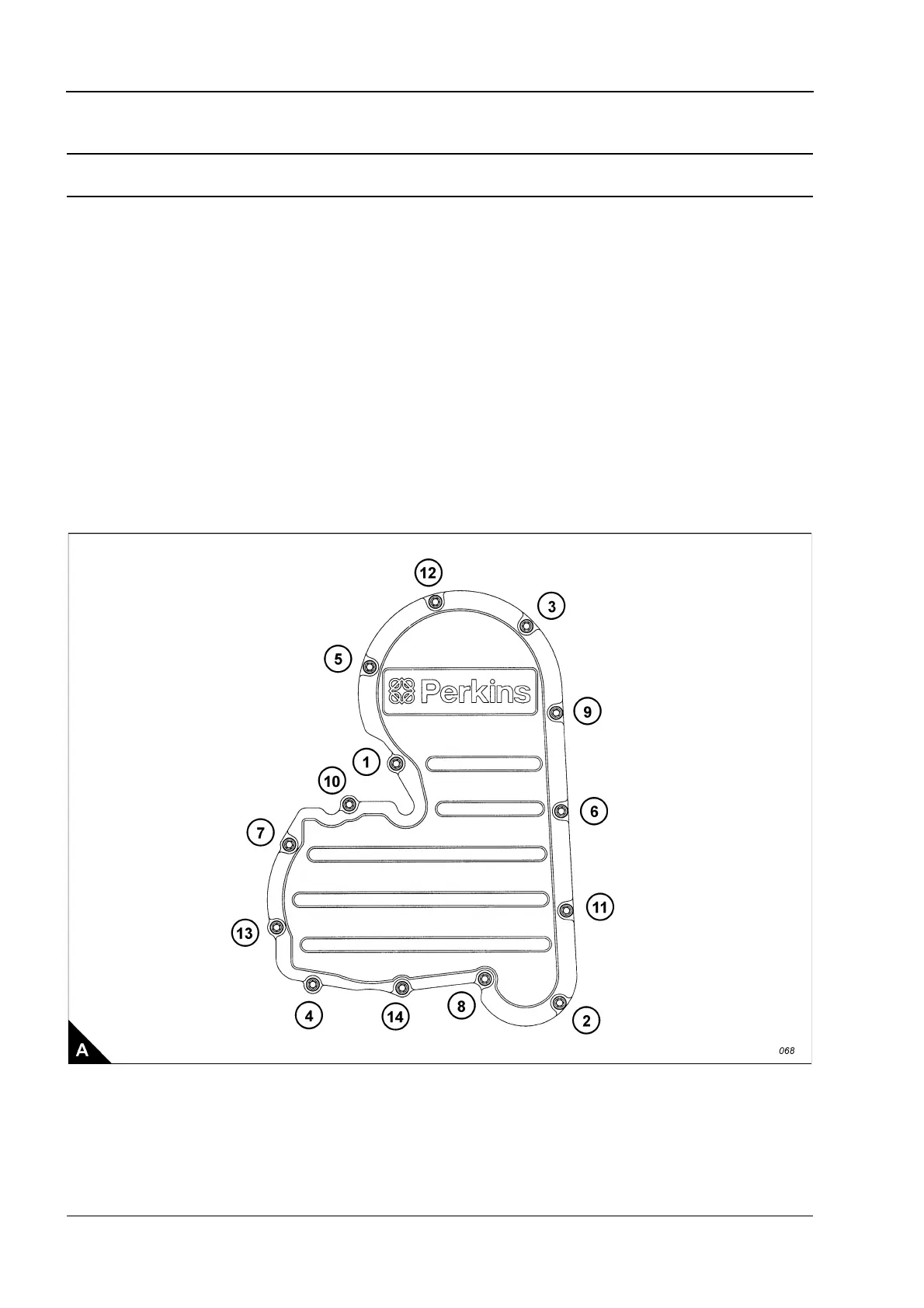
2 Fit the gear case cover and tighten the bolts, in the sequence shown (A), to a torque of 20 Nm (15 lbf ft).
3 Fit the fan, Operation 12-5.
4 Fit the radiator, Operation 12-4.



 To Next Page