5–16
2. Type 2
• Odometer
• Trip meter
• Average fuel consumption (AVG)
• Current fuel consumption (CFC)
• Distance to empty (RANGE)
• Eco Idle stop time
• Eco Idle stop cumulative time
• Service information
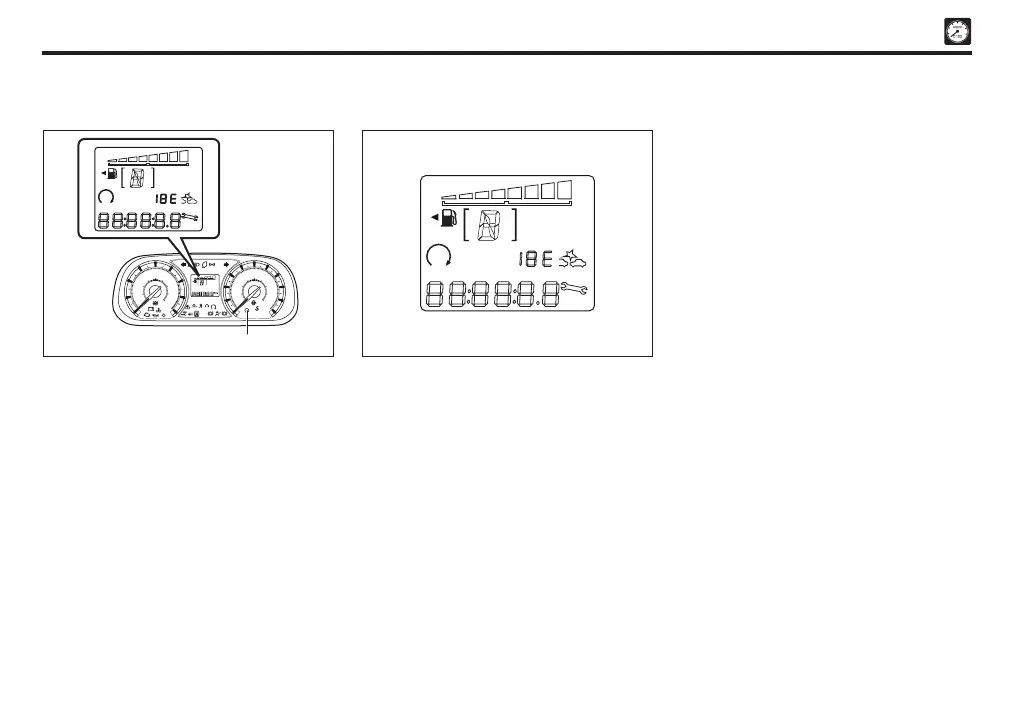
Multi information display
Selection display
Each time reset button is pressed, the
indication changes in the following sequences
given below:
A. Main routine
1. Type 1
• Odometer
• Trip meter
• Average fuel consumption (AVG)
• Current fuel consumption (CFC)
• Distance to empty (RANGE)
• Service information
F
E
km/L
A
4
ASA OFF
ERROR
ODO
RANGE
TRIPAVGCFC
eco
AT
OFF
TRC
OFF
OFF
P
OFF
A
A
4
F
E
!
2
1
0
0
20
40
60
80
100
120
140
160
180
200
3
x1000r/min
km/h
ODO/TRIP DISP
ODO
RANGE
6
7
8
5
4
km/L
TRIPAVGCFC
Reset button
F
E
km/L
A
4
ASA OFF
ERROR
ODO
RANGE
TRIPAVGCFC
Odometer and trip meter
Odometer / trip meter selection button
Each time the reset button is pressed, the
indication changes. To reset the trip meter
to zero, keep pressing the reset button for
more than 1.0 second.
Sect 05_EN D42L.indd 16 04/11/2019 10:42 AM


 To Next Page