5–17
4
F
E
km/L
CFC
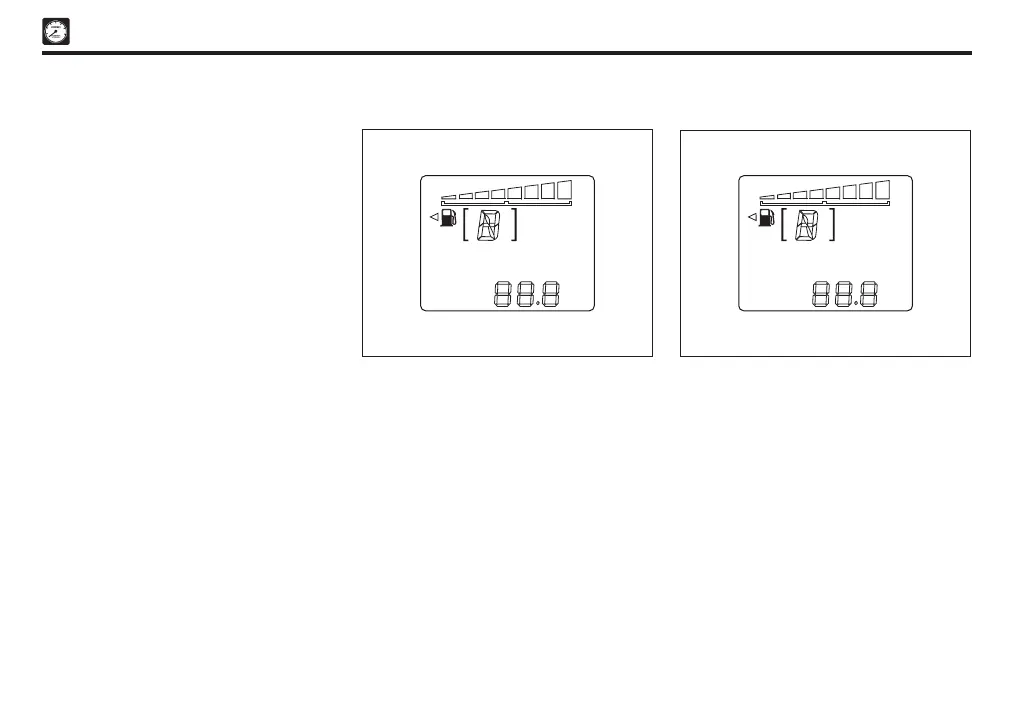
Current Fuel Consumption (CFC) mode
This mode will calculate and display the
real-time fuel consumption during driving.
The display value will be updated every 2
seconds. At vehicle stop (0km/L), the display
will show ‘0.0’ km/ L.
When ignition switch is turned “ON”, ‘-.-’
symbol will be displayed until enough data
for a valid calculation is received.
4
F
E
km/L
AVG
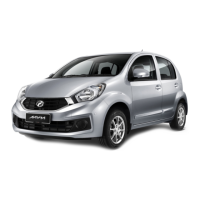
Average fuel consumption (AVG)
This mode will calculate the average fuel
consumption depending on driving pattern.
The display value will be updated every
10 seconds and after reset, ‘-.-’ symbol will
be displayed until enough data for a valid
calculation is received.
NOTE
Average fuel consumption value is
calculated from the total fuel used and the
distance since last value reset.
B. Customize routine
At odometer, hold the reset button more
than 3 seconds to enter customize routine
setting mode.
After that, each time reset button is pressed,
the indication changes in the following
sequences given below:
1. Type 1
• Eco indicator light display setting
• Customize routine OFF (‘End’ will be
displayed)
2. Type 2
• Eco indicator light display setting
• Eco Idle display setting
• Customize routine OFF (“End” will be
displayed)
(See “Eco indicator light display setting” and
“Eco Idle display setting”)
CAUTION
Make sure the vehicle is completely
stopped when you want to change the
display setting mode.
For safety reason, customize routine
setting mode cannot be entered while the
vehicle is running.
Sect 05_EN D42L.indd 17 04/11/2019 10:42 AM


 To Next Page