5–19
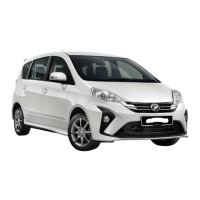
2. Push the reset button for more than 3
seconds to reset the data. “cLEAr” will be
displayed and it will blink 3 times before
restart counting from ‘10,000 km’.
3. Push the reset button for more than 3
seconds to “OFF”.
NOTE
• If there is no operation for about 10
seconds, the display will revert to
Odometer.
• Do not reset the display between
service intervals to avoid incorrect data
counting on the display.
If the countdown at service information
display has reached 10,000km, ‘ km’ will
be displayed. mark will blink for 5 times
and it will appear at every display. The same
reminder condition will activate every time the
ignition switch is turned “ON”.
This indicator will go out if the service
information is set to OFF or reset.
How to switch display
1. Push the reset button to enter the service
information setting. (See “Selection
display” for indication sequence)
km
km
Reset
Restart
Off
Service information reminder setting
A
4
F
E
ODO
Eco Idle stop cumulative time
(If equipped)
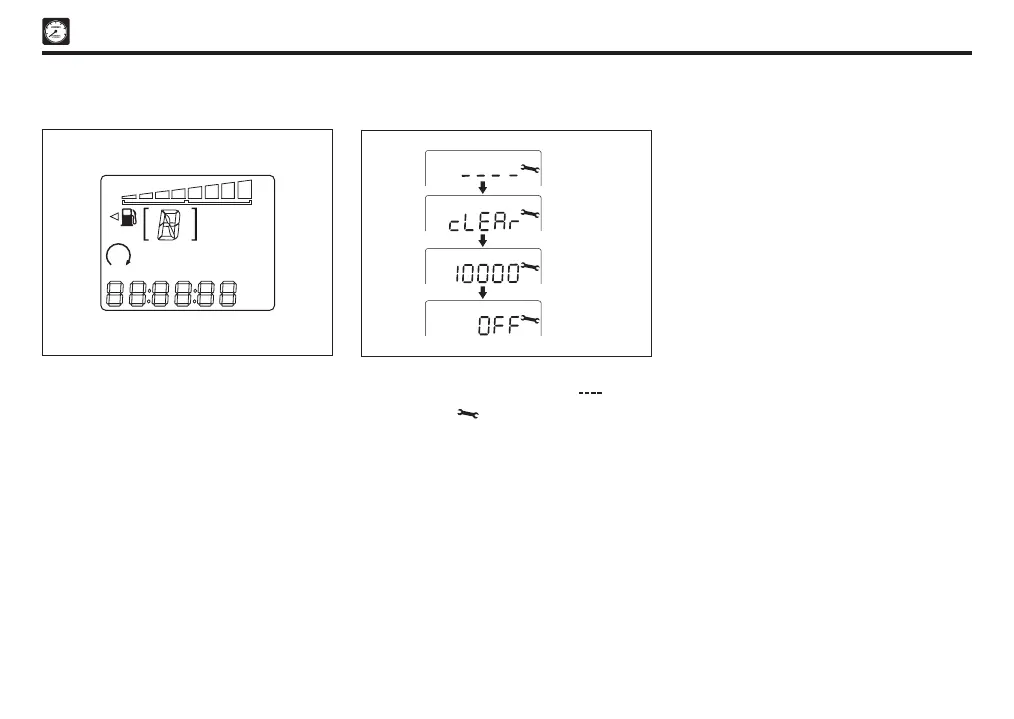
This mode will show the cumulative timing of
Eco Idle condition. The total stop time will be
counted continuously from previous trip. Data
will not retain if the battery is disconnected.
Press the reset button to enter Eco Idle stop
time setting. (See “Selection display” for
indication sequence).
Pressing the reset button more than 1 second
will reset the display.
Sect 05_EN D42L.indd 19 04/11/2019 10:42 AM



 To Next Page