7–8
Track Select Button ( / ) - 2
• Press “ ” button 2 to forward to the
next track.
• Press “ ” button 2 to backward to the
previous track.
• Press “ ” button 2 more than 2 seconds
to fast forward the track.
• Press “ ” button 2 more than 2 seconds
to fast backward the track.
Track number will appear on the display.
Scan Button (SCN) - 3
Intro Scan function allows you to scan a USB,
by playing the first 10 seconds of each track
in order. Press SCN button 3 to activate intro
scan whereby the “ ” will appear on the
display. Once you hear the desired track,
press again to resume its normal playback.
Repeat Button (RPT) - 4
To repeat the music you are listening to,
press RPT button 4. “ ” will appear on
the display and current track will be repeated
continuously. Press again to cancel the
repeat mode.
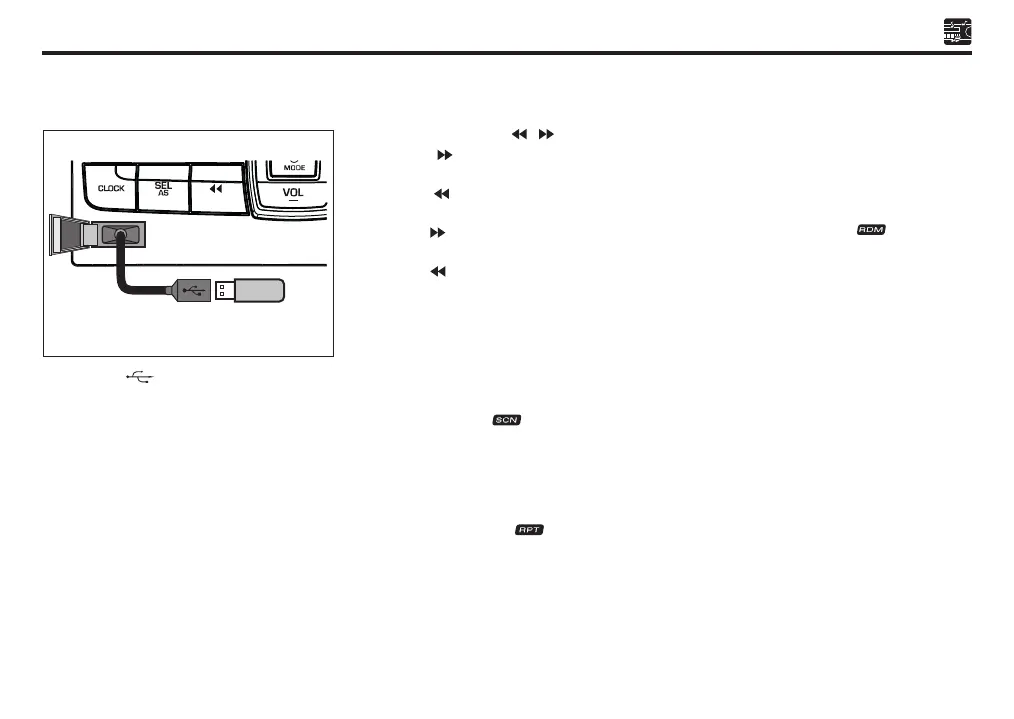
Figure 1
USB Door ( ) - 1
• Open the USB door 1 and plug in USB
cable extension with USB memory into
USB port (as shown in Figure 1). The
system will automatically switch to USB
mode and play MP3/WMA track.
• It is recommended to use a USB extension
cable to avoid protrusion.
• To detach the USB memory, straightly pull
USB extension cable out from the unit.
Removing the USB extension cable or
USB memory will also stop play back.
Random Button (RDM) - 5
• Track Random
Press RDM button 5 to select song randomly
from USB. Song will randomly played within
selected folder. Press RDM button 5 to
activate this function and “ ” will appear
on the LCD. Press again to deactivate this
function.
• Folder Random
Press RDM button 5 for more than 2 seconds
to select a song randomly in different folder
from USB.
Mute Button (MUTE) - 6
• Press the MUTE button 6 more than 2
seconds to pause play. “PAUSE” appears
in the display.
• To resume USB play, press the MUTE
button 6 more than 2 seconds again.
Sect 07_EN D42L.indd 8 25/10/2019 11:45 AM


 To Next Page