Pharma Test Apparatebau AG
Operating Manual
B-24-00100_PT-NODE_v1.0e.docx Page 26 of 64
Section 4.4.1 Device Manager
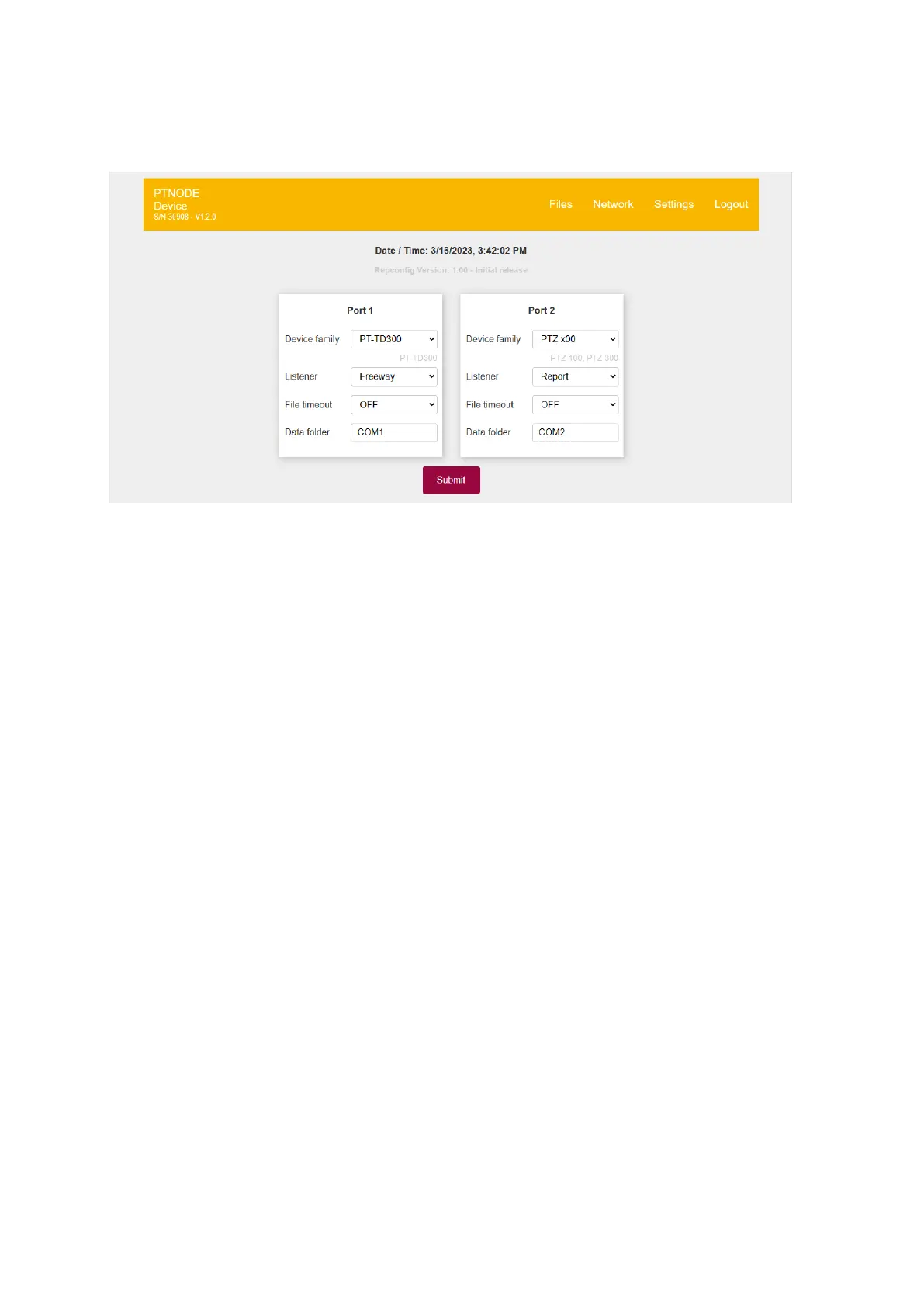
By clicking on “Devices” you can access the device manager:
Figure 24: Device manager
The communication settings for each device are stored in a configuration file called
“Repconfig”. The version of the currently installed Repconfig file is displayed here.
▪ Device family: Here you can select what device is connected to port 1 and port 2 of
of PT-Node. Sometimes on device family setting applies to more than one model of
Pharma Test instruments. The models compatible with the current setting are listed
below the selection field. In the example above you can see that “PTZ x00” applies
to both PTZ 100 and PTZ 300 models.
▪ Listener: Depending on the particular instrument you can select here between a
serial data output format (Freeway) and the result report intended for printing. For
more details about this refer to the sections below on how to setup the various
supported Pharma Test instruments.
▪ File timeout: If you want to use a timeout to automatically close a file currently being
written into after no data was received from the instrument for the set period of
time, use this setting. Usually this is not required as PT-Node automatically detects
start and end of a transmission. In case this is required for a particular instrument
which does not transmit a defined start and end of a transmission, this will be
mentioned below in the instruction on how to setup this particular instrument.
▪ Data folder: Select what folder name on the internal storage should be used to store
the files. If the folder does not exist, it will be created after you click “Submit”. We
recommend using a unique folder name for each instrument you intend to use with
PT-Node.
For more details on these settings see below, Section 5 on how to setup the parameters for
the various supported Pharma Test instruments.



 To Next Page