Pharma Test Apparatebau AG
Operating Manual
B-24-00100_PT-NODE_v1.0e.docx Page 37 of 64
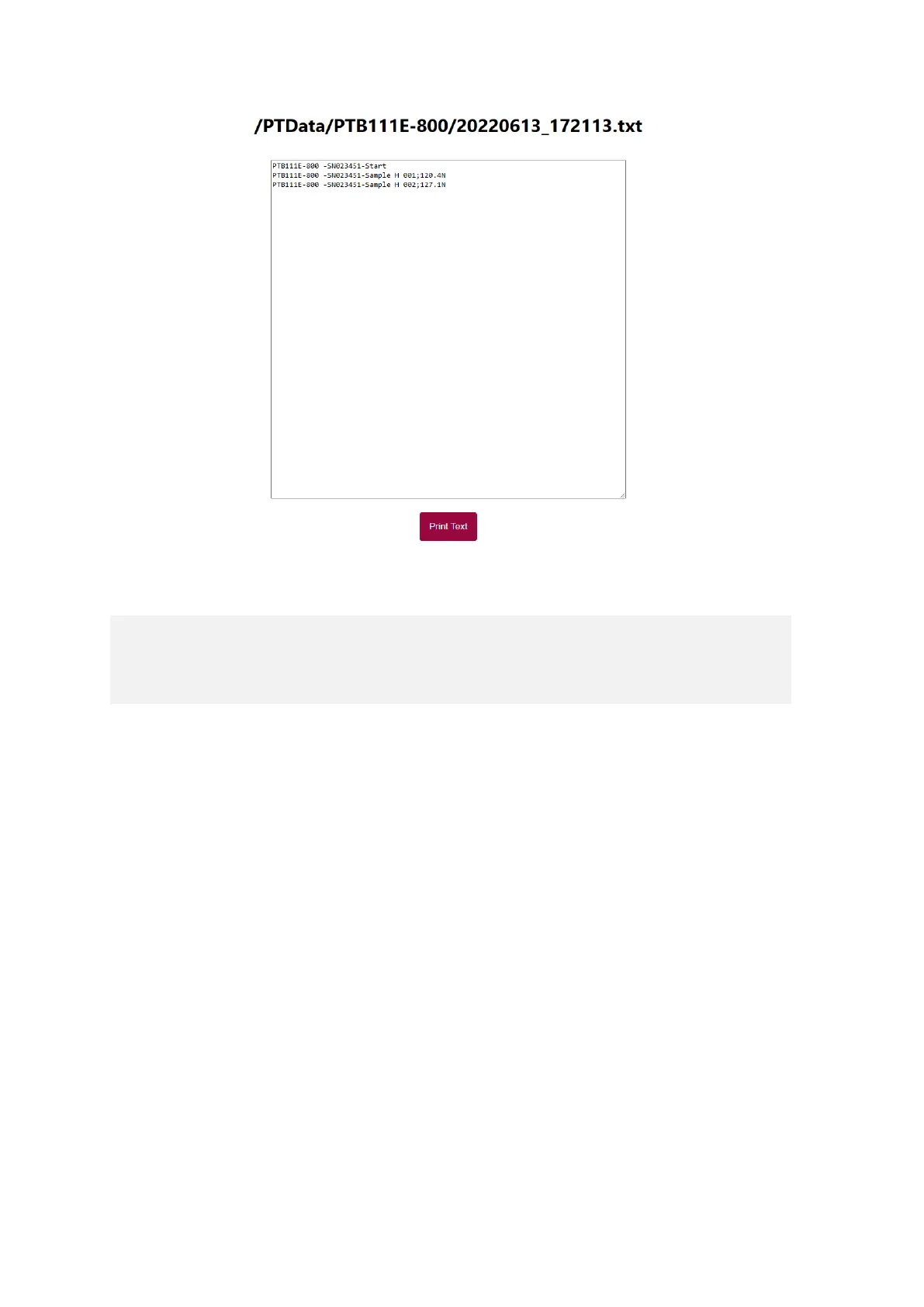
Figure 42: Example of a serial result of a PTB 111EP instrument
5.1.1.4 Data Format Description
and so on…
Every string starts with the instrument model (“PTB111E-800”), followed by its serial
number (“023456”) and either a command (“Start”) or an identifier for a variable (“Sample
H” for hardness). Then the sample number (“001” for example) followed by the actual test
result (“120.4N” for example) for the given variable. Note that this instruments supports
different units for its measurements. If the units are changed in the instrument settings,
they are also changed in the data output accordingly. Every string ends with [CR/LF]
(carriage return / line feed).
The data is formatted that you can select a “string parser”, identify the parameter with the
variable “H” (hardness) at position “30” and read the value for “H” at position “36”. Mettler
FreeWeigh® has been tested and confirmed that it is able to collect the data this way.
Note: When this setting is active, print-outs can still be performed via the built-in printer of
the PTB 111EP instrument.



 To Next Page