Pharma Test Apparatebau AG
Operating Manual
B-24-00100_PT-NODE_v1.0e.docx Page 28 of 64
4.4.2.1 Connecting to PC-Node without using a Network
In case you do not want to use any network to connect to PT-Node you can either use the
hotspot created by PT-Node itself to connect to it via a Wi-Fi enabled device or you can
create a direct connection to a PC using the supplied patch cable. For details about
connecting to the hotspot of PT-Node see the instructions above on how to perform the
initial network setup.
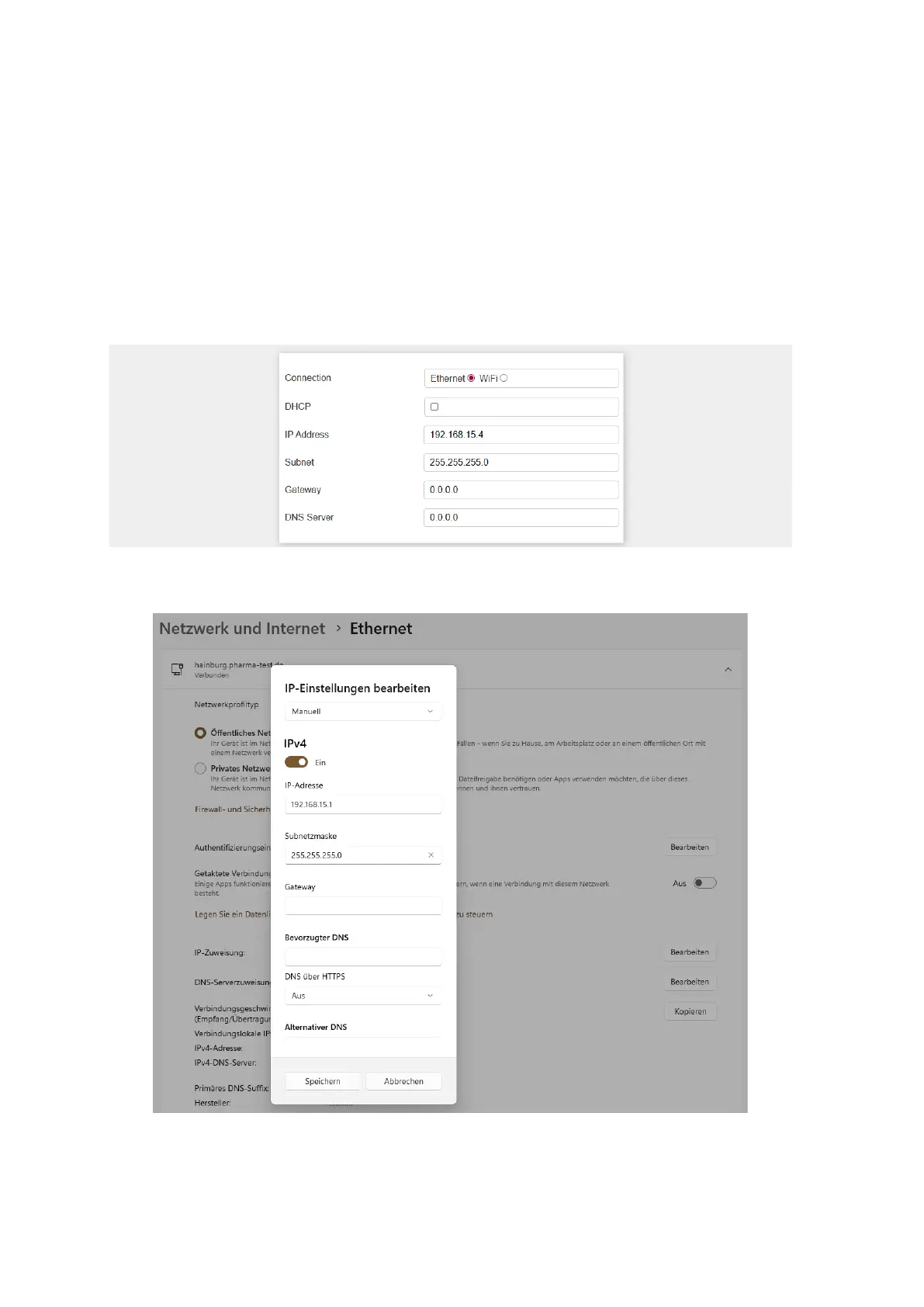
To use a direct wired connection, you must assign static IP addresses to both the PT-Node
and the network adapter you use on your PC. They must be in the same range.
For example, if you set the connection on PT-Node like this:
Figure 27: PT-Node network settings for direct connection
The network settings on your PC should look like this (example showing Windows 11):
Figure 28: Windows network adapter settings for direct connection
You can use any IP address starting like “192.168.15.xxx” where “xxx” is a value from 1 to
255. You must not use the same address for PT-Node and your PC.



 To Next Page