EasyManua.ls Logo

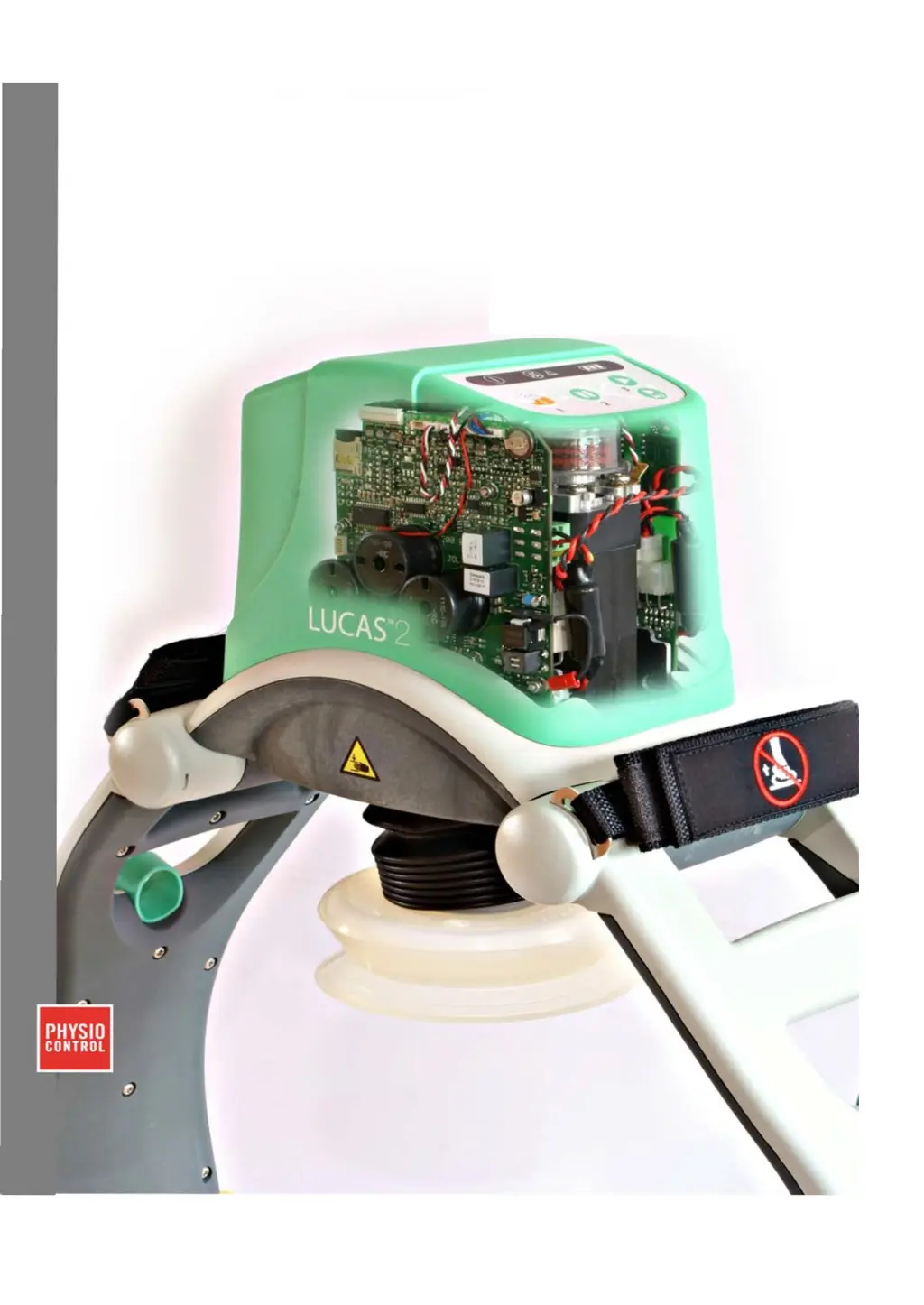
Physio Control lucas 2 - Service Manual

Physio Control lucas 2
77 pages
Print Icon
To Next Page IconTo Next Page
Loading...
1
LUCA2
Chest Compression System
Service
Manual
LUCAS® 2 Chest
Compression
System
-
Service Manual
3323809-001, © 2017
Physio-Control, Inc.

Table of Contents

Other manuals for Physio Control lucas 2

Questions and Answers

  • A
    allenlindaAug 29, 2025
    What causes Physio Control Medical Equipment to display 'Control EE-Prom CheckSum data error'?
    • T
      Tara ParkerAug 29, 2025
      If your Physio Control Medical Equipment displays a 'Control EE-Prom CheckSum data error', it indicates a CPU fault. To fix this, replace the Control board.
  • M
    mccannanthonyAug 29, 2025
    What does 'Start of Release Test time out (from Protective)' mean for Physio Control Medical Equipment?
    • D
      David MuellerAug 29, 2025
      A 'Start of Release Test time out (from Protective)' in Physio Control Medical Equipment is due to Protective start errors or I2C communication faults. Check for Protective errors and the cable between the boards.
  • M
    Mrs. Kimberly CollierAug 30, 2025
    What does 'Current detected at release/disable test by Control' mean for Physio Control Medical Equipment?
    • M
      Matthew HowellAug 30, 2025
      If current is detected at the release/disable test by Control in your Physio Control Medical Equipment, it indicates a P45 module fault or a problem in the cable between the boards. Check the cable between the boards and consider replacing the Protective or Control board.
  • C
    Cynthia ContrerasAug 30, 2025
    What does 'Start of Current Test time out (from Protective), Current detected by Protective' mean for Physio Control Medical Equipment?
    • M
      Mackenzie HammondAug 30, 2025
      If your Physio Control Medical Equipment shows 'Start of Current Test time out (from Protective), Current detected by Protective', it means current was detected by Protective or there are I2C communication faults. Check for Protective errors and consider replacing the Protective board.
  • I
    isheltonAug 31, 2025
    Why is my Physio Control Medical Equipment showing 'Protective Disable at current test'?
    • A
      Allison MarshAug 31, 2025
      If your Physio Control Medical Equipment shows 'Protective Disable at current test', it is caused by a P45 module fault or an issue in the cable between the boards. You should check the cable between the boards and consider replacing the Protective or Control board.
  • E
    Emily KramerAug 25, 2025
    What to do if LUCAS Medical Equipment by Physio Control has low battery?
    • G
      Gabriel RobinsonAug 25, 2025
      If the LUCAS Medical Equipment by Physio Control is on and the battery capacity is less than 30%, you should replace the battery or connect the equipment to an external power supply.
  • S
    Stephanie FarmerSep 1, 2025
    What does 'Pot value incorrect (Miss match at start)' mean for Physio Control Medical Equipment?
    • P
      Pamela FoleySep 1, 2025
      If your Physio Control Medical Equipment displays 'Pot value incorrect (Miss match at start)', it means there's a Control and Protective POT value divergence greater than 10mm at start. This could be due to a POT fault, un-linearity, or reference voltage faults. Check POT values and POT cables. Inspect the compression module and check for voltage faults.
  • D
    dannyrobinsonSep 1, 2025
    What does 'No end of Protective Current Test (time out)' mean for Physio Control Medical Equipment?
    • A
      Autumn GordonSep 1, 2025
      If your Physio Control Medical Equipment displays 'No end of Protective Current Test (time out)', it indicates a Protective current read fault or I2C communication faults. Check for Protective errors and consider replacing the Protective board.
  • K
    Kelly ZunigaSep 2, 2025
    What does 'No Battery Charger Power OFF test done (time out)' mean for Physio Control Medical Equipment?
    • J
      Jason RodriguezSep 2, 2025
      If your Physio Control Medical Equipment displays 'No Battery Charger Power OFF test done (time out)', it means the Charger CPU did not complete the T1 test correctly or there are I2C communication faults. Check for Charger errors and consider replacing the Protective board.
  • Y
    ywardSep 2, 2025
    What to do if my Physio Control Medical Equipment is 'Control not moving down before REW test'?
    • N
      Nicholas RosarioSep 2, 2025
      If the Control is not moving down before the REW test in your Physio Control Medical Equipment, it could be due to motor connection issues or the Protective system stopping it by disable line. Check the motor and look for Protective errors.

Summary

Important User Information

Scope of Service Manual

Defines the coverage and applicability of the service manual.

Required Skills for Technicians

Lists the necessary qualifications and training for service technicians.

Disclaimer of Liability

States limitations of liability for product misuse or consequential damages.

Patient Safety Fault Reporting

Procedure for reporting any failures affecting patient or user safety.

Trademarks

Identifies the trademark holder for LUCAS®2.

Related Information and Documents

References other relevant documents for additional information.

Service Administration and Procedures

Service Reporting and Device Tracking

Details on reporting service actions and tracking device modules.

Recycling Information

Guidelines for proper recycling of device materials.

Responsibility for Information

Identifies who is responsible for the accuracy of manual content.

Introduction to LUCAS 2

Intended Use of LUCAS 2

Specifies the device's purpose and limitations for performing chest compressions.

Warnings and Precautions

Electrical Hazard Safety

Precautions to take when working with electrical components.

Chemical Hazard Safety

Safety measures related to battery chemicals and leakage.

ESD Protection Measures

Guidelines for protecting against electrostatic discharge when handling electronics.

Function of the LUCAS Device

Electronics System Overview

Details on battery, PCBs, user panel, and cooling fan.

Compression Mechanism Function

Explains how the device generates chest compressions.

Components of the LUCAS 2 System

Lists and illustrates all physical parts of the LUCAS® 2 system.

LUCAS 2 Program Loader

Software Installation

Steps for installing the program loader software and drivers.

Connecting the Device to Software

Procedure to establish a connection between the LUCAS device and the computer.

Using the Program Loader Software

Instructions for operating the software interface and understanding its display.

Updating the Device Program

Procedures for updating the software on the LUCAS device.

Troubleshooting Failed Calibration

Addresses issues and solutions for calibration errors encountered during software use.

Understanding Checksums

Information on how to verify installed program versions using checksums.

Changing Device ID

Procedure to modify the device's unique identification number.

Setting Device Time and Date

Instructions for synchronizing the device's internal clock.

Storing and Printing Software Views

Functionality for saving and printing status views from the software.

Troubleshooting

Normal Operation Indications and Alerts

Interpreting visual and audible signals during normal device operation.

LUCAS Malfunction Alarms

Details on device malfunction alarms, their causes, and results.

System Error Codes

Lists and explains error codes from the Control, Protective, and Charger CPUs.

Control CPU Error Codes

Specific error codes originating from the Control CPU and their probable causes.

Protective CPU Error Codes

Specific error codes originating from the Protective CPU and their probable causes.

Charger CPU Error Codes

Specific error codes originating from the Charger CPU and their probable causes.

Practical Troubleshooting Steps

General advice and common checks for diagnosing device issues.

Spare Parts and Accessories

Service Spare Parts List

Detailed list of spare parts available for servicing the LUCAS device.

Other Orderable Spare Parts

List of additional spare parts that can be ordered for the device.

Accessory List

List of accessories compatible with the LUCAS device.

Tools Required for Service

Standard Tools List

List of common tools needed for performing maintenance and repairs.

Special Tools

List of specific tools recommended for LUCAS service.

Substances Used in Maintenance

Lists lubricants, fluids, and other substances required for maintenance.

Software for Maintenance

Lists the software programs required for device maintenance and diagnostics.

Preventive Maintenance

Yearly Maintenance Procedure

Step-by-step guide for performing annual maintenance on the LUCAS device.

Cleaning Fan and Mesh Grill

Instructions for cleaning the electric fan and mesh grill.

Compression Module Lubrication

Procedure for lubricating the compression module's carry ball screw.

Claw Lock Lubrication

Instructions for lubricating the claw lock mechanism.

Replacing Parts and Modules

Replacing the Hood and Hood Bracket

Procedure for removing and installing the hood and its bracket.

Replacing the Bellows

Instructions for replacing the bellows component of the device.

Replacing the Compression Module

Procedure for replacing the main compression unit.

Replacing the Drive Belt

Instructions for replacing the drive belt.

Replacing the Electric Motor

Procedure for replacing the electric motor.

Replacing the Controller PCB

Procedure for replacing the main control board.

Replacing the Protective PCB

Procedure for replacing the protective control board.

Replacing the Electric Fan

Procedure for replacing the electric fan.

Replacing the Support Leg

Procedure for replacing a support leg.

Replacing the Battery Connector Board

Procedure for replacing the battery connector board.

Replacing the Power Inlet

Procedure for replacing the power inlet.

Replacing the Main Body;Frame Assembly

Procedure for replacing the main body or frame assembly.

Function Check Procedures

Introduction to Function Check

Overview of the process to verify device functions after repair or maintenance.

Mechanics Test Procedures

Tests to verify the proper mechanical operation of the device.

Piston and Claw Lock Mechanism Checks

Detailed checks for the piston and claw lock mechanisms.

Electronics Test Procedures

Tests to verify the proper electronic functions and indicators of the device.

Physio Control lucas 2 Specifications

General IconGeneral
BrandPhysio Control
Modellucas 2
CategoryMedical Equipment
LanguageEnglish

Related product manuals