Connecting up
02
11
En
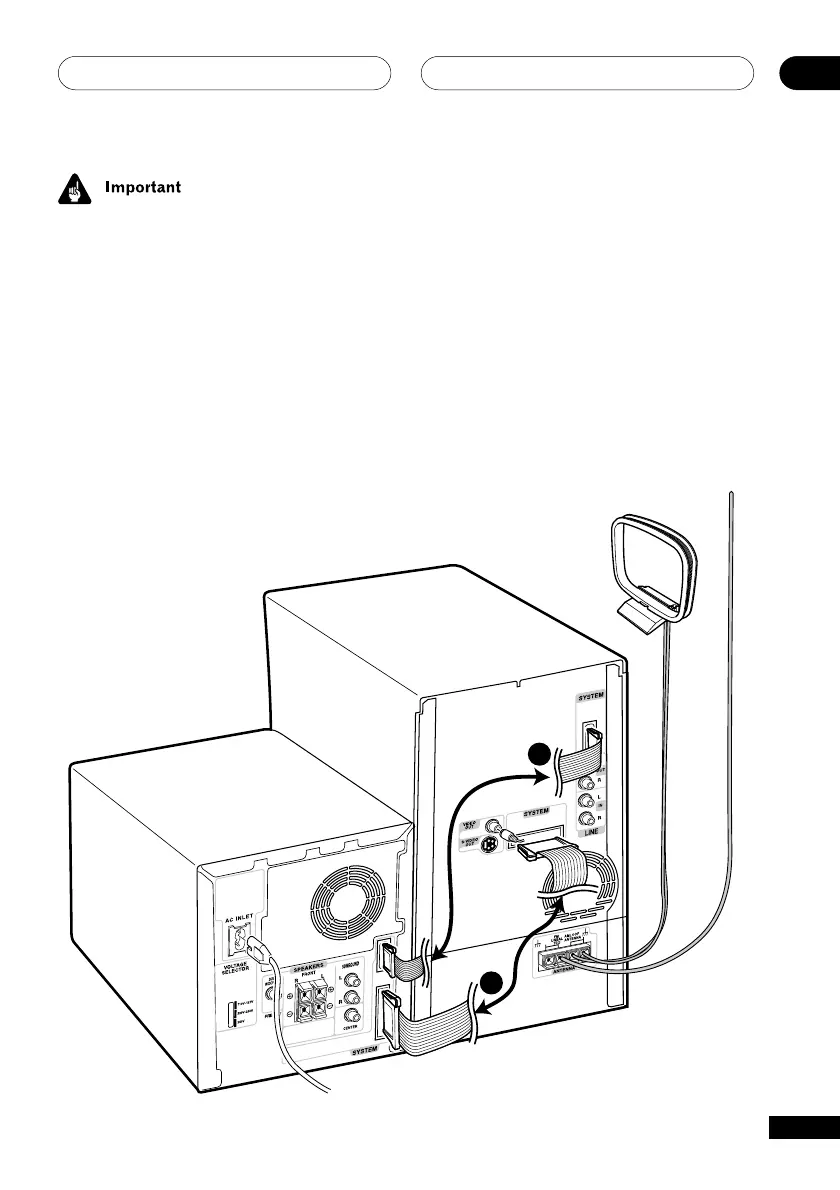
1 Use the supplied 20-pin system cable
to connect the SYSTEM jack on the DVD
tuner deck to the SYSTEM jack on the
power amplifier.
The jacks are located on the rear panel.
Make sure the 20-pin system cable is
inserted completely.
EV51DVD model only:
2 Use the supplied 8-pin system power
cable to connect the upper SYSTEM jack
on the DVD tuner deck to the upper
SYSTEM jack on the power amplifier.
Connect the cable the same way you
connected in step 1.
1
2
Before making or changing any rear panel
connections, make sure that all the compo-
nents are switched off and unplugged from
the power supply.
Connecting the system
components
Connect the amplifier to the DVD tuner deck
for audio and also to provide power to the
system.



 To Next Page