Controls and displays03
20
En
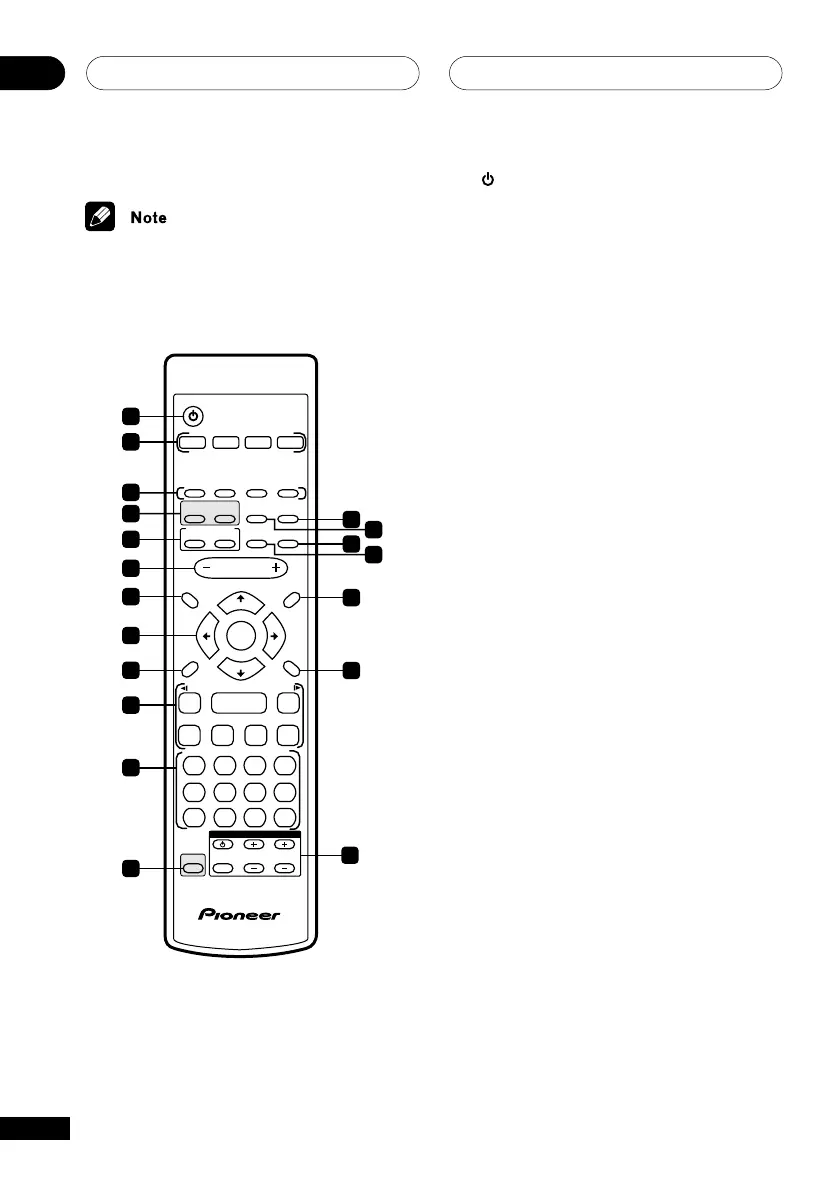
Remote control
The remote control for the EV51DVD model is
shown in the illustration below.
123
456
7890
CLEAR
ENTER
SYSTEM SETUP
DVD SETUP
TOP MENU
DVD MENU
SHIFT
CHANNEL VOLUME
INPUT
SELECT
SUBTITLE
VOLUME
ANGLE ZOOM
ADVANCED
MONO
SYSTEM DISP
DVD DISP
ECHO
DSP
AUDIO
DVD/CD TAPE FM/AM LINE
SURROUND
PROGRAM
TEST TONE
REPEAT
CH LEVEL
RANDOM
SLEEP
KARAOKE
I
—
KEYCON
—
i
TIMER
CLOCK ADJ.
MUTE
RETURN
FOLDER +FOLDER –
SOUND
MODE
ENTER
STANDBY/ON
4
/e
E/
1
¡
¢
8
7
3
3
3
TUNE +
ST +ST –
TUNE –
TV CONTROL
1
2
3
6
7
8
9
10
11
12
5
19
18
17
15
13
14
16
4
1 STANDBY/ON
Switches the player on or into standby
2 Function select buttons
Selects the source you want to listen to
3 DVD control buttons
AUDIO
Selects the audio channel or language
(page 48)
SUBTITLE
Selects a subtitle display (page 48)
ANGLE
Changes the camera angle during DVD
multi-angle scene playback (page 49)
ZOOM
Changes the zoom level (page 48)
4 DSP buttons (EV51DVD model)
SURROUND
Selects a surround mode for multi-channel
sound (page 63)
ADV. SURROUND
Selects a DSP mode for multi-channel
sound (page 64)
Sound Field buttons (EV21DVD model)
SFC
Selects sound modes or custom settings
from the Sound Field Control (page 66)
VIRTL. SURR.
Switches the Virtual Surround effect on or
off (page 72–73)



 To Next Page