Controls and displays
03
23
En
Display
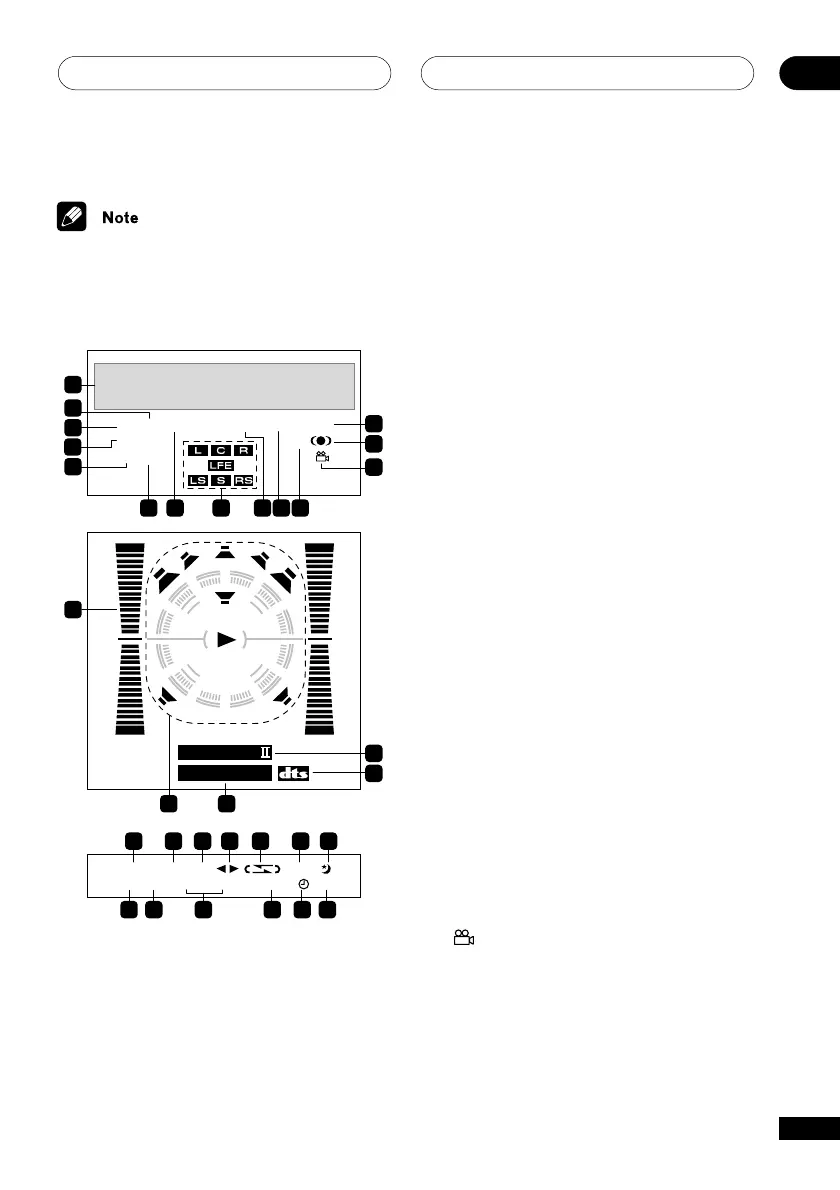
The front panel display for the EV51DVD model
is shown in the illustration below.
PGM
ADV.S URR. 9 6 k Hz
SFC MP 3
RDM RPT
–
1MONO TUNEDSTEREO
SUB Wf
PRO LOGI C
2
DIGITAL
2
NR
B. CUT
2
REC ASES
RECWAKE
–
UPKARAOKE L RECHO
KEY
1
6 7 8 9 10 11
14
13
12
19
18
2
3
4
5
15
16
20 21 22 23 24 25 26
27 28 29 30 31 32
17
1 Character display
2 RDM
Lights during random playback
3 PGM
Lights during program play
4 ADV. SURR. (EV51DVD model only)
Lights when one of the Advanced Surround
listening modes is selected
5 SFC (EV21DVD model only)
Lights when one of the Sound Field Control
listening modes is selected
6 MP3
Lights during playback of an MP3 disc
7 RPT-1
RPT lights during repeat play (RPT-1 lights
during repeat one-track play)
8 Format indicator (EV51DVD model only)
These indicators will light according to which
channels are encoded on the Dolby Digital or
DTS multi-channel disc currently in the player.
LFE lights when the disc has an LFE channel.
9 MONO
Lights when FM mono reception is selected
10 STEREO
Lights when a stereo FM broadcast is being
received in auto stereo mode
11 96 kHz
Lights when a 96kHz source is detected
(won’t light if the source is copy–protected)
12
Lights during multi-angle scenes on a DVD disc



 To Next Page