Connecting up
02
13
En
Connecting the surround
speakers
EV51DVD model only
Connect the left and right surround speakers
for multi-channel surround sound.
• Connect the left and right surround
speakers to the rear of the amplifier.
Use the attached RCA pin-plug speaker
cords. Insert completely.
Hints on speaker placement
The following guidelines will help you to get
the best performance from your speaker
system.
• Place the front left and right speakers at
equal distances from the TV.
• Place the center speaker above or below
the TV so that the sound of the center
channel is localized at the TV screen.
• If you choose to install the center
speaker on top of the TV, be sure to
secure it with putty, or by other suitable
means, to reduce the risk of damage or
injury resulting from the speaker falling
from the TV in the event of external
shocks such as earthquakes.
• If possible, place the surround speakers
slightly above ear level.
• Try not to place the surround speakers
further away from the listening position
than the front and center speakers.
Doing so can weaken the surround
sound effect.
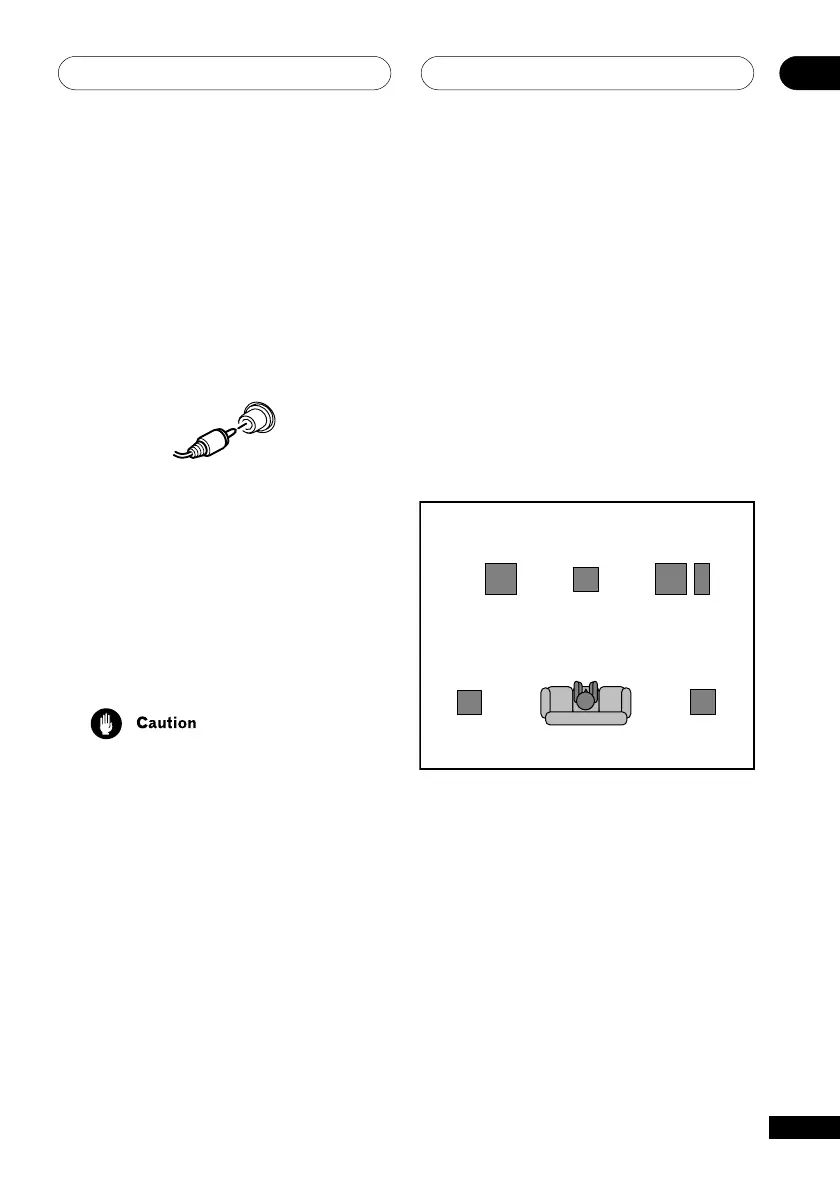
• To achieve the best possible surround
sound, install your speakers as shown
below. Be sure all speakers are installed
securely to prevent accidents and
improve sound quality.
Overhead view of speakers
Basic surround sound setup
Front
left
Surround
left
Surround
right
Listening position
Center
Subwoofer*
Front
right
* Active subwoofer is sold separately



 To Next Page