Connecting up02
16
En
• The signal ground (H) is designed to
reduce noise that occurs when an
antenna is connected. It is not an
electrical safety ground.
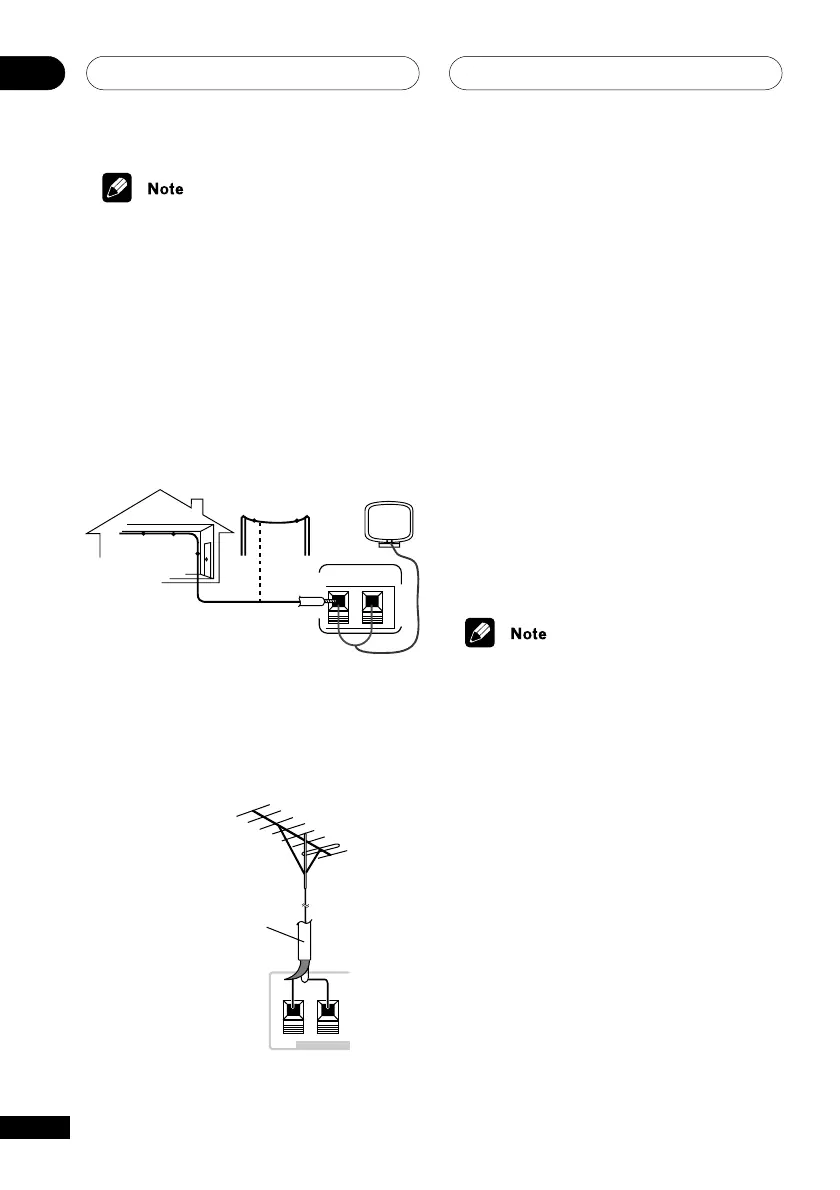
Connecting external antennas
External AM antenna
Use 5–6 meters of vinyl-insulated wire and
set up either indoors or outdoors. Leave the
AM loop antenna connected.
AM L
r
n
nn
5–6m (15–18 ft.)
Indoor
antenna
(vinyl-coated
wire)
External FM antenna
Use 75Ω coaxial cable to hook up an external
FM antenna.
FM
ANTENNA
75Ω coaxial cable
FM UNBAL
75 Ω
H
ANTENNA
Connecting auxiliary
components
This system has both stereo analog inputs
and outputs. Use these to connect external
components, such as a VCR, MD, CD-R or
DAT recorder.
• Connect the LINE IN jacks on the rear
panel to an auxiliary playback compo-
nent.
These include components such as a VCR,
DAT, or your TV. Connect using RCA pin-plug
stereo cables.
• Connect the LINE OUT jacks on the
rear panel to a recording component.
These include components such as a
cassette deck, VCR, MD recorder, or another
recorder with analog inputs. Connect using
RCA pin-plug stereo cables.
• DTS sources cannot be heard through
the LINE OUT jacks.



 To Next Page