Using the tape deck08
54
En
Playing cassette tapes
This unit has a tape deck that can be used
for both recording and playback. Other
features include auto-reverse and Dolby B
Noise Reduction.
• Auto-reverse lets you play or record a
tape without physically taking it out and
turning it over.
• Dolby B NR reduces hiss on tapes
recorded using Dolby B NR (which
includes almost all commercially
recorded tapes).
VOLUME
DVD/CD
TUNER
TAPE
LINE
OPEN/CLOSE
DOLBY NR(DEMO)
ASES
MIC VOL
MIC-1
MIC-2
REVERSE MODE
REC/STOP
PLAY/PAUSE STOPTUNING – TUNING +
4/1
¡/¢
– +
SYSTEM SETUP
DVD SETUP
TOP MENU
DVD MENU
SUBTITLE
VOLUME
ANGLE ZOOM
ADVANCED
MONO
SYSTEM DISP
DVD DISP
ECHO
DSP
AUDIO
DVD/CD TAPE FM/AM LINE
SURROUND
KARAOKE
I
—
KEYCON
—
i
TIMER
CLOCK ADJ.
MUTE
RETURN
FOLDER +FOLDER –
SOUND
MODE
ENTER
STANDBY/ON
4
/e
E/
1
¡
¢
8
7
3
3
3
TUNE +
TUNE –
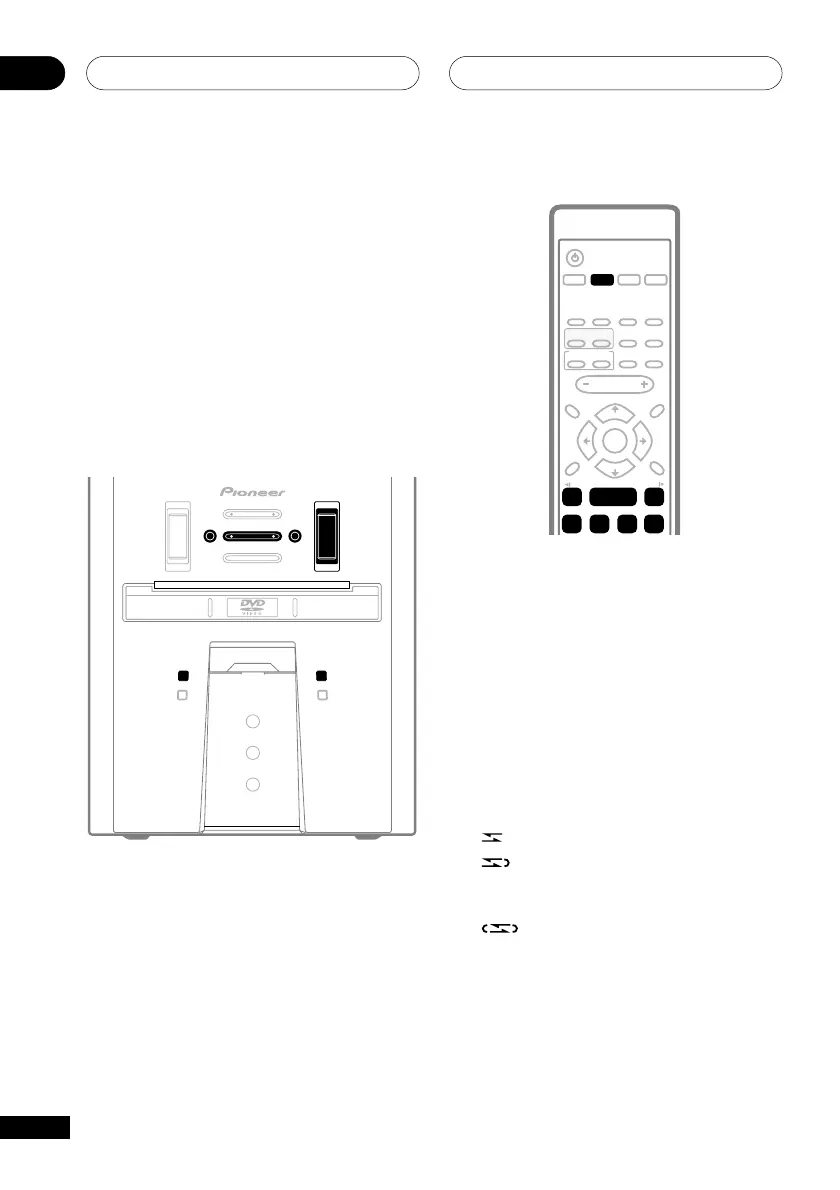
1 Push down on the cassette door (top
panel) where indicated to open it and
insert a tape.
2 Close the cassette door.
3 Press the DOLBY NR button (front
panel only) to switch Dolby B NR on or
off as required.
4 Press REVERSE MODE (front panel
only) to select the reverse mode.
Press repeatedly to choose between:
•
– Single side playback
•
– Auto-reverse playback: stops after
finishing playback in the ‘reverse’ (2)
direction
•
– Continuous playback (up to 16
complete plays)



 To Next Page