9.3.2 Archive (4200)
To view error history:
Select About > 4200 Archive > Error History to view a list of the error
messages that have been generated by the X- ray unit. The errors are
shown in chronological order with the latest error message on top.
To view exposure statistics:
Select About > 4200 Archive > Exposure Statistics to view statistical data
about the X-ray unit.
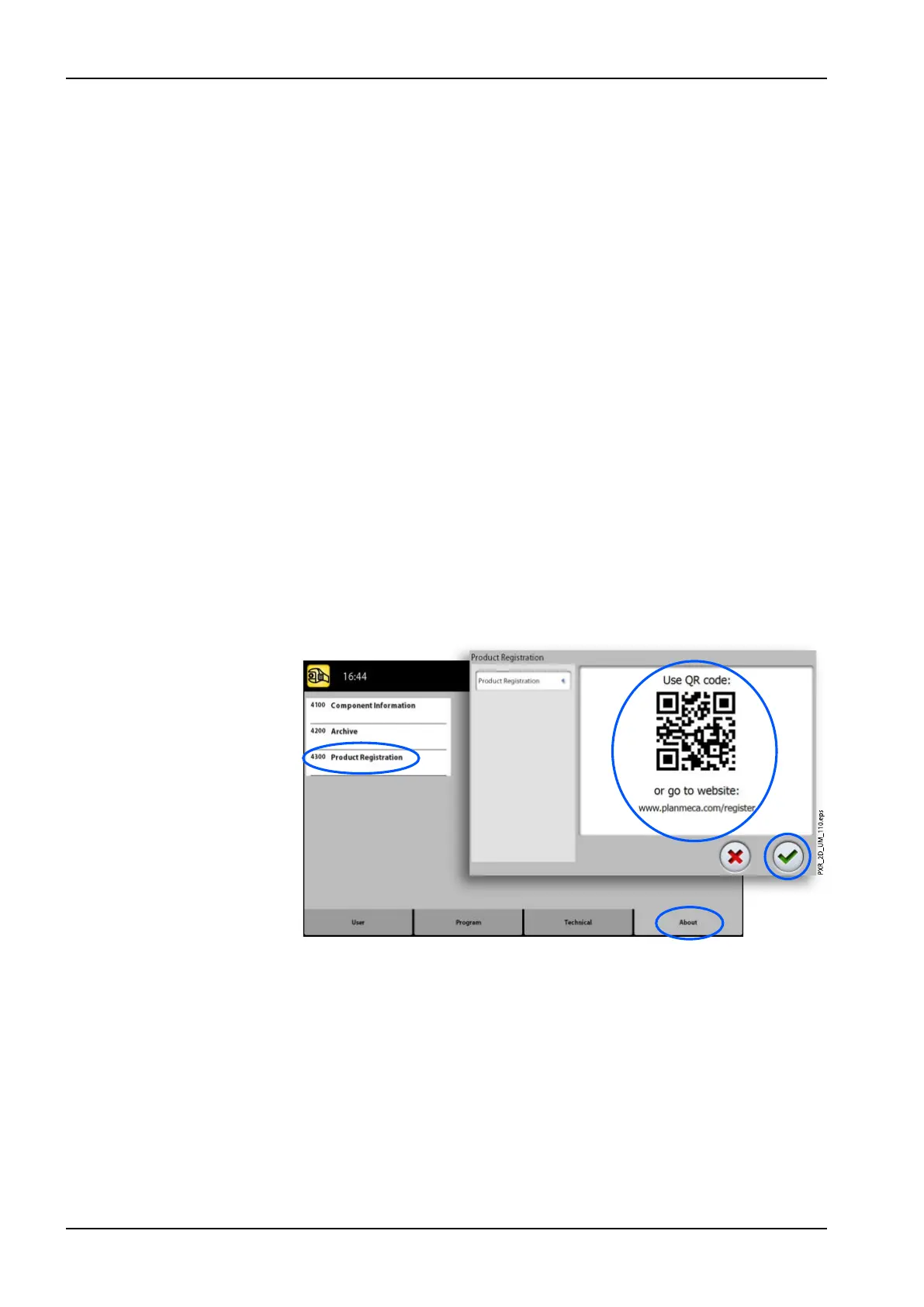
9.3.3 Product Registration (4300)
To register the X-ray unit on Planmeca’s website:
1. Select About > 4300 Product Registration.
2. Do one of the following:
1. A QR (Quick Response) code is shown on the screen. If you have a
QR code reader installed on your mobile device (e.g. smartphone),
hold the device steady over the QR code. You will be directed to
Planmeca’s product registration page.
2. Go to Planmeca’s product registration page at
http://www.planmeca.com/register.
3. Follow the instructions on the registration page.
Note that when you enter the X-ray unit serial number, you have to
include any letters shown at the beginning of the number.
4. Select the green check mark button.
9 Settings
98 Planmeca ProMax User's manual














 To Next Page