MANAGING RESULTS
PROCLEIX
®
TIGRIS System Operator’s Manual 4-1
Volume I: Operating the Instrument
Part # 902649EN Rev. A
Use the Results screen to view test results. Results can be viewed either after the worklist has
finished or as brackets of in-process worklists are released.
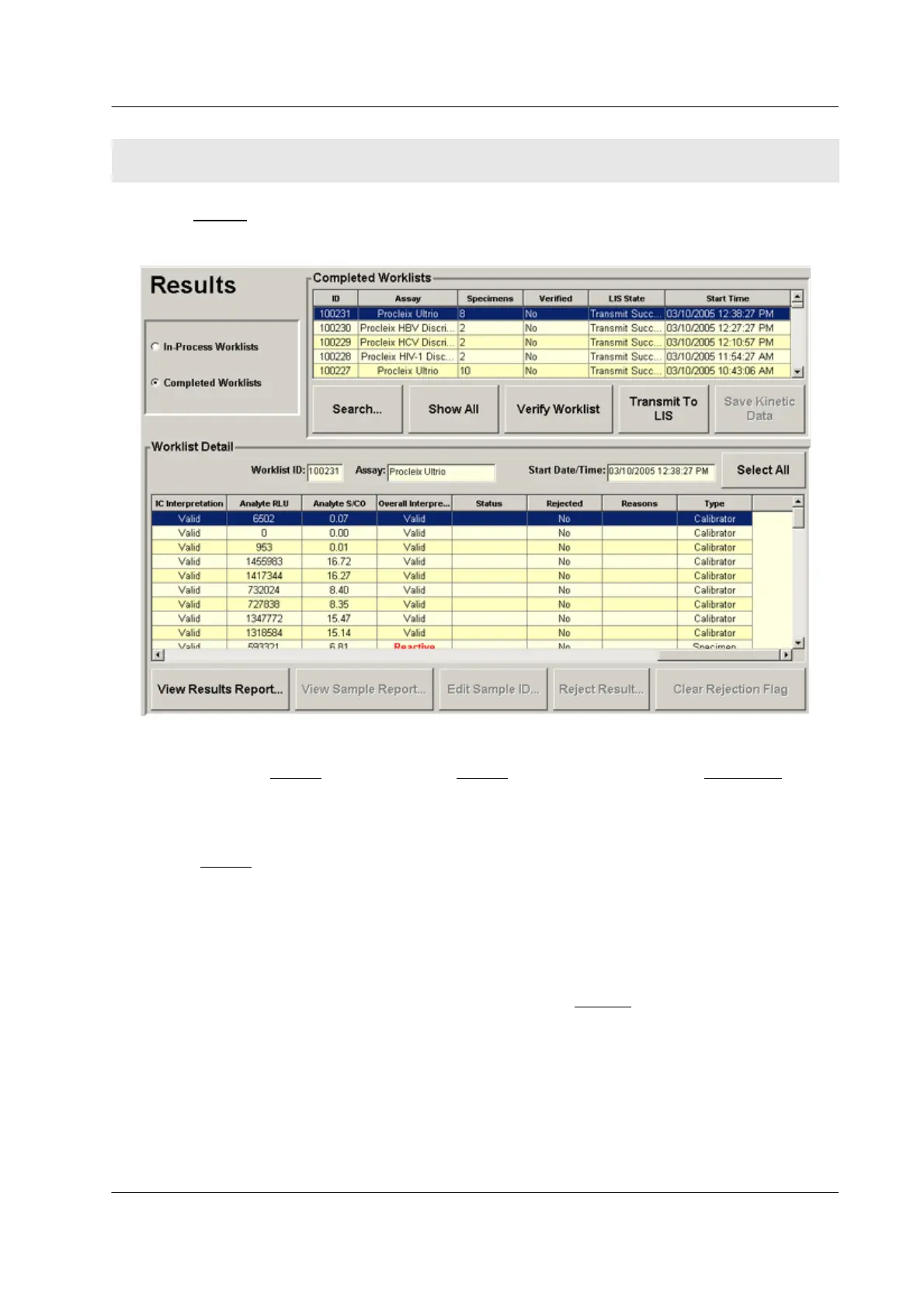
Figure 4.1 Results Screen (Example)
To access the Results
screen, select the Results tab on the right side of the Main Menu screen.
Viewing Results
The Results screen displays two types of worklists:
♦ In-process worklists – Worklists that are currently processing. Results are displayed for
any control brackets that have completed processing. See “Control Bracketing” on
page 3-2 for more information about control brackets.
♦ Completed worklists – Worklists that have completed processing. All results are
available.
To choose which type of worklists to display on the Results
screen, select In-Process
Worklists or Completed Worklists in the upper left corner of the screen.
SECTION 4. MANAGING RESULTS



 To Next Page