SECTION 5
5-2 PROCLEIX
®
TIGRIS System Operator’s Manual
Part # 902649EN Rev. A Volume I: Operating the Instrument
Creating a New Operator Account
To create a new operator account:
1. Click Add… on the Operators
tab.
An Add Operator
window opens.
2. Enter the full name of the operator in the Operator Name field.
3. Enter a username that is six to eight characters long in the Username field. This is the
username that the operator will use to log on to the system.
4. Enter a six- to eight- character password for the account in the Password field.
5. Re-enter the password in the Verify Password field.
6. Select the rights to be assigned to this operator account in the Available Rights
box.
All operator accounts are automatically assigned rights that allow them to perform basic
system operation (the “Operator” right). Additional rights to an operator account can be
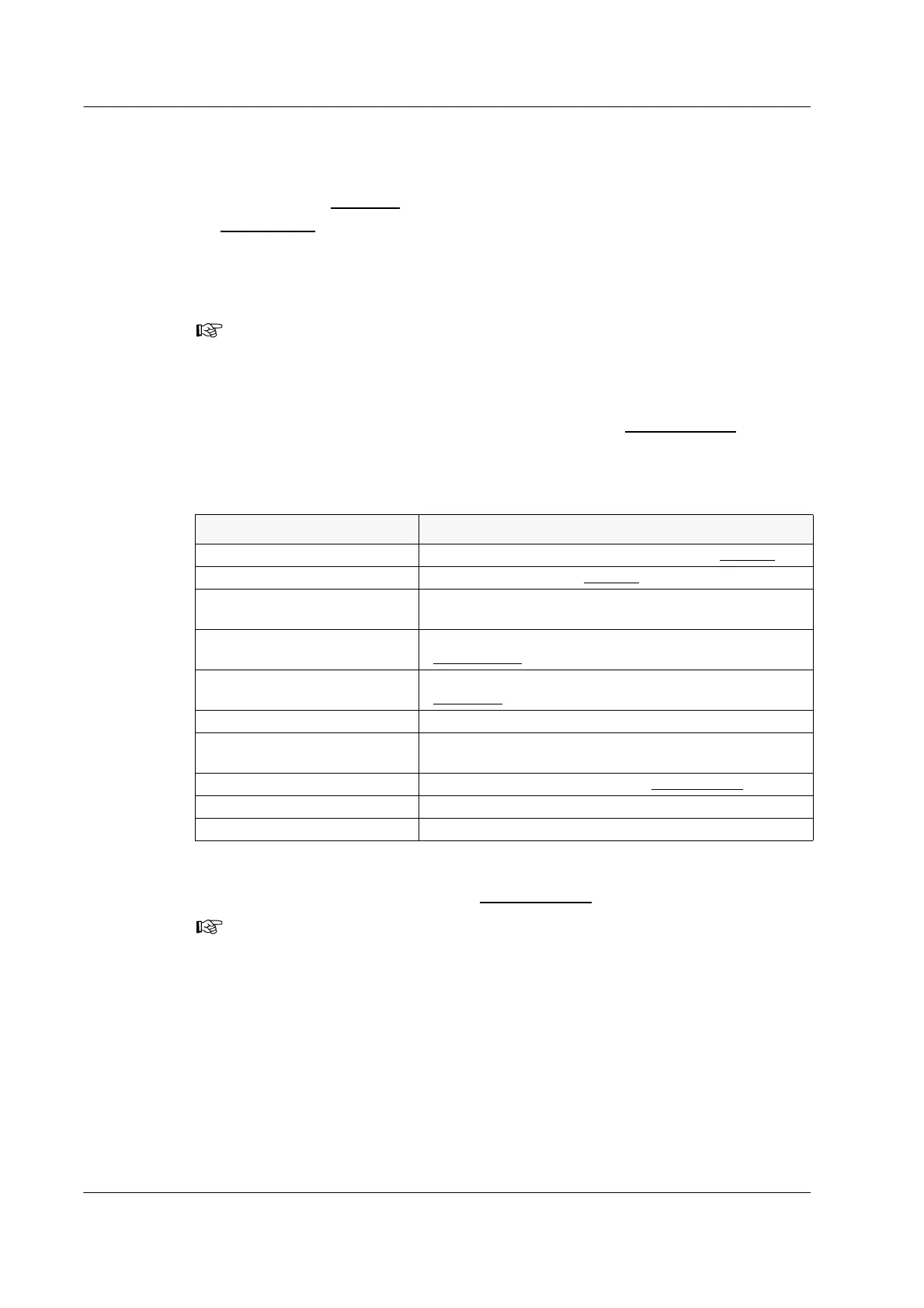
assigned as described in Table 5.1.
Table 5.1 Additional Operator Rights
7. Click > to move the selected rights to the Assigned Rights
box.
8. Click OK.
The system creates and activates the account.
Note: The username and password are not case-sensitive.
Right Description
Maintenance—Admin Logs Purging, archiving, and sending logs on the Logging tab.
Maintenance—Basic Logs Viewing all logs on the
Logging tab.
Maintenance—Database Backing up and restoring the PROCLEIX
®
TIGRIS
System database.
Maintenance—General Performing the maintenance activities on the
Maintenance screen.
Maintenance—Operators Adding, editing, and deleting operator accounts on the
Operators tab.
Maintenance—Results Archiving and purging results from the database.
Maintenance—Setup Setting the time and date, adding new Master Lots, and
unregistering Master Lots from the system.
Maintenance—Software Setup Changing system settings on the
Configuration tab.
Results Rejection Assigning rejection flags to specimens.
Results Verification Verifying the results of a completed worklist.
Note: To assign all available rights to an operator account, click >>. To remove
rights, select the rights and click <.



 To Next Page