SECTION 4
4-4 PROCLEIX
®
TIGRIS System Operator’s Manual
Part # 902649EN Rev. A Volume I: Operating the Instrument
Assigning Reject Reason Flags
A reject reason flag can be assigned to a specimen after a worklist has completed processing if
an issue with the specimen is discovered. Specimens with reject reason flags are considered
manually invalidated results. When using this feature, refer to the Interpretation of Results
section and the Quality Control Procedures section of the appropriate PROCLEIX
®
Assay
package insert.
To manually invalidate a result:
1. In the Worklists
grid, select the worklist with the specimen to be manually invalidated.
2. In the Worklist Detail
grid, select the specimen.
3. Click Reject Result….
A Reject Result Reason
window opens.
4. From the Reject Reason drop-down list, select the reason for manually invalidating the
test result.
* All references to “samples” in this table indicate specimens.
** Not applicable to PROCLEIX
®
Assays.
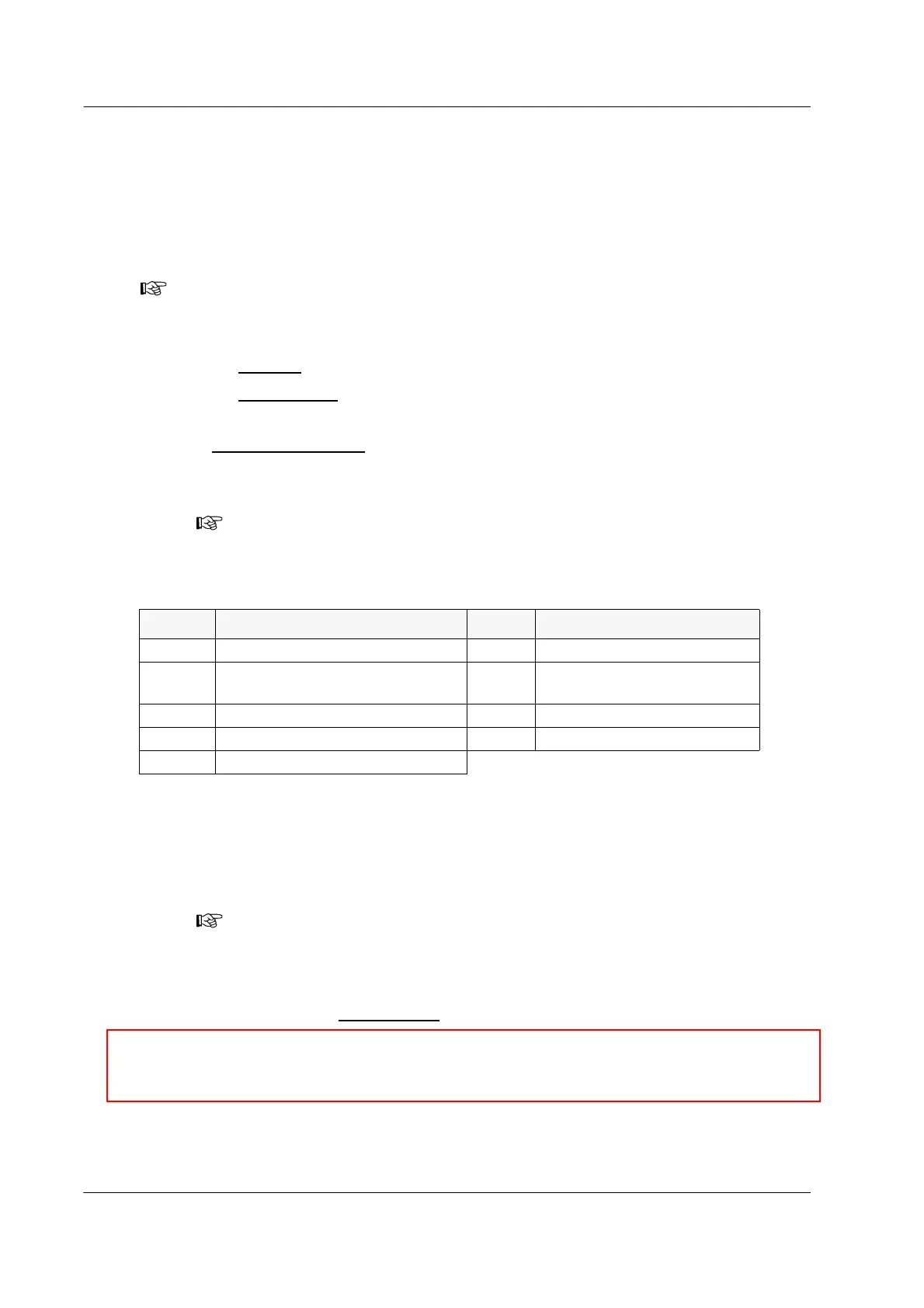
Table 4.3 Reject Reason Flags
5. If RO – Other is selected, enter the reason for manually invalidating the specimen. Up to
47 characters can be entered.
6. Click OK.
The System updates the specimen results in the database; the reject reason flag
appears in both the Worklist Detail
grid and the Results Report.
Note: Calibrators and PROCLEIX
®
TIGRIS Controls cannot be manually invalidated by the
operator.
Note: Reject reason flags are used in the event that specimen acceptability was
not properly assessed prior to testing or specimen acceptability limits were not met
during testing.
Flag Description Flag Description
RO Other—specify reason RSH Sample hemolyzed
RSA
Sample* age beyond package
insert limits
RSI Incorrect sample used
RSB Sample icteric RSM Sample mucoid**
RSBE Sample barcode entry incorrect RSS Sample storage error
RSC Sample collection error
Note: Only one reject reason flag is allowed per specimen. To assign more than
one reject reason flag, select RO - Other and enter the multiple reasons.
,
Caution: The interpretation on the run report will not change for a specimen
flagged with a reject reason flag. The Flags column must be carefully reviewed to
identify specimens with reject reason flags.



 To Next Page