SECTION 3
OPERATING PRINTER
54
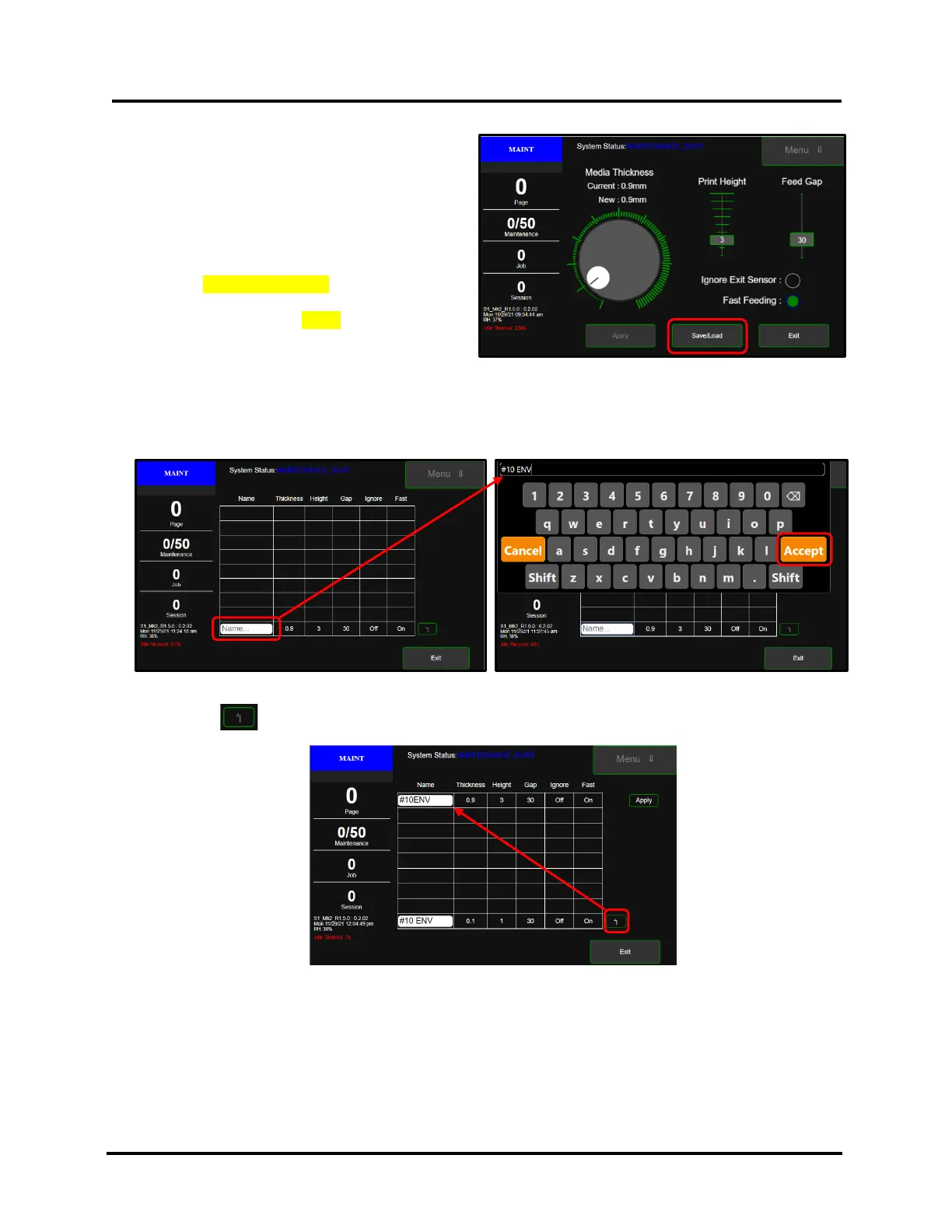
Save/Load – Tap the Save/Load button to:
• Save current Media Setup settings as a
recallable selection (preset Name).
• Load a selection (preset Name) that was
previously saved.
NOTE: Save/Load feature is available in printers with
UI Software version 0.2.02 and higher.
The printers UI Software version can be found near
the lower left-hand corner of the printer’s touchscreen.
Example: S1_Mk2_R1.5.0 : 0.2.02
To Save (add) a preset Name for the current Media Setup settings, click on the box showing “Name…”.
A keyboard will appear.
Enter (type) the desired preset Name (10 characters max). Example: #10 ENV
Then tap Accept.
Press the Enter button to add this item to the list.
Press Exit to go back to the Media Setup Menu.
Repeat process to add additional selections (preset Names) to the list.
NOTE: A maximum of eight preset Names can be saved. Once you reach this maximum, adding a new preset will
overwrite the item at the bottom of the list.



 To Next Page