SECTION 3
OPERATING PRINTER
65
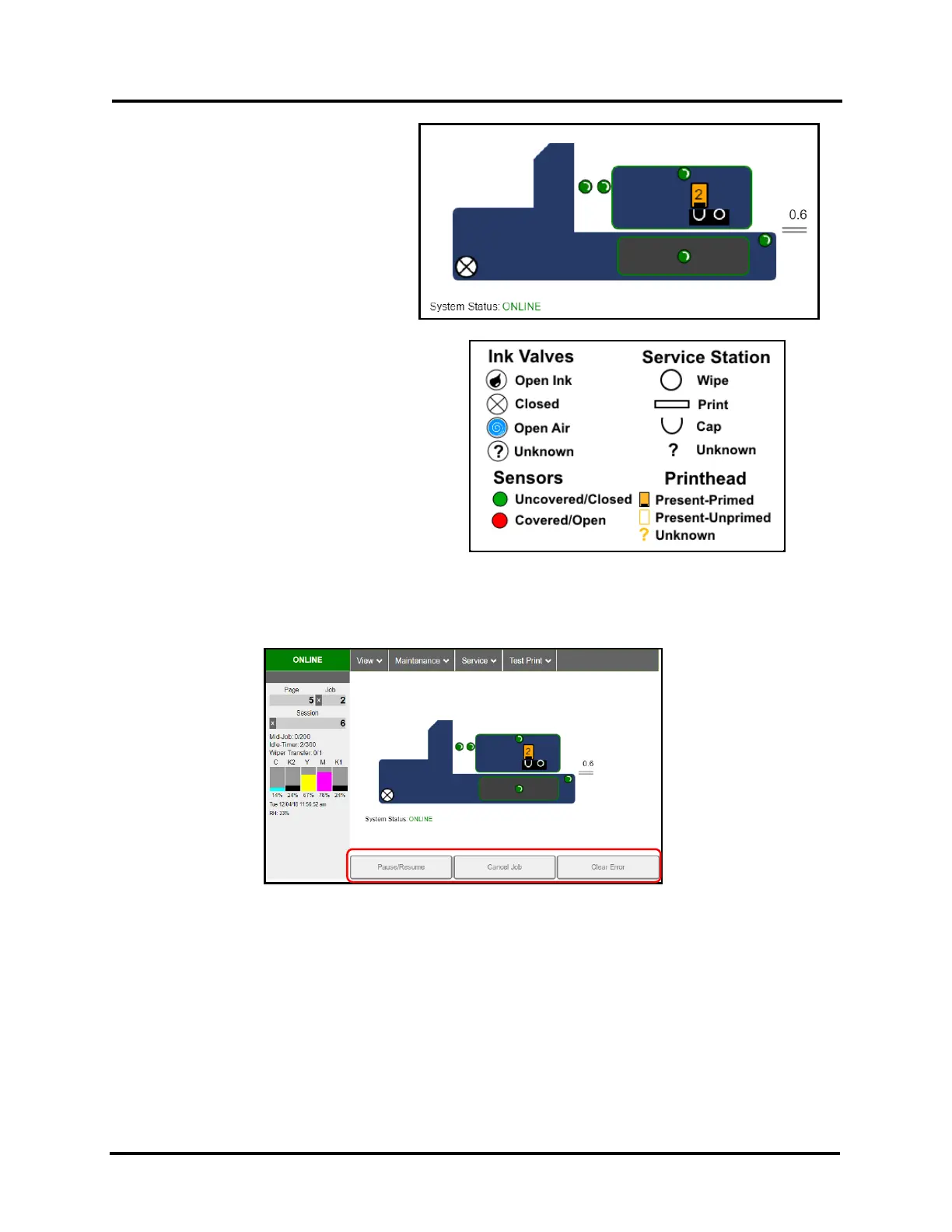
Printer Icon: Shows status of Media
Sensors, located in the media feed path of
the Printer, as well as status of the Ink
Valve, Service Station, Printhead, Print
Height, Printhead Door, Ink Tank Door
and Media Thickness.
Status icons (see icon key below) are used
to alert the operator to the type and
location of a problem.
Rolling over any of the status icons, with
your cursor, pops up a description of that
icon.
NOTE: When an error is detected, the “System
Status:” line may show additional details such as
“DOOROPEN_INK”.
CONTROL BUTTONS (located along bottom of screen): Provide quick access to often-used functions.
Pause/Resume: Tap to temporarily pause printing. Tap again to resume printing.
Cancel Job: Cancels (deletes) a paused job from the printing queue.
NOTE: “Cancel Job” button is unavailable unless the “Pause” button has been pressed first.
Clear Error. Click this button to clear error messages after you have resolved a Printer problem (i.e., after clearing
a paper jam).



 To Next Page