SECTION 3
OPERATING PRINTER
67
Low Humidity
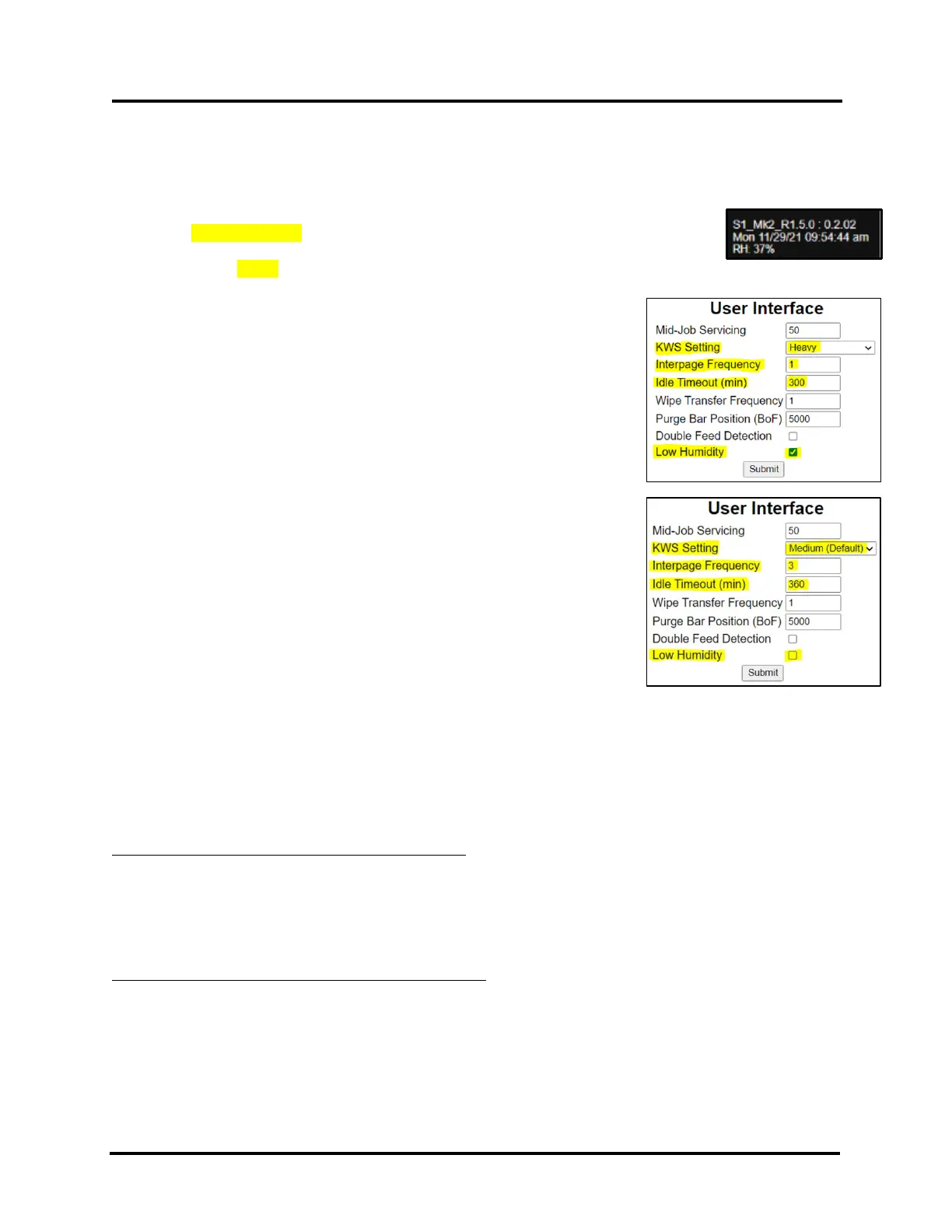
The Low Humidity mode can be used to help reduce print quality issues caused by low relative humidity levels.
When relative humidity levels are below 30% the RH value, located near the bottom left-hand corner of the printer’s
Touchscreen, will flash RED, indicating that it would be a good idea to enable (turn on) low humidity mode.
NOTE: Low Humidity feature is available in printers with Firmware version R1.5.0 and higher.
The printers Firmware version can be found near the lower left-hand corner of the printer’s
touchscreen.
Example: S1_Mk2_R1.5.0 : 0.2.02
If you toggle Low Humidity mode to ON (selected) the following
User Interface settings will automatically change to:
• KWS: Heavy – Increases Keep Wet Spitting from Medium to Heavy.
• Interpage Frequency: 1 – Increases the frequency of the Purge, which
occurs between pages, from every 3 pages to every 1 page.
• Idle Timeout (min): 300 – Reduces the time interval for idle
maintenance from every 360 minutes to every 300 minutes.
If you toggle Low Humidity mode to OFF (un-selected) the following
User Interface settings will automatically change to:
• KWS: Medium (Default) - Decreases Keep Wet Spitting from Heavy to
Medium.
• Interpage Frequency: 3 - Decreases the frequency of the Purge, which
occurs between pages, from every 1 page to every 3 pages.
• Idle Timeout (min): 360 - Increases the time interval for idle
maintenance from every 300 minutes to every 360 minutes.
Click “Submit” to apply settings.
NOTE: After toggling to a different Low Humidity mode selection (on to off or off to on), the operator can make
(over-ride) changes to any of the User Interface values. However, if the Low Humidity mode selection is changed by
the operator again, the values shown above will be automatically selected.
The following Printer Control Configuration settings are also automatically changed, with the selection of Low
Humidity mode (on to off or off to on).
When Low Humidity Mode is Toggled to ON (selected):
wipe_posn: 500 – Wipe position value is decreased from 1000 to 500, to increase wipe pressure. Reducing this
value increases wipe pressure. A higher wipe pressure pulls more ink from head during wipe. This change helps to
improve wiper roller hydration for better head cleaning results and to reduce wiper error conditions caused by a dry
wiper motor module.
job_cont_dely: 2 – Next job wait time is reduced from 3 to 2 seconds. This cleans and caps the printhead quicker to
help reduce nozzle dehydration.
When Low Humidity mode is toggled to OFF (un-selected):
wipe_posn: 1000 – Wipe position value is increased from 500 to 1000, to reduce wipe pressure.
job_cont_dely: 3 - Next job wait time is increased from 2 to 3 seconds.



 To Next Page